JayLibove
FREEDOM
-
Joined
-
Last visited
Everything posted by JayLibove
-
I've got a "Via-T" (one of those automatic toll collection RFID[I-guess] devices which let you drive on toll roads without having to stop to collect tickets and pay the tolls in cash/card on the spot). I'd installed it on the back (that is, the forward facing) side of the rear view mirror in my 2020 Octavia Scout, on the passenger side as low down on that side of the rear view mirror as I could place it. (There's a sensor on the forward facing side driver side of the rear view mirror, so I didn't stick it on the driver side). On a small number of occasions the toll device has completely failed to read, and on a couple of other occasions it has read very late. Where do you stick your toll collection devices on your Octavias? Has anyone else encountered a problem with (I don't know, maybe something embedded in/ decaled onto the windshield just in front of the rear view mirror) interference with a toll collection device, either when stuck to the rear view mirror like I've done it, or elsewhere? thanks! -Jay
-
I finally tested this today, and it does keep the virtual cockpit display across turning the car off and back on again. It really does suck that "personalization" being on causes the driver's personal setting to re-set at power off. Just makes no sense. Thanks again,
-
Hi @e-Roottoot, I think we may be talking about different combinations of features, which Skoda may package one way on one vehicle and another way on other vehicles. Here's what the 2020 A7 Scout manual says about Offroad mode: "Offroad mode includes functions that help to overcome routes that are difficult to navigate when travelling on non-paved roads. The following functions are integrated into Offroad mode. Hill descent assistant ESC Offroad ASR Offroad EDS Offroad ABS Offroad" As far as I can tell, these feature - particularly Hill descent assist - are ONLY available when offroad mode is enabled. Moving on to what the manual says about Hill descent assist: "The hill descent assistant (hereinafter referred to as assist system), with its automatic braking action on all wheels, ensures a constant speed is maintained on a steep slope when driving forwards and reversing. The assist system is automatically engaged under the following conditions. The engine is running. * For vehicles with Manual transmission the shift lever is in the neutral position and or the 1st, 2nd, 3rd gear, or reverse gear is engaged. * On vehicles with an automatic transmission, the selector lever is in the R, N, D/S position or in the Tiptronic position. * The downhill gradient is at least 10 % (when driving over sleepers, the limit can briefly drop to 8 %). * Neither the accelerator nor the brake pedal is pressed. Driving speed Initiate the downhill descent at a reasonable speed of approx. 2 - 30 km/h, the assist system constantly maintains this speed as you travel downhill. If a forwards or reverse gear is engaged on vehicles with a manual transmission, the speed must be high enough to avoid “stalling the engine”. The driving speed can be changed by pressing the brake or accelerator pedal. This is true even if the shift lever is in the neutral position and the selector lever in the N position. Engagement of the assist system is resumed after the pedal is released. WARNING For the correct operation of the assistant the road surface must be sufficiently adherent. The assistant cannot properly fulfil its function on slushy soil due to physical reasons (e.g. ice or mud). - there is a risk of an accident!" So, we can only get hill descent assist when offroad mode is enabled. Hill descent assist is limited to what I'll describe as "less challenging" offroad conditions (as the manual says, above, that hill descent assist won't work in particularly slippery conditions). My questions here related to hill descent assistant specifically, not to offroad mode generally. The relation seems to be imposed (by Skoda, on the 2020 Scout, at least) by making Hill descent assist only enablable when offroad mode is enabled. None of the above suggests that hill descent assist should NOT work well on a well-paved (but steep, defined above by Skoda as being at least 10%) road. And none of the above explains why my 2020 Scout's hill descent assistant is jerky, while others have reported not encountering this, and when I used another recent VW-group vehicle (2020 Tarraco)'s hill descent assist I found it smooth. I'd appreciate if we could set aside the arguments that I shouldn't be doing this (unless someone can find an actual reason why that's the case; simply claiming that I'm "not off-road" when I'm on a steep, well-paved concrete track" is an opinion, not an engineering or statement-by-the-manufacturer reason/justification), and focus on what engineering cause could result in this - other than possibly that my specific vehicle's hill descent assistant maybe isn't working correctly. thank you
-
Hi @Rodge, what you say is true, of course. The question remains, why would we expect the Hill Descent Assistant - a thing meant to hold a specific speed so that the driver may concentrate on other things - to behave _worse_ on a _better_-than-it-could-be road? And, this still doesn't explain why it behaves worse for me than for other Scout owners, and worse than what I experienced of what I assume to be the same technology in another VW-group car (a 2020 Seat Tarraco 4WD)?
-
Back to the original poster's original question (which I see has occasionally been mentioned before: https://www.briskoda.net/forums/topic/409786-glare-from-air-duct/?tab=comments#comment-4700501 https://www.briskoda.net/forums/topic/350631-what-about-the-things-that-annoy-you/page/26/?tab=comments#comment-4642705 Me too. (Brand new 2020 Octavia Scout, default dark grey colour scheme). The reflection of the dashboard top/windscreen air vents is often visible towards the bottom of the windscreen, and a bit too frequently it's too distracting. So, other than electrical tape or spray paint, no fixes? I've never understood why manufacturers would EVER put something in a car that obviously interferes with the driver's clear vision of the road... :-(
-
Interesting. Here's what the A7 Octavia Scout manual has to say about Offroad mode: "Mode Offroad Read and observe on page 241 first. The mode Offroad is suitable for driving outside paved roads. Further information » page 213, Offroadmode." (Page 241 is just a brief overview of the existence of Drive Mode Selection, and a mention of on what vehicles certain of the Modes exist; in particular, for the Octavia, Offroad exists only on the Scout). Page 213 includes the same notice that you see for your Kodiaq: "■ Offroad mode is not designed for use on common roads." This of course leads to the question of what Skoda things is a "common road". I suspect that 10%+ descents on lightly corrugated concrete pavement is not a "common" road. In any case, why would we expect my particular vehicle's downhill assist/ descent control feature to be jerky when on such a road, just from reading "■ Offroad mode is not designed for use on common roads."? The description of Hill Descent Assistant says that a road must have sufficient adherence. So as far as the requirements for this feature, a steep, well-paved concrete road would be ok. Looking at other aspects of Offroad mode, to try to find anything that should suggest that a not-"common" (but also not-"wildly slippery rocky steep uneven just-barely-within-the-Scout's-capabilities") road should make the Hill Desent Assistant behave in a jerky fashion, we see that in Offroad mode the ESC allows a little bit of over- and under-steering, which isn't relevant to this case; Traction Control/ ASR in Offroad mode allows a little bit of wheel slip - again, not relevant to this case; EDS Offroad mode WOULD behave more harshly - IF the condition required it ("A spinning wheel or wheels are braked earlier and with more force than with the intervention of the standard EDS system."), but that's explicitly not the case on this well-paved steep concrete road; and finally ABS in Offroad mode allows a small amount of wheel-locking in order to help accumulate a small pile of material on/over which to (re-)gain some traction - again, not relevant to our current case. So, why would "Offroad mode is not designed for use on common roads." suggest that on this perhaps edge-case road the Hill Descent Assistant (on my car, not as reported by other owners) would be jerky? I'll arrange to demonstrate it to the service department and see what they say. Though since they'll have seen very few Scouts here, I hope that their experience on Kodiaqs, Tarracos, etc, gives them enough for comparison.
-
Hi all, could someone please help me resolve my ignorance, and suggest how I might implement @langers2k's recommendation to "turn off personalization via the headunit"? thanks, Jay
-
So I had the opportunity yesterday to test again, on a concrete road in excellent condition, dry and clean, moderately steep (10% ?), and the downhill assist performed badly. I got a call from Skoda's Spain national customer service office, only confirming what the delivering dealer's shop manager had told me - that there is no configuration or adjustment for this feature, and that my car lacked no software updates. So the next step will be for me to set up an appointment with the shop to have them experience it for themselves and tell me if they think I'm right that it should be more smooth, or if I'm just expecting too much. I'll keep you informed.
-
Thanks everyone. I'll do more tests, and also Skoda Spain have contacted me about the feedback I'd provided about this issue to the dealer and they (Skoda Spain) are raising the question to Skoda (the brand, engineering). Not sure if they'll actually get back to me, but if they do, and when I have done more tests of my own, I'll come back here with information.
-
Good point. My tests were, first, where I specifically noticed that I just plain didn't like the way that descent mode worked, were with the default summer tires (not, in my case Pirellis; my car came with Goodyear "EfficientGrip Performance" tires, which actually are GREAT for summer on good pavement. Really quiet and smooth. But, perhaps, not at all good on more challenging surfaces. Although, one of the tests was on excellent (just, steep) concrete, so it shouldn't have given any tires any difficulty. The next test, where I still wasn't completely satisfied with the descent mode, was after I swapped these summer tires for Michelin CrossClimate+ M+S tires. I'll do more tests over time, and report back. thanks, all.
-
Hi ScoutCJB, what year, engine, and transmission do (did?) you have? thanks.
-
In these cases, the use of off-road mode and descent control was purely to test the hill/descent feature. (In fact, driving on a deeply rutted, snow-covered [but not particularly steep] road a couple of days ago, I didn't even bother putting the car into off-road mode at all.)
-
Hi @e-Roottoot, I've tried this on rough unpaved road, good unpaved road, and good cement paved road. Gradients, hard to say - 10-15%? The worst that I noticed was actually on the slightly steeper, well paved cement road, although another day on a similar road it wasn't too bad (though it still wasn't nearly as smooth as my own foot on the brake).
-
So, downhill assist/ descent mode of off-road mode in my Octavia MkIII combi Scout seems a bit .. jerky. Like the downhill autopilot gets verrrry nervous when the speed isn't quite right and tends to mash the brake instead of touch it gently. In short, I can maintain downhill speed much, much more comfortably that the assistant does. And that surprises me. What do you think of your Scouts' off-road mode downhill assist? Do you find that it does a nice, smooth, comfortable job of holding the speed? Or is it a bit jerky? Any way to smooth it out - adjust the programming/ settings to allow for a little more variation in speed in exchange for more gentle braking? thanks. (2020 model year MkIII, 2.0 DSG-7, 135kW/184CV)
-
You're right - the VIN code "L" for the year is 2020. It's just that I thought that from the 2020 model year was when the MkIV came out, and mine is definitely a MkIII.
-
😅 Heh, I'm a newbie, sorry... Ok, virtual cockpit. Erm, please forgive my further ignorance .. what does it mean, and how to do it, "turn off personalisation via the headunit"? (Also, seems a bit counterintuitive that a personalised setting - "I like this virtual display" - would be better kept with "personalisation" turned off? Yeah, yeah, I know, I've been around software and systems entirely too long to actually expect anything to make sense...). thanks! -Jay
-
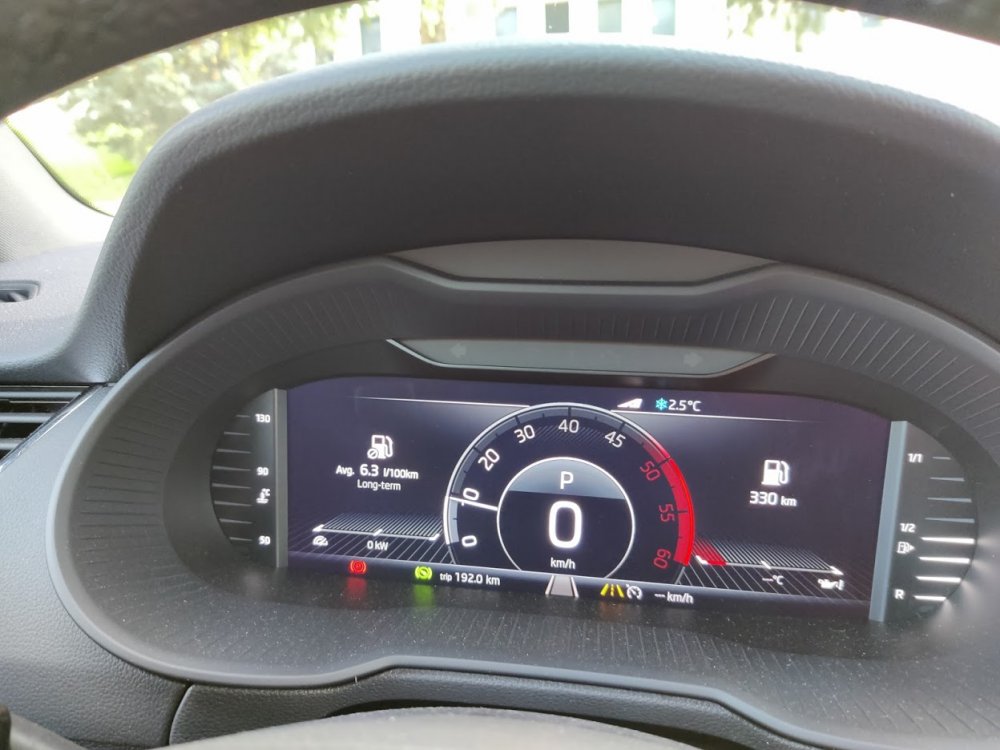
I apologise in advance as it seems that this must have been addressed here already, but I failed to find it searching. I'd like to change the default Maxidot layout on my 2019 Octavia combi Scout to the layout in the attached photo. How may I set that, either in the infotainment configuration settings, or using an OBDeleven (that I've ordered and is on its way)? thanks!
-
Kudos to @ExSEAT - it is indeed the "adaptive" option within Lane Assist which makes the car behave like a hyper-coffeinated mother-in-law (apologies to all the mothers-in-law out there; my dearly departed one was a wonder of a person, and we miss her) about stay EXACTLY IN THE MIDDLE OF THE LANE! With the "adaptive" (why would they call it that??) option turned off, Lane Assist does just what I want. thanks!
-
Thanks @Cd01101, very cool that these sorts of things can be added to even the more base models of these cars. For now, I'd still prefer to stay with factory provided (even if not factory-enabled) features (and anyway as my car does have Lane Assist and Adaptive Cruise Control I hope to be able to tweak things to my liking with less investment in new toys). warm regards,
-
Thanks @ExSEAT, your description is how I'd expect Lane Assist to work. How I've actually experienced it working is that it's a perfectionist, frequently tapping the steering wheel frankly earlier than is needed to do adequate lane-keeping. This makes it sound like my experience is what you describe as "adaptive". I'll re-check whether I have an adaptive setting under the Lane Assist configuration, and if I turn it off whether that takes care of the annoyance. Thanks, I'll post back - probably after tomorrow (no plans to go out driving today!)
-
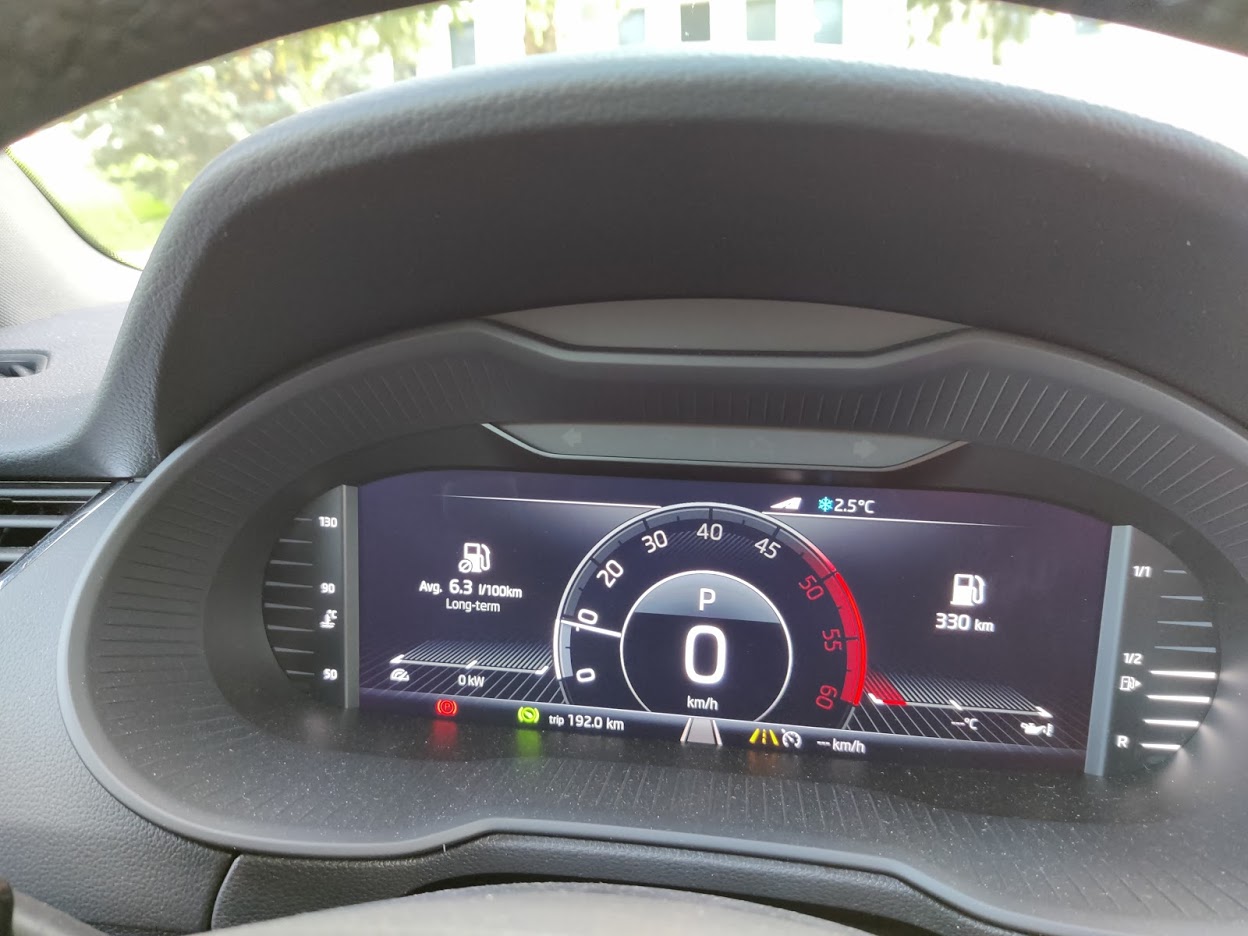
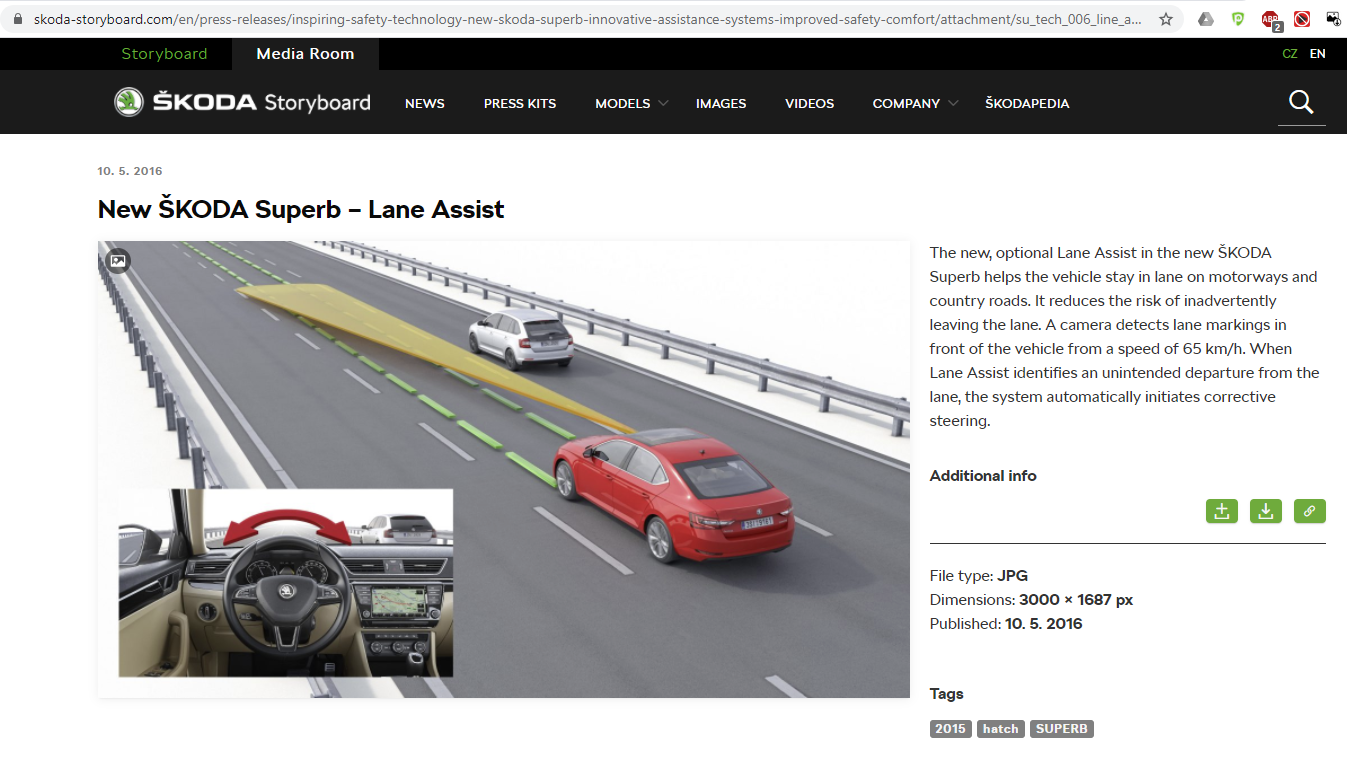
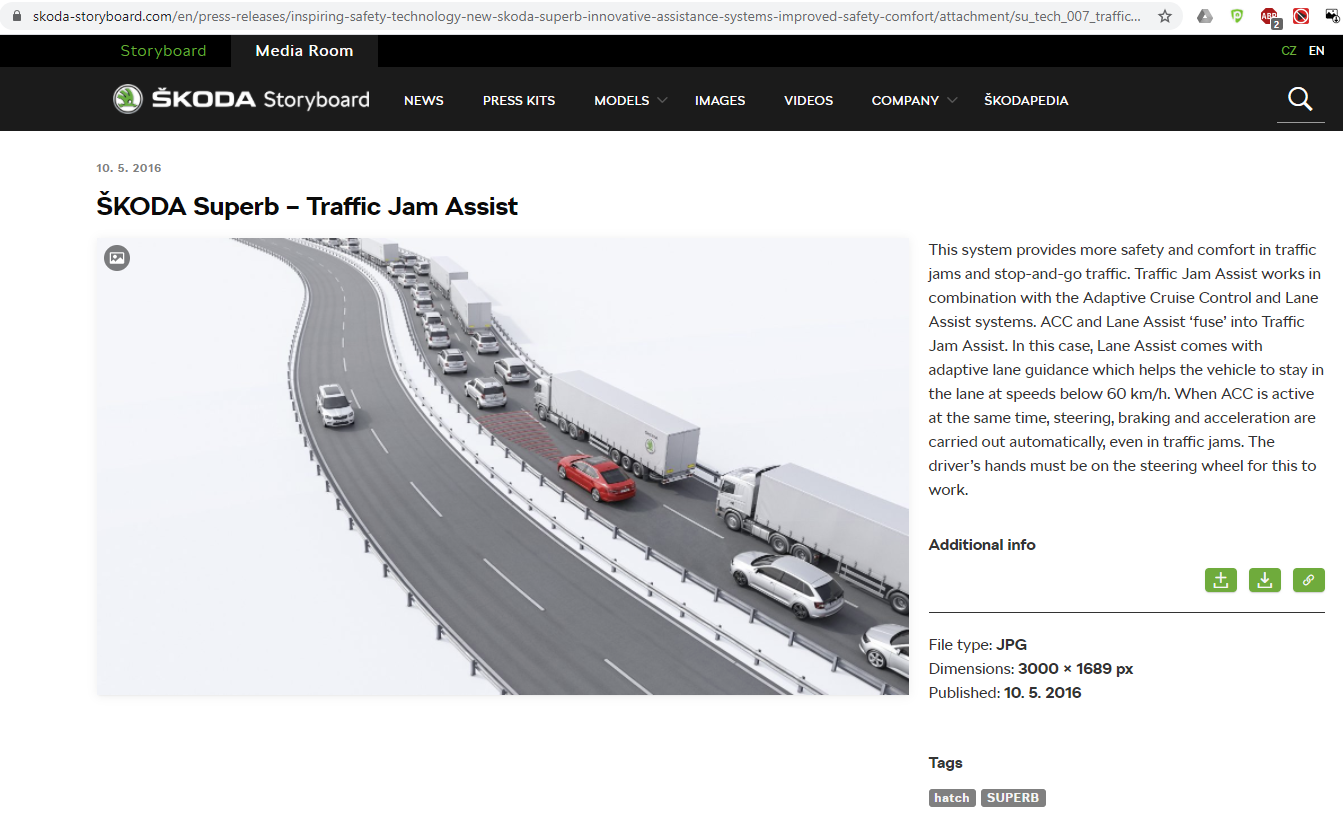
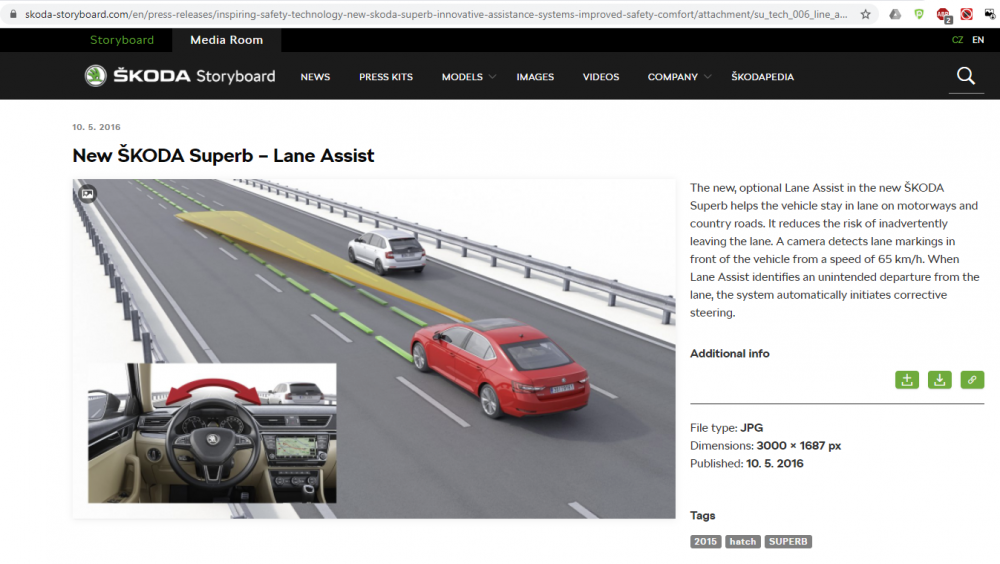
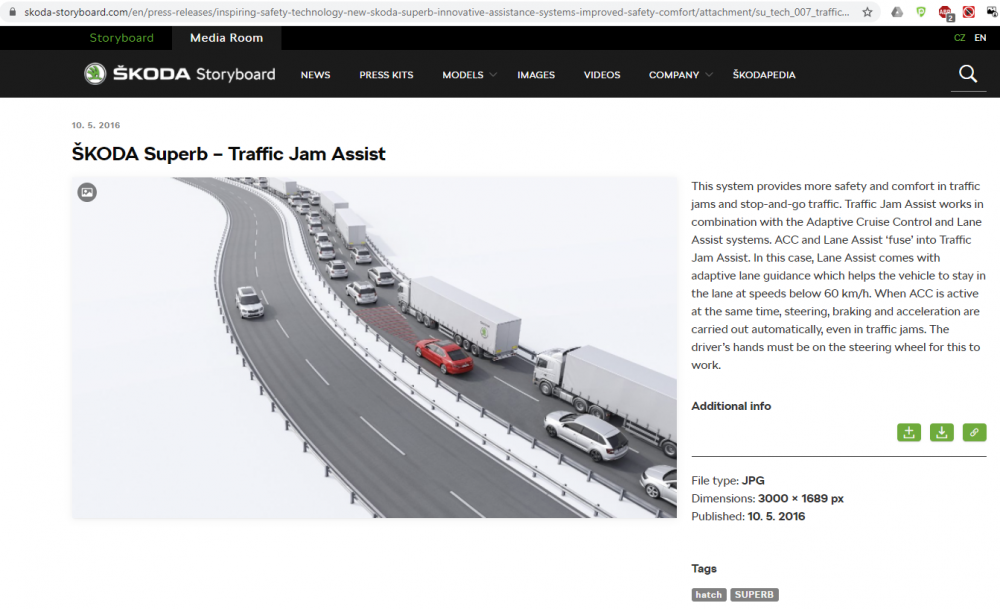
I actually found these posts on the Skoda Storyboard: This first one states that Lane Assist works above 65km/hr. This, I guess, is what the feature does when the Lane Assist feature is "Active" (activate, on, not disabled). This is the thing that I find too aggressive. Next: Although this appears under "Traffic Jam Assist" (which I will now further investigate to see if I can OBDeleven enable... hehheh .. Oh, maybe not: https://forum.obdeleven.com/thread/6856/traffic-jam-assist as it seems to require actually flashing additional software onto the car, which goes a bit beyond what I'm willing to try, just yet!) it discusses "adaptive lane guidance" as a sub-feature of Lane Assist, and it describes it as "helps the vehicle to stay in the lane at speeds below 60km/hr". I'm not sure why Skoda would call "below 60km/hr" "adaptive lane guidance", and "above 65km/hr" "Lane Assist". But neither of them seems to include tuning the aggressiveness of the feature (per @ExSEAT's comment). @ExSEAT I'm a little confused, what do you mean when you noted that "it has a limited ability to learn your road position and use that as the datum"? "Learn" to me implies developing a model of how an individual driver drives, which I'd hope Lane Assist would not do since its goal is to drive better than we do... Also, your description sounds a bit different from Skoda's Storyboard explanation. Could you clarify please? Thanks everyone.
-
New Skoda owner here in Catalunya, Spain. Just got our 2019 model year (dealer says it rolled off the factory line around April-May 2020) Octavia MkIII combi (station wagon) "Scout" all-wheel-drive. We chose the Octavia Scout for it's good driving characteristics, fantastic history and longevity, mated with all wheel drive and slightly higher (17cm) ground clearance as we're hikers and do go onto unpaved roads at times. (Though a nice little old Catalan lady in the hills did suggest that we not try one particular road, as she said that the ruts in the road are too deep for this car. We respected her guidance). Basic infotainment system (is that what's called "Bolero"? Sorry for my ignorance; I've found Skoda's marketing information, catalogs, even the owner's manual, well, less than clear). It doesn't seem to have telematics/ over-the-air updates/ Skoda Connect... 2.0L Diesel 135kW/184cV, 7-speed DSG automatic transmission, Adaptive Cruise Control, Lane Assist, Front Assist, Rear parking sensors and camera, Drive Mode Select, Hill Start Assist, Off-Road Mode, Blind Spot Detection, Front Assist, Cornering full-LED lights,
-
You all rock - thanks! I'll let you know how it goes once my OBDeleven arrives in a few weeks. (The offer of InfoSec assistance stands. :-) ).
-
Hi @langers2k, I'm unfamiliar with the camera model option codes that you mention, and I found nothing in searching for them. (I found some VW group option codes documents, and the website http://vag-codes.info/, on which these codes don't seem to relate to camera models). My Scout has Adaptive Cruise Control, Lane Assist, front and rear parking assist, rear camera .. Where may I find details about the option codes/ camera types that you list, and what exact cameras my car has? thanks, -Jay
-
Many thanks @langers2k. Yeah, I'm aware that I might have an issue with the lack of a nav system in my car. (I've never met an in-car nav system that I liked better than Google Maps. That said, Google Maps Navigation through Android Auto kind of sucks, but we had no choice in the model and features of the car anyway). I think I had seen discussions of the issue of a warning message due to no nav database on which to fall back, and maybe some suggestions on working around it. And in the end if it's a 30 seconds harmless warning that goes away I could live with it. Thanks so much for the recommendation of the A5 channel IDE04733! -Jay