JayLibove
FREEDOM
-
Joined
-
Last visited
Everything posted by JayLibove
-
I notice that, if I press the lock-all-doors button in the centre console (so all doors lock and the button light turns on) and then a door is manually opened from the inside, the "all doors are locked" light goes out (which, technically, is accurate) but no other doors are unlocked (which sort-of makes sense). The problem with this is that the other doors do remain locked. So, problematic use case (happens routinely when my wife is in the passenger seat and I'm in the driver seat): We've pressed the lock-all-doors button. All doors lock. The light on the button comes on. Either one of us (or both) gets out of the front seats. Light goes out. Rear doors stay locked. Some time later (could be thirty seconds, that's all it takes to forget 😹) one or the other of us tries to open a rear door to put something in/ take something out. Cursing ensues, followed by (if I recall correctly, at least sometimes) two presses of the lock-all-doors button, to re-lock all (because that's what the button does when any door is not locked) and then unlock all (to get the rear door unlocked). I'm honestly not sure what the "right" pattern would be. I certainly don't want all doors unlocking when just a door is manually opened from the inside. And I don't suppose it would be exactly accurate to have the lock-all-doors button's light stay on when any door has been unlocked (by being manually opened from the inside). But, equally, it's wrong for that light to go out which feels like it means "all doors are unlocked". (I know, it doesn't mean that, but the fact that this keeps happening to us says that the user experience of that button and its light is .. imperfect). First, are there any settings at all that I might consider to change this behavior? Second, just for discussion (since I imagine it can't really be changed in our existing cars - or, can it?) is there any other way this could/should work? cheers,
-
I got an answer from Krieger Manufacturing that clearly and explicitly says that people DO use their inverters, wired directly onto the battery terminals, with the car engine running, to provide the full power of the alternator to the inverter. They also indicated that people use one-or-more batteries, connected to solar chargers, connected to their inverters. They commented that the reason their documentation talks about using the batteries (but doesn't explicitly mention doing it with the battery still connected to the car itself) is only in order to maximize the current available to the inverter. Victron also answered me. I truly don't understand the answer that I received to the question of whether modern, complicated car electrical systems would somehow have a problem with an inverter drawing from the battery terminals while the battery remains connected to the car and the car engine running. The reply text was: That said, they also went on to say "yes, then that's an option" to my follow-up question which asked (putting aside the "could a modern, complicated car's electrical system be somehow incompatible with this) my idea is to use the car as a kind of generator (so the fuel tank, engine, and alternator would power the inverter). So I guess Victron also is saying that this should work. I'd still like to get an answer from a Skoda/VW group electrical system expert just to confirm that the load the inverter would place on the battery/ alternator being connected to the battery, in the car, car running, would NOT cause some kind of problem... -Jay
-
I completely understand the physics of it. I'd argue that "cars" have been doing it _as badly as this car does_ only when the designers/manufacturers haven't paid adequate attention to the issue in the design and testing phase. It's rather worse than on most cars that I've owned over the decades; much more difficult to find a combination of which windows to open how much that results in sufficiently muting the sound while still getting reasonable airflow. It's quite disappointing. Has anyone been happy with a particular wind deflector product to help with the problem on our Octavias?
-
This has sort of been discussed in past threads, but I didn't see any proposed solutions. My 2020 (last of the MkIII) Octavia Scout (wagon) has terrible "beat" (a thumping noise) from the wind if windows are open. I imagine that this should be fixable by mounting small deflectors at the top of each door's window. Does anyone have a suggestion of a specific product that works well to reduce this physically painful sound and pressure on the ears while driving with windows partway down at speed? thanks, -Jay
-
Thanks @TheWanderer. I suspect that the "300W" rating is .. aspirational. If you plugged a 300W continuous draw load into this (say, a 300W old fashioned incandescent light bulb) I'm pretty sure you'd either trip the circuit breaker (if there is one) in the inverter, or a fuse in the car. The models that can handle continuous higher loads would have to be wired in to the car's electrical system. About Modified Sine Wave or Pure Sine Wave, you can read about it here: https://gopowerfleet.com/pure-vs-modified-sine-wave-inverters-whatss-difference The short is that modified since wave inverters are good only for not-particularly-sensitive loads (such as transformers with rectifiers) that can eat "dirty" power. Motors, and anything that expects the power to provide highly consistent wave form (old fashioned AC-plugged-in electric clocks for example) either won't function well or might be damaged by being supplied with modified sine wave power.
-
Hi @TheWanderer, thanks. I'm curious, I thought that the cigarette lighter ports were limited to about 120W. Did you ever run that 300W inverter (from the cigarette lighter port) at over ~100W? Also, although yes I see that Bestek is common, it still comes across as a Chinese-manufactured (yes, most things are actually made there, which can be ok) relatively "white label" brand (which often signals a problem for quality-sensitive products) - in the sense that searches for the brand primarily find Amazon and other generic online marketplaces, and although I didn't find it in a Google search I simply guessed bestek.com .. and got what looks like a typical Chinese white-label manufacturer's site listing their products, grand claims, insufficient technical information to trust. In short, I am not left with a strong sense that it would be wise to plug this onto my car's battery terminals and to plug anything I cared about into it. And none of the ads nor the Bestek website explicitly says nor shows in pictures how the product should be connected to a car's battery. I worry that their reference to "car" relates _only_ to the (120W-or-so limited) cigarette lighter port mode of the products. Isn't there any proven quality (German, British, American, Canadian, whatever) brand that makes these sorts of things? Please note, I am NOT prejudiced against the Chinese nor about outsourced manufacturing (in my work life I've overseen business process outsourcing on four continents, and it can work great if the client company performs adequate oversight). What I am sensitive about is cheap crap that can't be relied upon. Hm. KRIËGER seems to be a US-headquartered company. I'll look at their products. Hm. I notice at least one of their products has the same warning about not plugging in certain types of products: "Do NOT plug in battery chargers for cordless power tools if the charger carries a warning that dangerous voltages are present at the battery terminals." I get it. It's not designed to handle a device that could actually feed power back to the inverter. And "Certain chargers for small nickel-cadmium or nickel-metal-hydride batteries can be damaged if powered by this inverter. Two types of appliances are susceptible to damage: .. Cordless razors and toothbrushes that plug directly into an AC receptacle." I'd prefer to buy more bullet-proof, more "it produces AC voltage, which should be consumable by whatever needs AC voltage" products when dealing with electricity! (Got to give Kriëger credit, though; their manual makes these myriad warnings far more clear by explaining how and why it all works that way, than does the Bestek manual). Also, I am still looking for something decidedly beyond what can be plugged into a cigarette lighter port (higher consistent wattage), and still am trying to understand whether modern cars (which have enormously more complex electrical systems that than stuff on which I did my own minor maintenance 30 years ago...) actually get along ok with a piggybacked external load like a 400W, 500W, 1000W, etc inverter would represent. Hm. The Kriëger manual has plenty of detail of how to connect the inverter to a battery, or a bank of batteries .. and nowhere is a battery-that-is-actually-installed-in-a-car mentioned. Which makes me think that these things are absolutely NOT intended to provide continuous high wattage from a car's electrical system as it is being energized by an alternator! thanks again,
-
Several years ago there were a few threads here talking about 220V inverters (to supply more than the cigarette-lighter-adapter-limited 120W). Plenty of them show up on Amazon. Not a single one of those appears to be manufactured by a European company, and reviews tend to be skeptical. Also, neither in the manuals that I downloaded for a couple of these products, nor their marketing materials, nor the discussions here, did I get clear whether these things (the ones that are not permanently hard-wired and installed into the car) are intended to be operated with the engine running, or whether they're intended for brief use purely on the battery's stored energy. I'd like the option to use my car (2020 Octavia MkIII Scout, 2.0TDI 135kW) as an occasional generator out in the middle of nowhere, able to power some amount (a few hundreds Watts, maybe up to 1kW) of 220V plugged in stuff. Initially, the thought is just electronics (laptop, mobile phone charger) which can take fairly dirty power because they all have rather smart solid state transformer/adapters, but it would also be nice to be able to plug in, well, whatever, without having to worry about crap quality pseudo-sine wave output from a cheap, poorly regulated inverter. (The manual of one of the inverters actually warned against plugging certain things into it, to avoid damaging the _inverter_). So, a couple of questions: * Any of these inverters, which would be clamped on to the battery terminals, are they suitable for a modern Octavia, to be used with the car engine running so that its the car (and petrol/diesel) really providing the power? Or must they NOT be used with the engine running? * Does anyone know of a truly quality brand of manufacture of these things that will produce clean, relatively pure sine wave output, and can be suitable for anything from simple AC-to-DC electric transformers to motor-driven things and reactive loads that are sensitive to the quality of their input power? many thanks, Jay
-
Sorry for the long delay @Marshy33. Here is the head unit version information from my car: Device part number: 565035840 Hardware: H41 Software: 0478 Media Codec: 4101.0.0.0 Bluetooth version: C300 SmartLink: 4101.438.1.5 Radio database version: 1.10.10 USB surfstick version: 4101.438.1.5 Anyone with a very late MkIII (mfr date April 2020) have newer versions than these? Does this indicate the make of the head unit? (Marshy33 commented/asked whether it is a Technisat headunit). thanks! -Jay
-
So, I've tried again (and again, and again). Turning on the hands-free option in the Connect Lite software didn't affect it - same experience as before. I also tried turning the phone's WiFi and Mobile Data OFF, just in case the Connect Lite app WAS reaching the dataplug but was then getting hung up on something else - no effect. I also point out that, from the moment that the Connect Lite app starts to try to detect/connect to the dataplug (that is, as soon as I tap "Establish connection"), the app is frozen. (The "connecting..." animation continues to move up and down like a Cylon lying on its side, but) the app ignores its own Cancel button at the bottom centre, and its own ... menu button at the top right. Any other thoughts? At this point I plan to reach out to the parts dealer from which I bought the dataplug to request that they replace it. thanks, -Jay
-
Thanks. Ok, I've turned on the Hands Free thing in Connect Lite. Yes, I've been making sure that the phone's Bluetooth pairings DON'T already include the dongle, each time I try try try again to connect. With that one further change (Hands Free in Connect Lite) I'll try again... BTW do you find that Connect Lite is infuriatingly insistent about tracking you/GPS, Analytics (including for marketing...), "Challenges", etc? Sheesh, I just want to connect my car, not have my choices to NOT share my location, NOT share analytics (if it will be for marketing purposes - I'd love to share analytics for them to improve their crummy software quality!), be ignored and be re-asked all the time...
-
That's great information, thanks! I just tried again. And again. And again. I must've spent two or three hours total up til now trying to get this $@#$% thing to connect. About the hanging, sadly I'm pretty sure that it is what I think it is (hanging), rather than updating the plug's firmware, because it comes along with this screen: At that point, _nothing_ on the screen works except for the Android Home button, and the app can't be made to respond without killing it from the Android task manager. About the firmware (which I assume is what is printed on the Data Plug label as "software "?) version, the label says SW 0705, and the one time that my older phone successfully connected to the device it went through the full update process (so I don't know what firmware is now installed on the device, but I hope it would be "current"). My two devices are both OnePlus models, a 5T and the newer Nord. My OnePlus 5T runs Lineage OS (version "dumpling", based on Android 11, Lineage OS v18.1) and my OnePlus Nord runs OnePlus' own Android 11-based Oxygen OS operating system (also the current version). Both behave the same (the same "FAILED" message as in the picture above) except for the one time that the 5T did successfully connect (since then, it has returned to failing every time). Power saving is not switched on. About the "Making a call with a handsfree system", I'm not sure what that refers to. It doesn't look like either a Head unit setting nor an Android Bluetooth permission. Could you explain please? (Also, why should this data plug require any form of telephony privileges...) thanks again, Jay
-
Thanks @varaderoguy. I've tried repeatedly, on two phones. One phone did connect to the dongle, once. But that wasn't my main phone, and now that I've disconnected that (including forgetting the Bluetooth association) I can't re-connect on that phone and I still can't connect on my main phone. The connect dialog always results in hanging the app (have to go to the Android task manager and swipe the app away to try again). I'm in contact with Skoda/VW tech support, but it's slow going...
-
Moltes gràcies! 🤞
-
I ordered a VW "Dataplug" and after some farting around (on my principal mobile phone, neither the VW WeConnect Go app nor the Skoda Connet LITE app - which I had to get as an APK from Aptoide because it "isn't available in your country" on any of my geography-specific Google account, being Spain, Germany, and the US, *grr* - it wouldn't connect, and the apps hung) I finally got my older, backup phone to connect to the dongle via Bluetooth. At very first glance it doesn't seem to offer what I'm looking for. I'll play with it a bit further to see if it has any useful features. Thanks to everyone who helped. -Jay
-
Sooooo, nobody with a recent Octavia MkIII has the automatic-rain-closing feature?
-
Over the years there had been several threads about enabling rain closing (that the car would automatically close the windows and sunroof if they are open and it starts to rain). Back in around 2015 it seemed to be the case that the feature was no longer available due to a hardware change (RLFS, RLHS). I've found guides, OBDEleven/VCDS configurations, YouTube videos .. but no matter what I've tried (I have an OBDEleven) the option to enable rain closing never appears on the car opening and closing settings page. Does anyone with a 2019 or 2020 MkIII (mine is a 2020 Octavia Scout, manufactured April 2020, one of the last of the MkIII) have rain closing as an option in the head unit? I know that my car can sense when it's raining because it will wipe the windshield wipers automatically. The Central Electrics subsystem RLHS hardware number, per OBDEleven, is 5Q0955547C. I've followed all the configuration guides (so, particularly, the options to enable rain closing, to enable the rain closing menu, for it to be 'permanent' instead of 'once', are all set, and I've twiddled various other bits, all to no avail. The option never appears in the head unit, and the water test always leaves the windshield wet .. and the windows still open). thanks! -Jay
-
Old thread, I know. I have a 2020 Octavia Scout (one of the last of the MkIII, manufactured April 2020). It definitely has a rain sensor, because it automatically operates the windshield wipers. In OBDEleven in Central Electrics the RLHS subsystem has part number 5Q0955547C. In the five years ago commentary quoted below we see a distinction between 5Q0955547 and 5Q0955547A. Would someone please comment if the 5Q0955547C part supports rain closing? thanks, Jay
-
That would be cool. The app that the ad for this dongle refers to is branded VW. How can I check in advance that it would actually work for my VIN? - Update, it's clear from various reviews of the device that it will work (people refer to 2016 models, and to the Yeti). Aside from that, I have an OBDEleven; I'll send a request to OBDEleven asking if they are adding a way to use an OBDEleven device to connect to Skoda Connect Lite. thanks.
-
Fair enough @langers2k. Being a bit lazy, I'd still hope that a Skoda/VAG custom shop would be happy to take a few €/£/$ per year to check for me every few months :-)
-
My 2020 (last of the MkIII) Octavia Scout does not have the Skoda Connect feature (Bolero radio, Android Auto via Bluetooth+USB cable, no WiFi, no SIM card, no Internet connectivity). Is there a service with which I could register my car's VIN to be notified when software/firmware updates become available for any component of my car (especially the driving assistants such as traffic sign recognition, the occasionally and always utterly false-positive giant red screeching "you're about to hit something" warning, etc)? [Including if there's a Skoda/VAG custom shop which will do it for a fee] thanks, Jay Spain
-
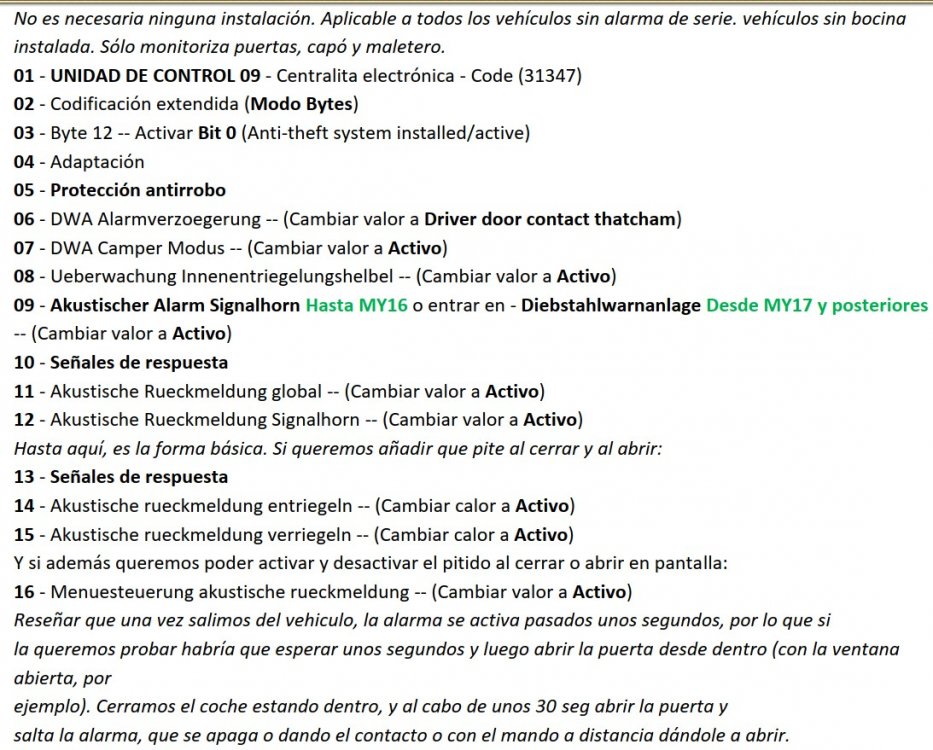
In some tweaks guide I saw a list of settings (to be made with OBDEleven, VCDS, etc) to enable an alarm of sorts on cars without a formal alarm system. It's supposed to enable a simple alarm, using the turn signals and the horn, if the driver's door handle is pulled from the inside with the car not having been unlocked by the key fob. I made the configuration changes with OBDEleven and then tested it by leaving the driver's window down, stepping out of the car and pressing the lock button on the key fob, waiting a minute, and then reaching in and opening the door from the inside. (This is on my 2020 Octavia Scout, one of the last of the MkIII Octavias). While the car will continuously flash both turn signals (until I turn off the "alarm" by pressing the unlock button on the key fob), and the customizations did include options to enable audio signaling (see below), the horn does not sound; just the turn signal lights flash continuously. I do know that the car is able to sound the horn in relation to some of these settings, because I also configured and tested sounding the horn upon unlocking or locking the doors and that worked. (And then I immediately turned that back off after the successful test and seeing that having that configuration on still didn't enable the horn sounding with the 'alarm', because honking the horn on unlock/lock is a really annoying feature...) Any ideas on a setting maybe that is needed in addition, or if some cars simply cannot sound the horn along with the built-in simple 'alarm' functionality? Below is the configuration guide that I followed; apologies that some of it is in Spanish. Thanks, -Jay
-
Hi @Marshy33, please forgive my ignorance; how do I figure out what headunit is in my car?
-
Thanks @ExSEAT! I wonder, if you don't mind, in the next days as you drive and occasionally (attempt to) voice dictate WhatsApp replies, could you try to notice whether it actually works well just at first (really, just the first one or two voice interactions) and then the lag starts? My original sensation had been "it's utter rubbish". I realized over the course of some very long (1000km/day) drives, that it actually worked great ... once, or twice, and then it got bad (and then it got unusable; until I disconnected the phone and reconnected it). Aside, what was a previous phone on which you had noticed more problems? Was it also a then-high-spec phone like the Samsung S20? Or was it a lower spec phone? (My phones have always been upper-mid to high level, so it *shouldn't* be an overload on the phone itself). Maybe it's also worth mentioning that I don't get a WhatsApp message every 30 seconds, so I hope I'm not overloading the expected performance characteristics of the car's head unit; I don't know whether the problem was coincident with a couple of WhatsApp messages coming in in relatively close succession or if it happens even with one message at a time with several minutes in between; I do suspect that a combination of WhatsApp messages and Google Maps-via Android Auto voice directions may also contribute to it choking. Oh, I definitely have tried swearing at it. Doesn't make it work any better 😜
-
Thanks for responding @skd12. Since everything else works reliably even while WhatsApp <-> my car's head unit is going utterly wonky, it doesn't seem likely that it's the cable. Also, WhatsApp itself on the phone (when I pull over and stop the car so I can manipulate the phone directly, of course) works perfectly even while the head unit is talking to itself and otherwise making my crazy(er...), so I don't see how anything about the WhatsApp app on the phone itself might be related .. I'll try clearing Android Auto's app cache. The one issue that I think has gone away with updates over time is that, originally, nearly every single time I would connect a phone to the car for Google Maps, Google Maps would claim that it was offline and couldn't get driving directions. Most recently, I may briefly see a "you're offline" message but then it promptly notices that in fact it was online all the time and it refreshes with the driving directions now displayed.
-
I have a 2020 (last of the MkIII) Octavia Scout, with (I think it's) the Bolero (basic) head unit. (No Nav, no Skoda Connect services; just Android Auto). For Maps, Android Auto works fine. But for WhatsApp, especially if I try to voice-dictate responses/new WhatsApp messages, it rapidly gets slower/ falls behind, such that it is practically unusable. My phone is a new OnePlus Nord (rather high spec, completely up to date Android, firmware, apps, everything; though I think I saw exactly the same problem on my older OnePlus 5T). For example, after just a few WhatsApp messages have been read to me through Android Auto, the follow-up "Do you want to send a reply?" (or whatever the exact prompt is) may be a little bit delayed, and in any case voice dictation of a reply/new message flat out doesn't work after the second or third message. Disconnecting the phone-to-head-unit USB cable and reconnecting (a process that takes over a minute, just like when Android Auto <-> SmartLink first starts up when I boot up, er, turn on the car) will make it "work" again, briefly... On a recent long drive, it got so far behind/ out of sync that it was hearing its own long-delayed "do you want to reply?" (or something) message in response to what it thought was me having told it that I wanted to reply. That is, the draft of the voice-dictation reply text was in fact something that the system itself had spoken out loud! I asked about this in a Spanish Octavia forum and got answers across the board; one or two people had the same problem; a few more said it works reliably for them. What experiences do Briskodans have with the reliability/performance of WhatsApp through Android Auto, please? ( @SashaGrace @skd12 @Aarond @ExSEAT @SoonToBeOctaviaOwner I've seen each of you comment about using WhatsApp; please forgive me for tagging you directly; I hope that your experiences might be most directly relevant to this question). Thanks everyone, -Jay