Ber31inger
Members
-
Joined
-
Last visited
Everything posted by Ber31inger
-
My MY21 Superb was in service today (steering wheel change - recall) so I asked the service guy, and he confirmed there are no updates available for this device part number
-
An interesting feedback from Cubictelecom "The free plan that Skoda informed you about includes sponsored content services such as weather forecast, news feed and GPS including maps. If you wish all of the online services which your vehicle is capable you will need to purchase an additional data pack from our website. Once you do that you will be able to connect up to 8 devices to your vehicle's wifi hot spot and also use features such as satellite radio and live time traffic updates."
-
Absolutely Chris...and this might explain why in Russia this method works - they have eSim disabled, so the only way to update maps is through USB so seems like they left that option open, but for the EU, they are forcing users to go with Cubictelecom....and good idea with planning few trips across Europe, might be we will start to force the download of the new maps in other countries as well...will give it a try
-
@batal, I am just saying what the dealer told me
-
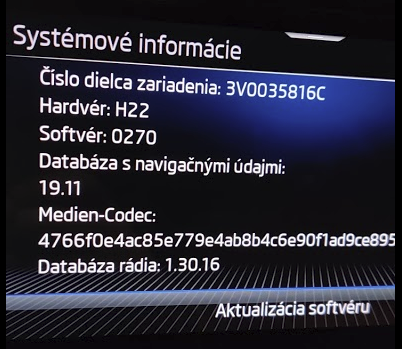
ok I took this one to my Skoda Dealer...and he confirmed that USB-C update is turned off on MIB3 as everything is pulled from the internet...so you either have the eSIM package through Cubictelecom or you have a 4G hotspot in your car and get the head unit connected. He also confirmed that for Devices 3V0035816B the 20.11 navigation is the latest...for 3V0035816C which is for example mine, it`s the 19.11 the latest but nothing to worry about as when you have net connection, it always download the latest maps for your route. The fact that the HW and the SW version is the same on all Device part numbers (B & C) does not mean they run the latest SW
-
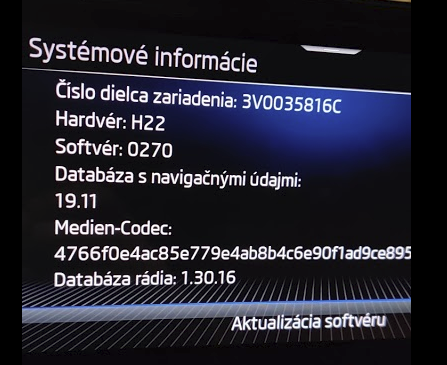
Perfect...would you mind to send a picture about your system information where we can see the Product number, HW, SW and Navigation DB version? I will go back to my Skoda Dealer and escalate if that will be the same as mine, except the Navigation version.
-
Is it the head unit without physical buttons?
-
Yes Sir...I have the latest maps from the Skoda Update portal...extracted the ZIP to an NTFS USB-C stick...after almost 2 hours, I did a hard reset, but stayed at 19.11 Than I tried FAT32 USB-C stick....still the same result :-(
-
Tried with NTFS, FAT32...no luck unfortunately
-
No luck :-( still the same version
-
My try is currently in progress...had mz car now for 30 minutes with ignition turned on...will leave it for another hour or so and do the hard reset....USB stick with the latest map in the USB-C port next to the DSG
-
you also have the MIB3? without physical buttons
-
You are probably right...I will do another try today...with a different stick, maps newly downloaded etc. let`s see...fingers crossed
-
Should still work for whole Europe through the e-sim connection...I just tried to navigate to Helsinki :-) from Slovakia...and it was working ok....than I tried South Croatia, still showing without any problems
-
I think the problem will be with what linni quoted...this is the new MIB3, without any physical buttons, so must be a different version to yours and they turned off the updates...my dealer told me the same...there is no integrated DB of the maps in the headunit anymore, everything is download using the e-sim or Wifi connection (if you have)...this would make sense as we just had a new highway opened recently (2-3 months ago) and it`s already visible within the navigation...so looks like it`s pulling the maps from the net....which is actually not a bad thing
-
Looks like same as yours
-
Thank you...I wanted to download the zip file based on my VIN but they must have changed something as now when quoting update through my VIN, it shows there is no update available...last week it was showing there is one
-
I meant that the zip file was unpacked to the USB stick
-
Ah sorry, yes it was NTFS and the maps were unzipped, withe 3500+ files on hundreds of folders...would you mind to share the zip file you used to do the uodate?
-
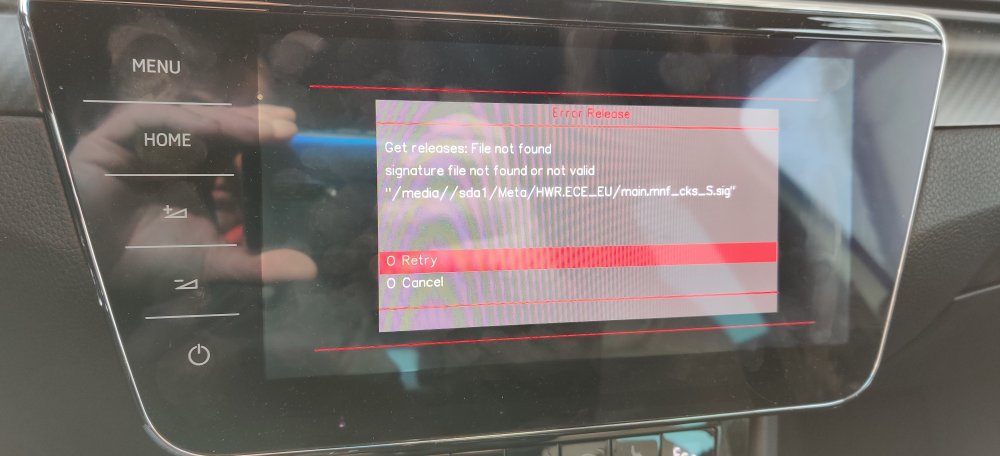
Unfortunately did not work for my MY21 Superb :-( left it on for 2 hours with the USB-C port, maps on the FAT32 USB stick, hard reset after 2 hours but still the same version. I than tried to do the update through the service menu but no luck, showing this error
-
Batal this is great, I will definitely try this...which USB port you used! The front C or middle A? Batal this is great, I will definitely try this...which USB port you used! The front C or middle A?
-
MIB3?
-
Very true :-)
-
Thank you Sir, but I am from Slovakia...will try to find a similar car
-
Good idea...tried, but still no luck :-(