bradecline
Finding my way
-
Joined
-
Last visited
-
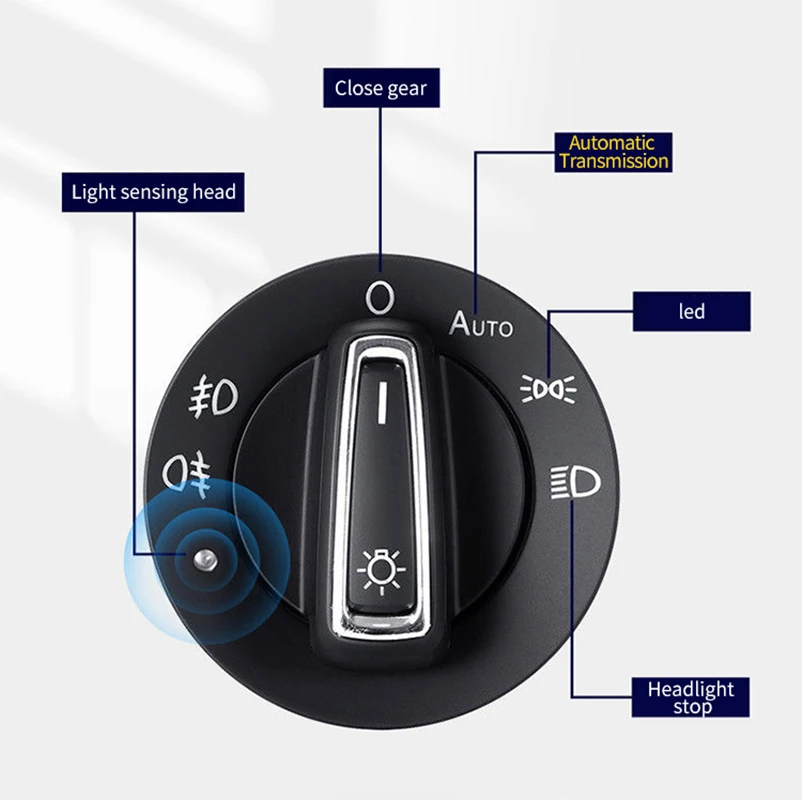
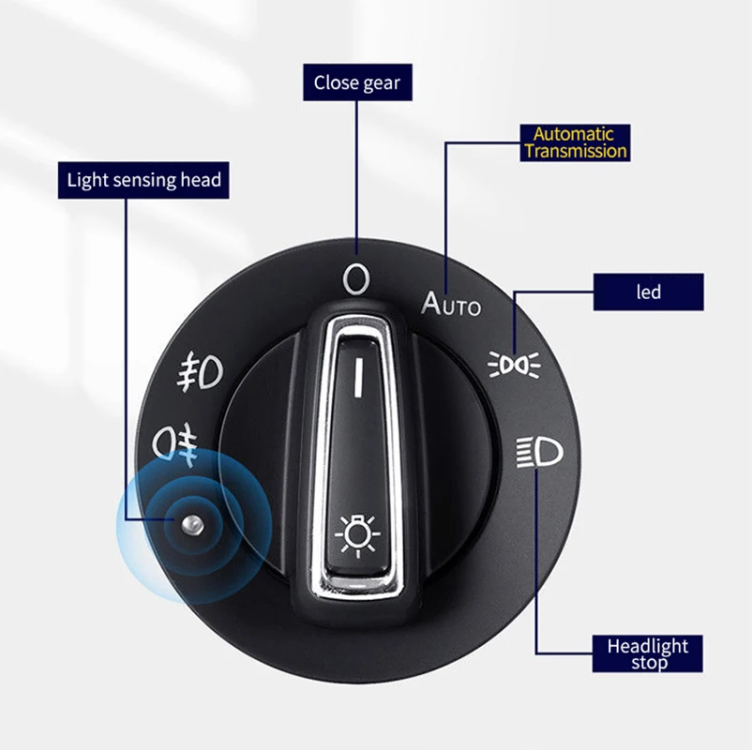
I went through the manual of my MY2023 and I don’t see any indicator for this function. I’d say the best you can do is check the lights knob. In the auto mode, the parking lights indicator should be lit when the headlights are turned on (the one named „led” in the attached picture)
-
I got a confirmation from Skoda that this will not work. "[...] An expert confirmed that without the cruise control enabled, only the Lane Assist option will be enabled. [...]"

-
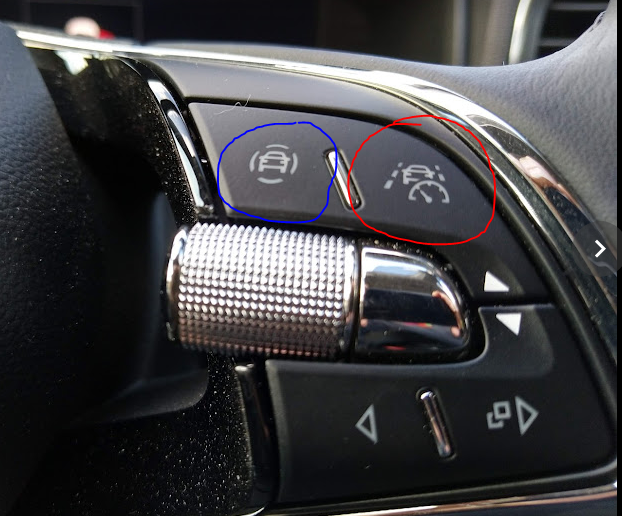
Can you confirm the lane guidance works when ACC is activated at speed below 65 km/h? When I activate ACC below that speed, lane guidance is inactive. I need to accelerate to 65 to activate it. Then it works at speeds below 65 km/h as long as ACC is active. I believe it's the difference between pre-FL and FL models. In my case with original coding (hc_variante = 2), when I pass the 65 km/h speed, only standard lane guidance is available. I need the ACC activated to enable the adaptive line guidance. Mine is MY23. Currently I have the hc_variante=1 coded which basically disables the Travel Assist functionality. That also makes the button on the steering wheel useless (the one marked with red color). To be honest, I'm not sure if I feel any particular difference in functionality between these two codings (except the button functionality), so it's more like my OCD that does not want to give up.
-
I have the FL model from 2023 so I shouldn’t need to retrofit a steering wheel, should I? If you meant something else, please elaborate.
-
Nah, it's more contacting about the information provided in the manual. Obviously, I skipped the coding part in the mailing 😛 I also contacted my dealer to verify that on their own. They weren't as enthusiastic as me after such a finding, but they promised to verify that next week.
-
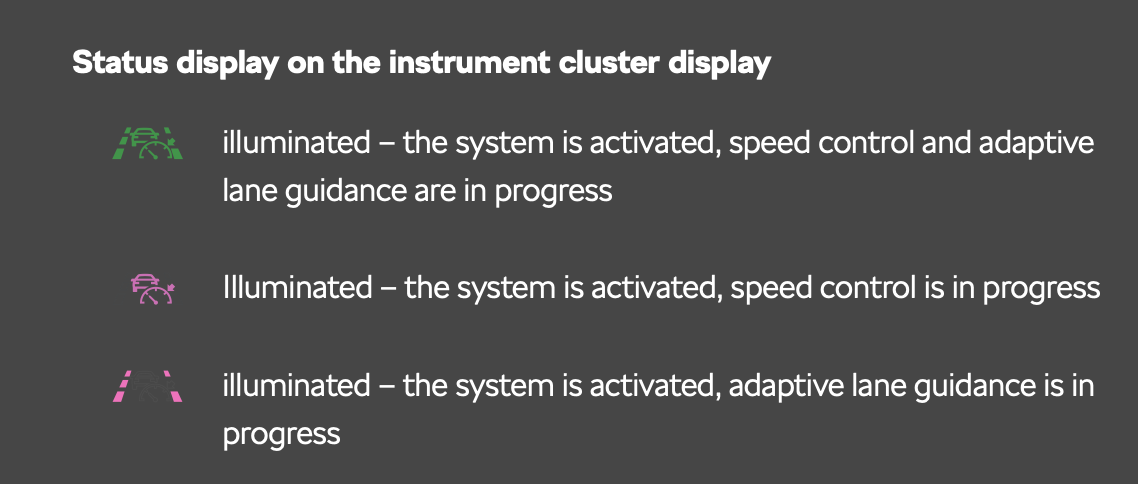
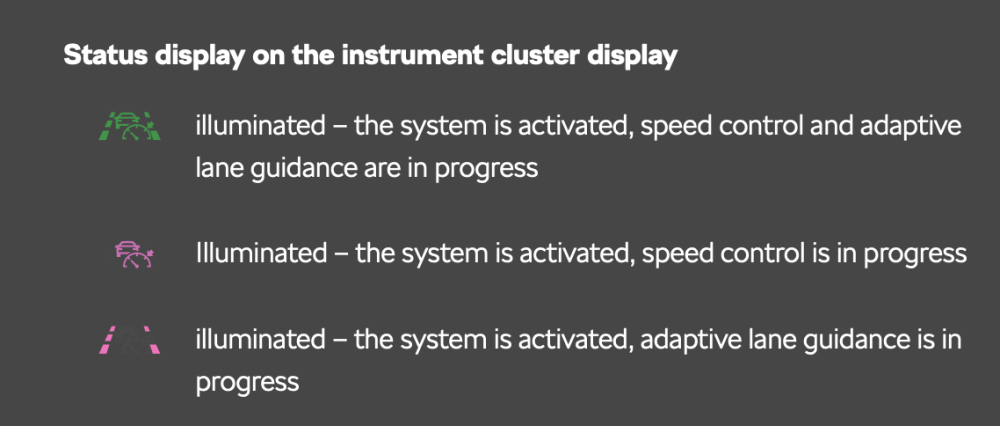
I'm reverifying whether it's possible to activate the Adaptive Line Guidance without enabling the ACC with Travel Assist coded (HC_variante = 2). In the digital instruction assigned to my car I found an instrument cluster icon responsible for showing the ALG activated while the TA is active. (link https://digital-manual.skoda-auto.com/w/en_GB/show/85ea6c1b3360901cfe3b6a41ed0a9af2_13_en_GB#ID_24cd31f1a45711ec828fd04cea46d3ed-e22f5b74763d73eeac1445257be7b8f6-en-GB) I contacted the Skoda support via their official email and I'm waiting for their response. I'll revert here once they reply.
-
In my mk3.fl (2023) it works in the following way When the ignition is on without engine running, I can open the door and there’s no warning (very useful for coding). When the engine runs, the warning is presented when the door is opened.
-
-
Some time ago I decided to test the setting with TA disabled and I noticed one additional difference I didn’t mention earlier. When you have the TA enabled and you’re in the traffic jam, you don’t need to use the throttle pedal or ACC resume button to start accelerating. It is enough to just have your hands on the steering wheel and the capacitive sensors tekst the movement. For the TA disabled, to continue driving you need to either use the pedal or ACC handle. I think I’ll keep TA feature disabled so that the adaptive lane assist gets activated without ACC. Personally I perceive this as much more convenient approach.
-
I expect it won’t work without activated ACC. It works when Travel Assist is totally disabled (with VCDS coding) so the TA button on the steering wheel does nothing. Anyway, looking forward to hearing from you about further results.
-
I tested several configs on my car and here are the results: - HC_variante =1, point of intervention = early (setting over menu) - Lane Assist gets automatically activated upon reaching 60km/h, it works with lower speeds when ACC was activated with speed > 60km/h. When I activate ACC with lower speed, LA is disabled. Travel Assist button does nothing. Option for the adaptive line assist is present in the Car options menu. - HC_variante = 2 - I need to activate Travel Assist button to have ALA enabled, without TA (and active ACC) car is bumping from left to right. Option for ALA is present in the car options menu, but when not active, it gets automatically activated when ACC is invoked (and deactivated when ACC is terminated). Here’s the video I recorded that shows described behavior https://drive.google.com/file/d/11uId7noQtTvzJ8fuAjA_csHeCljkrBDX/view?usp=drivesdk so I assume if you want to have expected behavior you need to have Travel Assist deactivated
-
Do you mean it had working adaptive line assist (ALA) along with the coded Travel Assist (TA)? In my case (2023 with Travel Assist) it works this way, depending on the coding in the ACC module; - HC_variante coded to 2 (stock setting) - TA option can be turned on, but ALA requires ACC enabled - HC_variante coded to 1 - TA option cannot be turned on (the button on the steering wheel becomes useless) but ALA is automatically enabled when you reach 60km/h. if I understand your case correctly, in your previous car you had working ALA, triggered automatically after reaching 60km/h, and you were still able to switch TA on/off?
-
VCDS Coding: Module 17 - Dashboard Adaptation Tubes illustration, set to 3 from 0
-
Did anyone notice a connection between pop pop sound and bad mobile network coverage? I experience that annoying sound only in areas where my phone coverage is poor. And it’s always accompanied with an info on VC that SOS system has been activated (after a few seconds), so I assume it’s been deactivated earlier with no info provided.
-
Have you tried to reset both CarPlay (Settings > General > CarPlay > your car name > Forget this car) and Bluetooth pairing? You should also try to reconnect your device by a cable.