JoaoVr
Members
-
Joined
-
Last visited
Everything posted by JoaoVr
-
Good evening, At work, we have an old 1999 Skoda Octavia that serves as our work commute bus, and we're planning to give it a fresh coat of paint. Unfortunately, we're having trouble finding the sticker with the black color code. Does anyone happen to have a black one they could share with us? Your assistance would be greatly appreciated. Thank you!
-
Someone with the parts software can check how many parts change to upgrade the 1 fan system to the 2 fan system ?
-
Another gift 😃
-
https://www.1stformations.co.uk/registered-office-service/ they are located here
-
https://www.bilstein-shocks.co.uk/ is a good source? Their adress is a gym place in the middle of the London..
-
Is trusted? The adress is in a mall
-
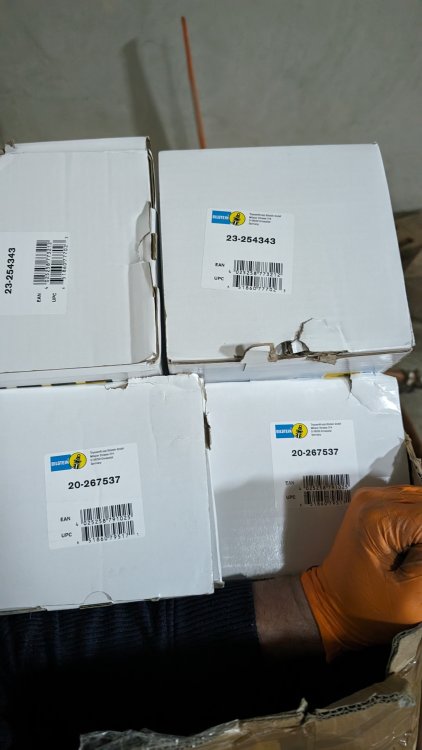
Can you guys tell me where you are buying your Bilstein shocks? I'm looking for 23-254343 and 20-267537
-
Can you guys tell me where you are buying your Bilstein shocks? I'm looking for 23-254343 and 20-267537
-
Can you guys tell me where you are buying your Bilstein shocks? I'm looking for 23-254343 and 20-267537
-
Can you guys tell me where you are buying your Bilstein shocks? I'm looking for 23-254343 and 20-267537
-
They do not have 23-254343 and 20-267537 😕
-
Anyone bought on this store? how is the feedback? https://www.bilsteinsuspensionstore.co.uk/
-
Is there a possibility to upgrade 1 fan to 2 fans?
-
I had the same question here:
-
Did anyone removed the DCC shocks to fit a regular ones that can give feedback?
-
By the way, does it need DCC calibration in the end?
-
Thanks mate
-
Bump stop and dust proctector comes with shocks or I will use old ones?
-
Yes!
-
For a 2016 Estate Superb 2.0 TDI 150HP (NON 4x4) what is the correct part number for B6 Bilstein? Front: 23-254343 Rear: 20-267537 ?
-
here is mine https://www.spritmonitor.de/en/detail/1410208.html
-
Links to the websites will be amazing
-
I would like to try that upgrade. Will it work in a 2016 2.0TDI 150HP Estate?
-
Where are you from? I will be soon removing mine to retro-fit the ones with the "view" option
-
How much did you paid for the display?