




Nigel_S
Finding my way
-
Joined
-
Last visited
-
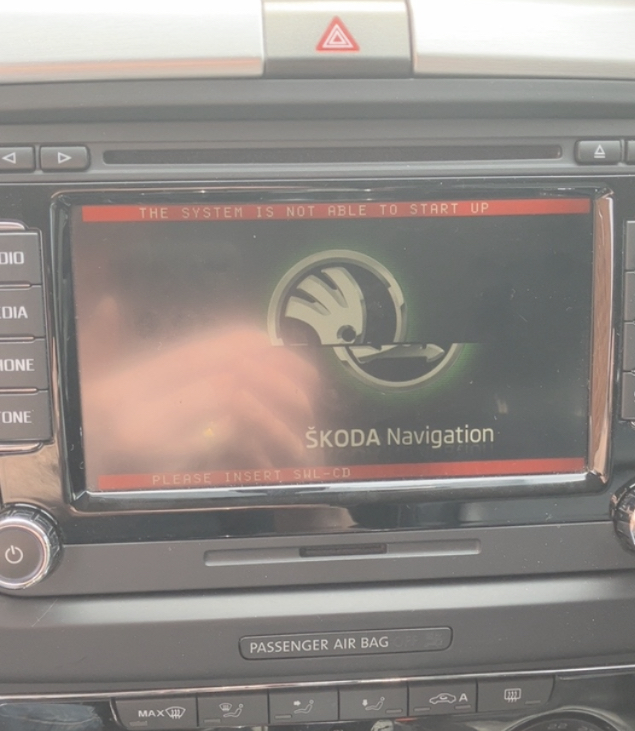
I'm sure it's a DVD. I got mine off eBay but cannot find any listings atm. I found this link to Latest-Sat Nav, uk based seller: https://www.latestsatnav.co.uk/latest-5238-software-update-for-skoda-columbus-rns510-navigation-308-p.asp?srsltid=AfmBOoq5u_jh1BViHV9WjdYRdqJU7vhnx-5j2vNDlE-PXZah5NgQuY7-
-
I got my disc from eBay but the seller isn’t on there anymore. Earlier this year I bought an Android unit off AliExpress and works really well and does CarPlay to my iPhone and has rear camera.
-
No, if ambient is below 8c and I’m it traffic it won’t get up to temp. If driven normally it does but traffic sooo slow in the mornings average <30 mph so unless I get a chance to hoof it it get to 70 or 80c. Had DSG stat twice, main stat, water pump but still the same.
-
water pump perhaps?
-
Ps love Pinky & the Brain, which I assume yr forum name is based on?
-
Glad you’re all sorted 👍
-
you need to be in MFD, and them the scroll wheel lists things like oil temp, mpg, consumption, journey time, miles covered, etc. top right in the MFD is a number 1 or number 2 - if 2 you are in the long term trip meter and 1 is the current trip that is 0 miles, 0 mpg etc when you go out first thing in the morning.
-
Have you selected reading 2 - this is long term mpg and will change more slowly - you can tell by scrolling through the options and see journey time and miles covered? You can swap between trip and longer term by pressing the right-hand scroll wheel
-
I know it's an old thread, however I just did my front discs and pads and was also surprised to find no pad wear sensor wiring! Not sure if it can be retro fitted as there are not wires. I checked to make use a previous person hid the connector behind the wheel arch liner and used non-sensor pads but no, nothing, nada! The ATE pads have the sensor built in so simply snipped the wires close to the pads, job done!
-
Happy days!
-
RNS 510 Firmware v6276 Update Disc, Including Special Features. £9.95 Sold by: gr53gg https://www.ebay.co.uk/usr/gr53gg however it doesn't look like he has anything listed at the moment
-
I installed the firmware and didn’t loose the maps I already had
-
if anyone searched/finds this post we (by we I mean SJFISHER67) fixed this using VCDS. I think the bit that fixed it was: 920 941 M,channel IDE01153-SIA: maximum value of distance to service, adapted from,0 km,to,15000 km Setting oil quality would change the days from 1-year to 2-years but would not do the miles. Worth noting my car had Variable Service from the factory but suspect someone has reset it either via the trip button method, or some proprietary tools, OBDii app, or some-such. Hopefully next year (or 9,400 miles) later it will reset ok using the trip button. Thanks again to SJFisher67 for sorting this!
-
I got a dvd for mine like the link below and it corrected the logo issue and been perfect since. Just need to do the map files but that’s another story! https://www.ebay.co.uk/itm/153260614872?mkcid=16&mkevt=1&mkrid=711-127632-2357-0&ssspo=x4JAut3DSZG&sssrc=4429486&ssuid=cszXrUYLRhS&var=&widget_ver=artemis&media=COPY
-
Sounds like a bearing. Whether it’s input shaft, output or internal to the box is another matter ☹️

