fox033
Finding my way
-
Joined
-
Last visited
Everything posted by fox033
-
I have been driving my car since yesterday without Android Auto, using Waze and Spotify on my phone only, and haven't experienced the above-mentioned problem. So, either it has something to do with the car, or it's some strange bug in Android Auto, maybe related specifically to the phones I used (Samsung Galaxy s23 and S24 Ultra). It's really annoying.
-
Good point, it could be completely unrelated to the car itself. But using these two apps in Android Auto should be a pretty common thing, so I was hoping someone else had already experienced the same and could suggest a potential solution. TBH, I never tried it without Android Auto. I'll do it today and report back...
-
When using Android auto and playing some music through Spotify, or any other app, if Waze says something, some kind of confiict happens. The expected behaviour is that the music volume gets lowered so you can better hear the Waze warning. But instead, the music gets stopped completely, or the Waze voice gets cut off. Sometimes both. I have been using different phones (all samsung androids), but could never find the solution to this problem. Is anyone else experiencing this? Did someone find the solution? For context, I own Octavia Mk4 (2023) with 10" display.
-
This happened to me too. I had the display restarting while driving, turning itself on and off, pausing and resuming music, and also turning itself on and off while car is locked. I had various theories about the culprit like high temperatures, bluetooth, wifi, android auto... But eventually I dismissed them all. Quite interesting that the first time I had this problem was in July last year and it lasted for few days and resolved itself somehow. I literally did nothing. After that I had zero problems up until June 2025. when it started all over again. I went to the dealer two two times and they updated the fw twice. And this did not help at all. Again, problem eventually solved on its own after about a week or so. I recorded many videos of this crazy display behavior and sent them to the dealer and they said they will try to contact the factory for advice. Never heard from them after that. But fortunately now the problem is gone. Well at least for another year I hope. My guess is that this has something to do with their servers. Something triggers this online. I find it unlikely that displays just somehow starts acting crazy once a year or so and then it just repairs itself... But it's still infuriating that they still have no clue what's causing this after so many owners reported it...
-
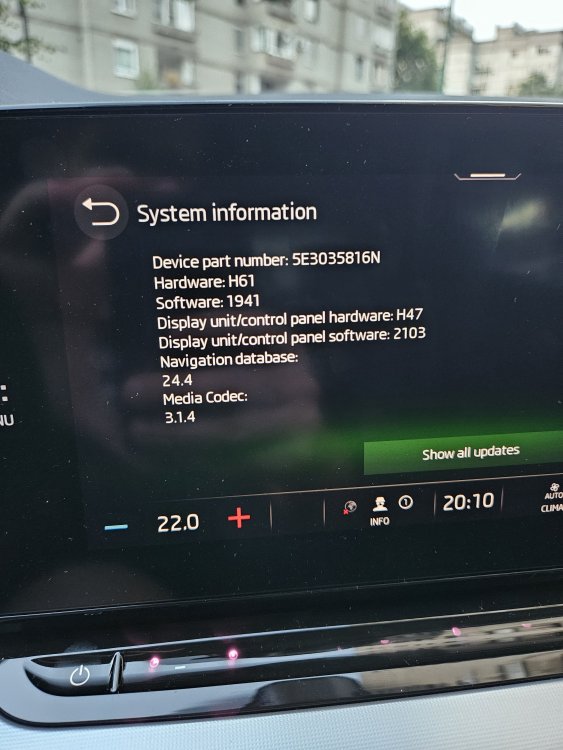
Funny thing now... All the mentioned symptoms started few days ago in two octavias bought in my company in 2023. At the same time?! I had the same problems last year, but it just resolved itself somehow after it almost deplated the battery. I updated the fw on mine this time from 1941 to 1985, but that did nothing. Could this mean there it could have something to do with their servers or some update? I've encountered also slow start of the infotainment with "loading settings" message staying on for few minutes after starting the car. It's kind of a big coincidence that it starts at the same time on two cars...
-
Just a quick update... I left my car for a day and a half in the garage and when I returned and started the engine, I got the message that the battery was low and the infotainment would be turned off (or something like that). Anyway, the infotainment did not turn off and I haven't had a single restart since. Btw. today I saw the mail from Skoda that my "Škoda Connect: services have been deactivated" (the free one-year service is over). I got it exactly on the day the poppop sound and restarts started. To me, it looks like this deactivation did not go through completely and until it completed this process fully, the system kept restarting and retrying. Also, this problem started when the car was deep in the underground garage with a very bad mobile signal.
-
Hi. I didn't even notice this. I know I've experienced the poppop sounds and restarting maybe a week ago. I don't exactly remember, but there was an update maybe a week or two before that. I'm out of my country right now and the car is driving me mad. The infotainment restarted at least 100 times during my last 4,5 hour drive.
-
I started experiencing exactly the same issues in last few days. Could it be that this started because of some update or some online service? These issues had mostly be resolved with fw 1941. It's strange that many owners started having problems again now...
-
Update done yesterday without any problem. Since then not a single restart of the infotainment in some 6-7 short journeys I had. Until the update, it was about 50:50 chance of reboot right after starting a car. It's probably still early to be 100% sure, but it seems the problem is finally solved! Thank you varooom!
-
It seems everyone is happy with this update. I'm considering doing it myself. @varooom would you be so kind to send me a link to download the files? Thanks!
-
Hello everyone. My name is Emir. I'm from Sarajevo, Bosnia and Herzegovina. I've been reading this forum for quite some time and just decided to finally become a registered member. Last month I finally got my new Octavia MK4 1.5 TSI MAN delivered. It's a beautiful car and drives really nicely. But (there's always but), infotainment is quite buggy and restarts right after start very often. I've seen that some of your members had successfully installed SW1941 update themselves and solved this annoying problem. I'm considering doing it myself. In the past I owned Skoda octavia MK2 FL 1.9 TDI and Skoda Favorit.