JamesK
Members
-
Joined
-
Last visited
-
The car may have been registered in May, but when was it manufactured and how long did it sit unused? My Octavia had a gap of 10 months from production to initial registration. I took ownership 9 months after registration. The battery was never amazing and Start/Stop barely activated when sitting in traffic. I had a new battery fitted a few months ago and it's like a different car. Start/Stop constantly activates now even without the car being warmed up. So could be worth checking the battery health, and maybe putting a battery charger/conditioner on it? I regularly get complaints with Front Assist, and they're always temporary. It seems to not like certain sections of road. When I take my kids to school there's always one section of road, that if Front Assist will alert, it will do it there. I've never really worked out why.
-
@Rhencullen Have you ruled out the tailgate dampers not being the cause of the rattle? Have a look at this thread for more details... Link to forum thread
-
Have a search of the forum, there's a few people who've raised this previously. I had seen a couple recently where someone had followed the path 1664 > 1941 > 1985 without any issues. I had also seen someone go direct from 1664 > 1985. But if you're at all concerned about doing it, or not confident then it may be easier to take it to a dealer. As your car is on a very early infotainment, it's very likely there are other modules that would also benefit from an update such as the OCU.
-
@Justo Did you get your windscreen issues resolved?
-
There was a post on here a while ago from a member who had their windscreen replaced. After it was done the windscreen wipers were randomly activating. It looked to be because they'd done a messy job with adhesive around the cameras. Here's the link: Link to forum post So I think you need to use the photo you've already got of the camera area, and then make sure it looks identical after they replace the windscreen or you could have issues.
-
Have you tried doing a factory reset of the infotainment, and then logging in again as primary user? This might help, but I've not heard of anything like this before. If that fails to resolve the issue I think you'll need to goto a dealer, especially if you can easily reproduce the fault. If not easy to reproduce I'd recommend taking a video of it happening. My dealer were receptive to video proof of an issue.
-
I'm on 5WA035284A and the dealer recently upgraded my OCU to 0311. No issues to report.
-
Mine was recently taken to 0311 by the dealer, and infotainment to 1989. Similar to @scotthugh3s I've never had any 'big' updates via OTA. App and Map updates have always been pushed OTA without an issue. However, all seems completely fine with OCU at 0311 and infotainment at 1989. The only real difference I've noticed between 1985 and 1989 is that it's displaying far more radio station logos.
-
Hopefully the furniture polish keeps the dampers quiet. If it doesn't you may need to upgrade to the lithium grease. Recalls such as this don't ever make it to that government website. It's internal to Skoda and the dealers. So you would need to goto the dealer and report the issue, and they should know about the recall for the specific issue. That's the theory anyway.
-
Have you tried unpairing and repairing the phone? Depending on the phone it could be worth trying Android Auto/Apple CarPlay instead?
-
I completely understand how frustrating it is when the infotainment behaves likes this. These issues are well known and understood, so the Skoda dealers do know how to fix this. It's frustrating that it keeps coming up on the forum that dealers want £100+/hour to "investigate" something they already know about. It might be worth raising this with the Skoda Executive Office. I recently had good success with them in getting a load of software updates issues paid for. My argument was that the issues were well known, and had been for several years. And they agreed to help. It did take a while to get to that point, but may be worth persisting.
-
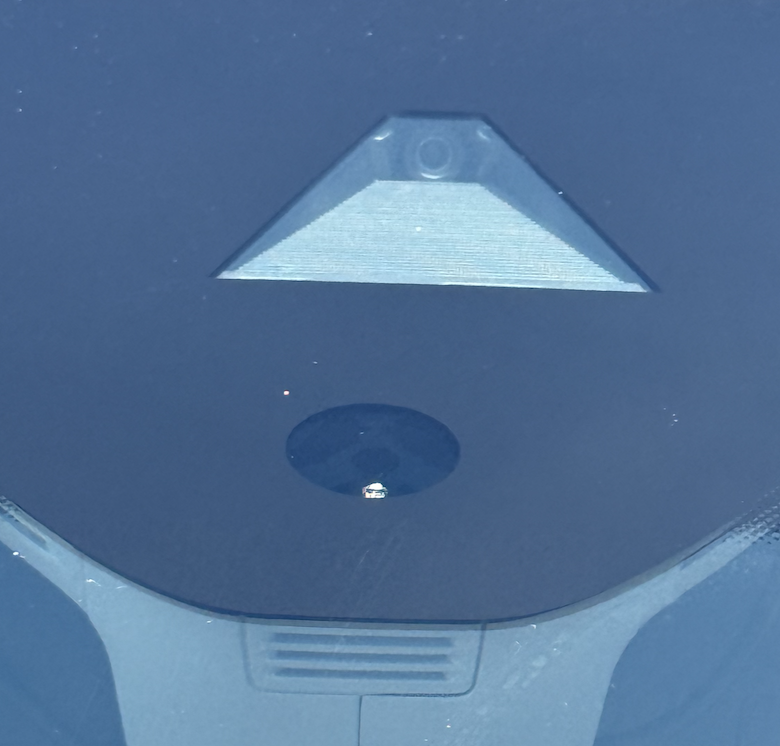
@Justo Below is a picture of my windscreen. The circular section underneath the camera looks very different to your image. So if the rain sensor sits inside that circle, looking at your image I can see why the intermittent wipe function is not working. It looks like they've done a messy job in that area. Have they applied a sealant there when none is required? I would contact them.
-
What's your infotainment version? Also it would help to know whether you're connecting the phone via Bluetooth, or Apple CarPlay / Android Auto.
-
@Bobsko1 I had exactly the same issue last year, and it was the dampers that were the problem. Here's a couple of forum posts on the topic: Link to Forum Another Link to Forum The resolution for me was to use a good quality lithium grease. The first product I tried only last a week before the rattling came back. The product I've linked to below worked much better, and I've not had an issue in the 10 months since I applied the grease to the dampers: Link to Amazon Hope this helps...
-
@Warrior193 Thanks for the suggestion, it worked perfectly. I ended using some picture hanging wire. There was an element of luck with it as the wire had a small sharp bend on the end where it had been previously cut. As I lowered it down the gap it ended up getting caught, and wedged behind the lego. This allowed me to drag the lego up and out of the door.