




Psaandja
Finding my way
-
Joined
-
Last visited
-
I had very much the same, as well as a lengthy delay getting 2nd Key. Required another visit to Skoda after getting 2nd Key for their tech to activate/reactivate the modules to get Smart link, Nav, Cruise Control and Hybrid Mode selection functions to work. Was a simply job once they knew what to do, but getting them to admit the car, as sold, should have those features might be a challenge.
-
Sadly I guess your warranty with Skoda is expired? May be worth pushing Big World to sort the issues via Skoda as they advertised certain features that are clearly defective. Forgot to ask about the emergency call feature/button - do you get the occasional loud pop pop noises followed by error on screen about emergency call unavailable, that's likely a hardware module needing replacement, again a Skoda only job.
-
Been there and done that! you'll need to take it into Skoda to get the software updated to version 1941 or 1969 (depends on what they're doing now) which won't necessarily fix your issues, but is first step. While they have it, get them to correctly activate Nav and Smart link which should work regardless of keys or SW versions, you may also want to check functionality of the adaptive cruise control (mine only had speed limiter until sorted) and mode button(ran pure EV until battery was dead then pure ICE, no option to use hybrid modes and consequently no ability to play with sport mode. 2nd Key will be needed, Car dealer may be persuaded to supply (check their sales contract/details/advert) otherwise it's £250-350 depending on who and where
-
Yup, the pixies living under the bonnet (or ghosts in the machine) have given whatever required it a gentle tap with a mallet and this morning it was A-OK, annoyingly humming/buzzing to itself til you get a move on. Wait, monitor and report later I guess
-
Took ~20 mins from SD card in the car, all seems to be still working correctly, can't say I noticed any difference other than SW version number went from 1941 to 1969. Did make me nervous as dire warnings about not turning off the car while upgrade in process, but not sure if mine (an iV) would time out and go sleepy byes thus bricking everything, or stay awake. As it turned out, it stayed on and did the upgrade no issues. My random coolant low and electronic brum brum sound errors are probably coincidental, but no way to tell now!
-
Interesting new feature this morning, "Error- Electronic driving sound, please drive carefully". Now got a 'not seen before' error light on the dash, car with a megaphone on the roof. Guess I'll have to wind down the windows and apply my own "Brum Brum, Beep Beep" noises so folk know I'm around. Prob have to turn the tunes down slightly too so wary pedestrians can hear me approaching. Anyone else? Another trip to Skoda under warranty?
-
Had a 'little chat' while collecting mine from passed MOT (no warning lights on dash at the moment the tester checked, how strange!!) and the service manager called his oppo in Stourbridge and I'm now booked in for Wednesday 22nd, significantly better!! Also advised to drive carefully between now and then, preferably in Hybrid mode and battery save/charge set to maximum so as to use 'the other engine' (Petrol) and let the electric one take a little rest. Lets see how I find myself on Wednesday evening eh?
-
Hybrid tank with the tamper proof seal
-
looks like I'm joining this thread, driving from Derby yesterday and got coolant error - visit workshop. In with Skoda Wolverhampton (Johnsons) today for MOT coincidentally and they advised coolant is low due to issue with Air Con gas forcing the fluid level down? Earliest booking I can get from them is June 27th and until then, I have a car that ought not be driven (low/no coolant!), but I need to drive on Business, but there's no curtesy cars available. Trying other dealers in the Midlands had an unexpected result, while on hold with Stourbridge awaiting a date, the lady from Wolverhampton came back onto the call, Stourbridge having bumped me back to them! Got a very bad feeling about this....
-
Skoda Essentials same as others have reported - Activated, image of a car, nowt else. "My Skoda" app however is all working fine and as expected. Uninstalled essentials, seems it's been terminated!
-
The pop up notification is a bit on the obtrusive side for my liking, covers 70% of the screen area and persists slightly too long without you having to poke it to go away. Also if you have voice notifications, it kills your music for an equally too long period. I guess having paid yer money, there's no way you're going back to Skoda saying I got done coz your app didn't look out for me well enough!
-
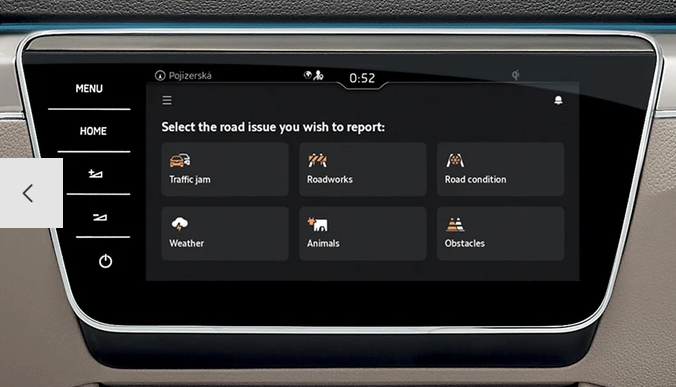
yes, Traffication also does same for me with either a visual and/or vocal warning about a speed camera ahead. The paid for app itself has buttons to report an issue, on the road, traffic jam, accident and more but TBH I've never delved into it while driving to see if there's a button to report a camera or mobile cash trap. Took a wander to the Skoda Website, this doesn't seem to cover cameras:
-
That was me!, I think it was keeping finger on then swiping left, or right, til the trash can icon appears. The apps are "free" but useless in UK, which you only find out AFTER installing, configuring and adding your payment details. Avoid unless you're adventurous and travel 'over there'.
-
Software glitch. Have you tried turning it off and back on again (sorry!) but leaning on the power button for 10-15 seconds forces a reboot that might solve issues. Otherwise you may be back to Skoda deal for in warranty work to reactivate the missing modules. Mine had same and needed a day in workshop to sort software update to version 1941 and reactivate all the missing toys. Have you tried the Mode button since the glitch? I lost that as well so no sport or pure EV mode selection, it simply ran pure EV til drained then pure ICE until I'd plugged in and fully recharged.
-
can't even see that as an option in the shop, so that's a negatory!
