




MARViN2003
Finding my way
-
Joined
-
Last visited
Everything posted by MARViN2003
-
Surely if you disable the GPS link then the LED Matrix will still be blinding oncoming traffic - the whole point of the car knowing it is on the Motorway is so it can dip the right hand section (as the auto-dipping will not work where there is a central barrier blocks the oncoming headlights) It's just that it is dipping the wrong way (dipping the left hand side rather then the right) Also does this unlinking of the GPS and Camera effect the ability of the car to slow down when approaching a change in road speed (for instance, currently it uses the GPS and maps to slow down the car to 30 before you get to the 30mph sign)
-
@Rafal78 - This is great info thanks, but what about the right hand side? That is illuminated when it should be dipped for the central reservation - would this also be fixed using the GPS sever fix? Also to add to this, it is caused by the GPS info, because my GPS hasn't been working (water into the sharkfin seal) and while it wasn't working, the matrix headlights worked as normal on the Motorway (but still could use with the right side being dipped)
-
Mine went to the Skoda dealer but they couldn't find anything wrong. Interestingly, my GPS stopped working for a few days, and when going on the motorway or dual carriageway, the matrix LEDs just carried on working as they do on a normal road, so it's linked to the car knowing it's on a dual carriageway / motorway from the GPS mapped data rather then just the camera.
-
Are you sure you didn’t use Apple Maps by accident?
-
Yes - the Zero Emissions screen has gone for me as well
-
Maps have been updated over the air to 25/6
-
Plug straight into the socket and set the timing in the car - mine is set to 0% minimum charge (so it doesn't start charging straight away) and then charge between 23:30 and 04:30 each night.
-
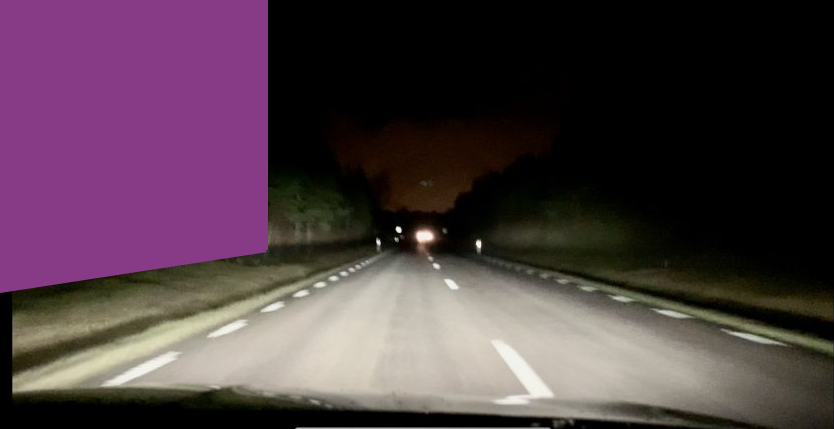
I'm sure the matrix mapping is wrong for UK motorways and dual carriageways; It blocks out the left hand side (shown in purple) rather then the right hand side - which I would expect it to do, so that even if car light are obscured by the central barrier, they would not get blinded...
 I had my OCU replaced under Warranty. The SOS system was red and producing an error all the time. My Infotainment system was stuck loading profile when I tried to load anything other than the guest account. I contacted Skoda digital and the told me they had done something to the account - and to reset the system, then set the privace setting to maximum and then back to minimum. This then caused the 'Loading User Profile' message to be stuck on all the time (rendering the infotainment system useless) I'm pretty sure they deleted all the accounts (including the guest account) meaning there was nothing to load! I think they could have fixed it by reloading the original programming using ODIS - but they said they would replace the unit - so better to have the new one. New OCU put in and programmed, now I have logged in and I'm the primary user and everything is working (MySkoda app etc) I activated a free month of infotainment updates and the maps have just updated to 25/1 Running 332Switch to driving data view - then the trip selection and you can reset the trip by pressing the rh steering wheel button (the screen says press 'OK' to reset)Just a couple of notes: You can use a USB-A drive in the USB socket in the armrest, or the USB-C in the centre console for updates. Single updates take about 20 minutes, so if you are only doing 1 at a time, you don't need to charge the 12v battery. You can update the OCU software the same way you update the MIB3 software - unzip to the root of the USB drive, then use the engineering menu. If your current MIB3 software is less that 270, you will need to have the SWaP code activated for onboard Navigation.I updated to 278, then used ODIS to add the SWAP. I've now updated to 308 and just about to do 330. Is 332 thr latest update and where can I find it? Also how do you check the version and update the VC?@Rainesh I tried to message you re a link to 332, but it says you aren't accepting messages...My Superb iV (2020) had MIB 0156 so I am planning on updating the OCU and the MIB If you don't activate the Navigation (SWAP) does this affect the ACC at all - I'm sure it uses the maps to determine road speed limits in some situations (I have already updated the maps to 24/6) I will get the SWAP done, my car is booked into the dealer, but the earlier they had was 26th Feb


Important Information
Welcome to BRISKODA. Please note the following important links Terms of Use. We have a comprehensive Privacy Policy. We have placed cookies on your device to help make this website better. You can adjust your cookie settings, otherwise we'll assume you're okay to continue.