newbie69
FREEDOM
-
Joined
-
Last visited
Everything posted by newbie69
-
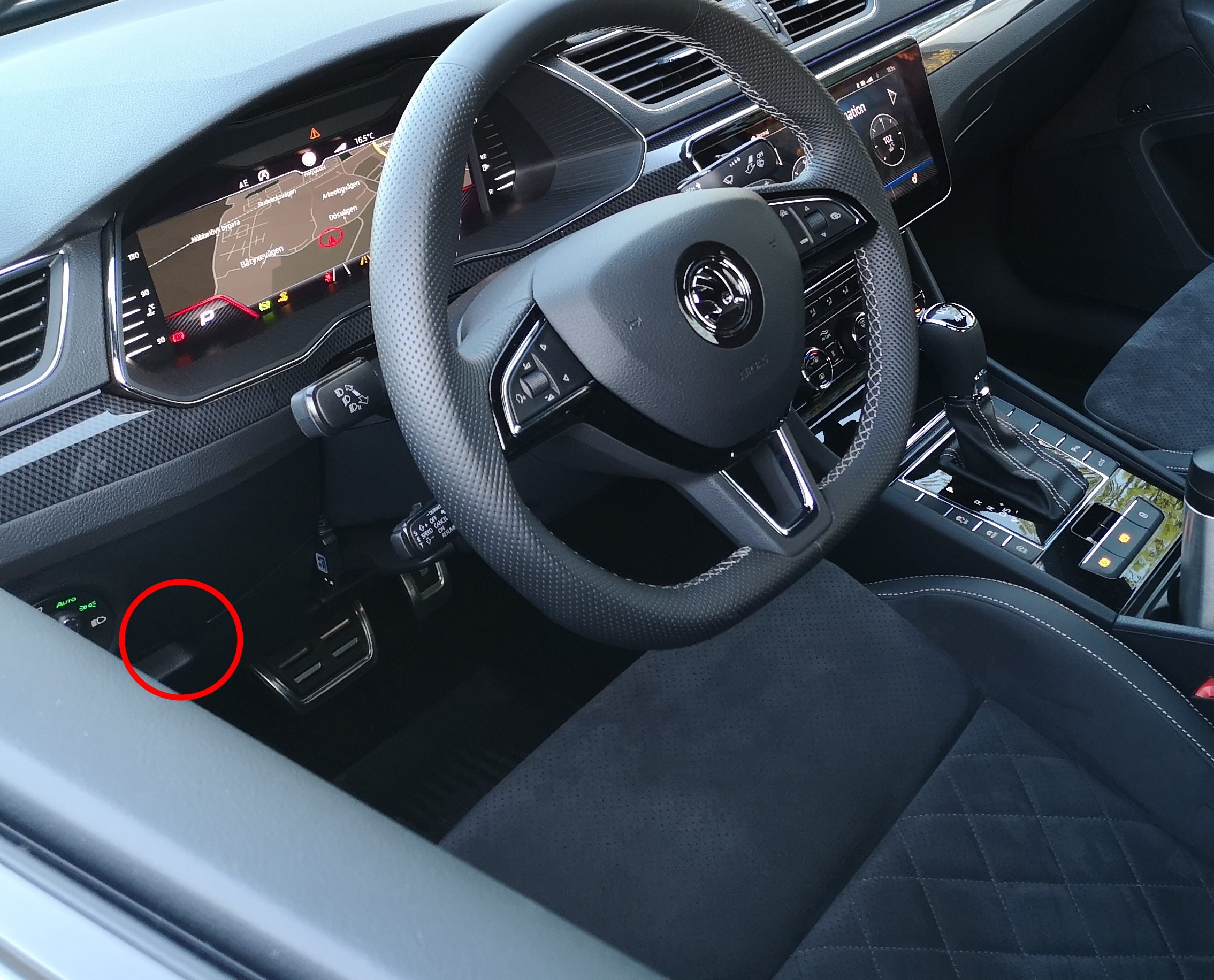
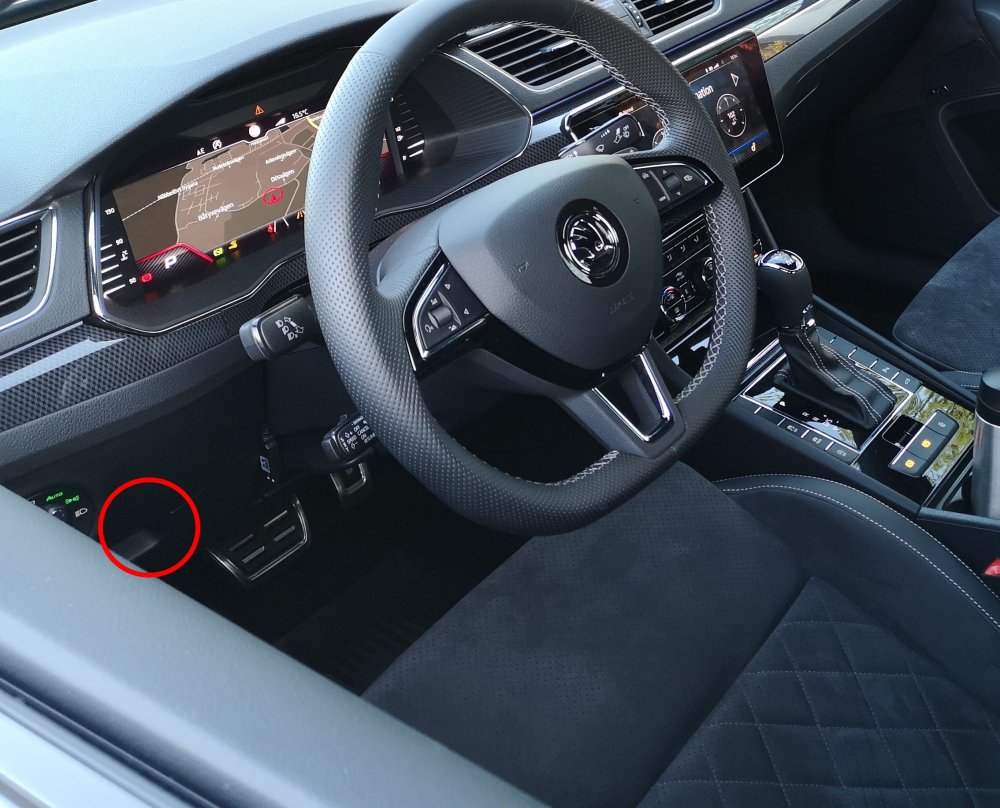
If it's the same holder/cubbie as in the LHD models, just below the light switch (circled in the photo)... ...then just open it normally as fully as it gets, then continue to push down harder for it to further pivot and it will come out. There's going to be some resistance and might seem as if you're going to break something but the only thing keeping it in place are some tabs at the back which are slightly higher and thus behind the outter plastic frame. They are flexible enough to give in if using a bit of brute force, I have done this 3-4 times already when routing the pedal box controller and JB4 cables.
-
BRIEFING After more than a year with a JB4, around a month back I decided to find out whether I had been missing out on some extra oomph... JB4 is good for 340bhp/430Nm on these cars and average times of 13.0" for 100-200km/h and sub 5's 0-100 (my PB was 4.8"), it is a solid improvement over stock, plus you keep your warranty intact. However coming from a faster car I soon got used to it and then I was really intrigued by REVO's claims about GPF cars actually not being as restricted as originally expected, in fact making even more torque with the same boost levels as the pre-GPF cars and mapping to the same 370bhp as before. I decided this had to be put to the test, purely for sciencitfic purposes of-course. I also got a R600 intake and a Racingline turbo inlet pipe to replace the stock items but I did install them after I did a few measurements with only the REVO map and all stock hardware to compare. https://www.onlyrevo.com/blog/all-new-gpf-stage-1-software-for-2-0t-ea888-gen-3-is38/ At the same time, the tuner warned me that the DQ381, is occasionally struggling even with stage 1 torque levels which is well on the 500Nm side. I hadn't noticed any slippage with the JB4 but then that was making 70Nm less and the truth is, I had not been entirely happy with the box's behaviour during manual operation and launching the car. Manual mode on the DQ381 is much jerkier than on the previous DQ250 to the point it made it unpleasant to me to drive it in manual, whereas my DQ250 car before was being driven in M mode, 95% of the time. Also, when using Launch Control, the car would often bog down as if ESP was kicking in (it shouldn't on a AWD car in Launch mode). In an attempt to adress all than then, I went for the TVS's stage 2+ DSG remap at the same time as the ECU remap. The stage 2 refers to the extra clutch clamping pressure, whereas the "+" in the name is essentially a side-remap so to speak, including several drive-ability and life extension features being added (more info in the link below), as well as having various modes and behaviours optimized (response times, shift points etc). I knew TVS as top DSG specialists hardware-wise and their DSG map reviews were excellent so: "add that to the basket too..." https://tvsengineering.com/en/dsg-transmission/dq380-dq381/?fbclid=IwAR0ABBTfq8HoVxf3egD_5WUFCWgKc0YHC1mLGHmMvVcKpnoJC5VNfqEa3sE
-
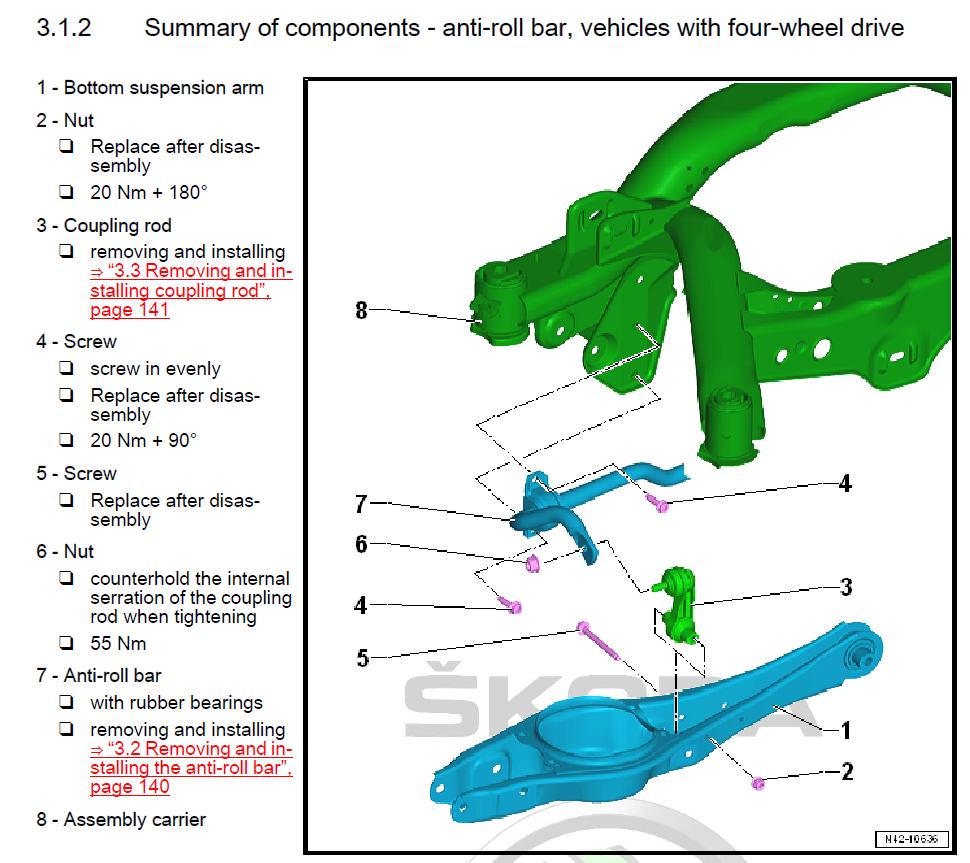
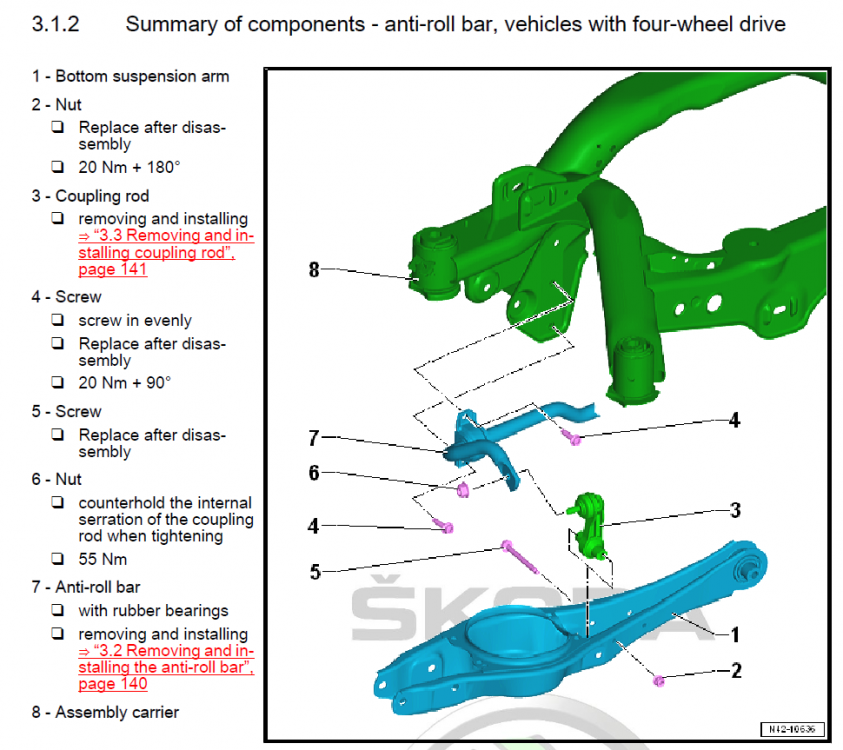
This has become a hot topic lately, a few people have ordered or are about to order an upgraded rear arb and many more are asking about it so I reckon it would be helpful to have this information gathered in one thread, instead of scattered in various (sometimes not even related) threads. Information about possible options, installation and reviews of-course. I've went for the H&R 25mm one, the model number for the 2.0T 272/280 AWD cars is: 33581 HA5. The model number for the 2.0T 220 FWD is: 33851 HA for the 24mm one and: 33851 HA2 for the 26mm one (apparently the FWD has two options) The bar already arrived today but I will hold off installation until I get the replacement OEM bolts and nuts on Monday, needed for the job. Below is the illustration of the items from the Skoda manual as well as a small table I made with all the involved fasteners for upgrading the rear arb and end-links (if needed), numbers and torque figures. FASTENERS INVOLVED: # in Skoda manual Title OEM No. Torque Quantity REPLACE Tool #4 Bushing bolts M8x30 N10765801 20Nm+90 4x YES Triple square No.10 #6 ARB to droplink self_locking nut N10286110 55Nm 2x NO 16mm socket + Triple square No.6 for inner screw #5 Hex head bolt M8x85 N10776501 - 2x YES 13mm socket #2 Hex nut N90183804 20Nm+180 2x YES 13mm socket UPDATE: Link of a very clear video of the installation on a Mk7.5 Golf R (identical setup)
-
Right, so I thought instead of just a write-up of my impressions of the unit, why not have a dedicated thread where everyone can post all JB4 related information, experiences, questions, results in one place. It's the case in other VAG forums and I know it's quite helpful for anyone looking for JB4 related information. Also, since this was the 3rd time I have installed the unit (1st time on the Superb) I thought I'd share some conclusions and tips that helped me during the process. Installation: ========== For anyone who hasn't done this before, it can seem a bit tricky at first but following a few good practices can make life a whole lot easier. This is not a step by step guide as instructions do come with the unit but more like a few areas to draw attention to on how things could be better carried out more easily. The unit has 3 plugs that are connected at different sensors in the engine bay. Two of them (B and C) are straightforward plug out and then in, but the bottom one (D) is the tricky one. To access it, you need to lift the car slightly and remove the plastic under-tray held by T25 screws. I did it at my garage using a jack and lifting the left side of the car just a bit to allow me to unscrew all the screws. Then, to un-plug it you should have definitely practiced your grip on those connectors as they need a special technique and if you haven't worked with VAG cars before it will seem harder than it is. All it takes is a good press-pull (actually: pivot) of the top tab to release, you can usually (but not always) hear a "click" when it does, then you just pull the connector out. Problem is you can't place your hand exactly as you'd like due to the connector being at a funny angle so practice so as to be able to do it without looking at it. You could also use a screwdriver to pry it open but take care with that as you could brake something. The AFR wire and positap connector, just follow the instructions on the manual (they are good on that part). Finally, the routing of the OBD cable and the USB data cable (for those who didn't opt for Bluetooth connection) through the firewall. This is where I'd lost a couple of hours a few years back as the place behind the firewall is so tight you are just working by feel. How I prefer to do it eventually: Get a bit of steel wire to use as a "driver" but not too flexible (3mm thick would do). Attach the molex plug at its end and enter the engine bay from the oval opening with an upright angle (60-70 degrees roughly). You will need to cut a cross slit to the grommet to get through. Helps to have a friend checking what's coming out at the other end otherwise you should be pausing to check if you're good. When you are done, leave the steel wire there and attach the USB cable (the thin end going to the computer not the JB4 end) so that it can get to the cabin when you pull the wire back in through the grommet. Then just arrange all the cables below the steering so that they don't get in your way (I used cable ties) and you're good to go. It's good to drive normally for the first minutes after first installation, then gradually give it full throttle for the ecu and gearbox to adapt fully, ie. don't expect the full effect the first time you floor it. Then again it should not be a particularly long process either. Start with Map 1 at first to make sure all feels fine and no errors, lights come up (shouldn't but just in case some wire is not secured in place etc), and even do some logs to confirm this. Then if all looks fine you could switch to Map 2 which is closer to an actual stage 1. Driving: ======= So the million dollar question: How does the unit feel on a 272 AWD Superb? Impressively linear. You won't/shouldn't get any unexpected power spikes, hiccups, noises or other weird reactions. In fact, the unit goes completely un-noticed and has no effect during your regular off-boost driving (you can easily check this by seeing actual boost being the same as ECU requested boost). The extra power is in relation with the throttle position and aggressiveness, when you ask for it, you get it, based on the way that you asked. And what you do get is not some explosion of power as I already said (would be hard to get this with just stage 1 power levels) but a noticeably stronger, more convincing will to accelerate hard up to the red line without any hesitation. As stock, after the instant "get going" effect wears out (above 40mph) the cars feels like it makes progress but not particularly fast, more like in a fixed speed building state. With the JB4, the car wants to accelerate harder and harder the higher you go in the rev range, as if some limiter has been removed. Flooring it in 1st is hilarious, instant, almost electric slap so be prepared (and that was without Launch Control even), 2nd gear throws you back fiercely, 3rd still goes pretty strong and even in 4th you're accelerating significantly. The power delivery as a whole has expanded and is more interesting to explore the upper departments... But it never feels "injected" or "enforced" on the car, you could easily believe this is how it left the factory. Coupe of things to note: - My driving was done with Map 2 as after a quick check on Map 1 there was no point in wasting more time there. Map 1 will have a less pronounced effect on all of the above as it tapers more the extra power. - The car has a pedal box already which definitely amplifies this instant low speed pick-up and I think one complements the other into a great combo. Again, expect a less pronounced effect without it. Rough data: ========== Haven't yet had the opportunity to safely compare 0-60 times but judging from the rest of the acceleration figures I got and the way the power is laid down in the first 3 gears (the new 7speed helps there) it definitely feels it can do mid 4's. Update will come in due time. 100-200km/h (or 62-124mph for the UK guys): Stock, the car did it in 16.6". On Map 2 and no other mods whatsoever this dropped to 11.9"-12.1" which is ridiculously good improvement for a mere stage 1 without any other mods whatsoever. For reference, this is significantly faster than the latest 540i xDrive and S6, and still faster than the latest S4/S5, 440i etc. so not too bad. Still for people coming from relatively powerful cars, and especially above 100km/h, you will feel it's ok but nothing extraordinary. The good (or bad, that depends... ) thing is this platform can handle a lot more power so up to you really where you feel it's enough. For the time being I'll just add the Racingline filter and turbo inlet pipe that I got out of my previous 2.0 TSI and call it a day till the situation with the GPF downpipes clears out, then we'll see. I somehow feel I ultimately won't be able to resist a proper upgrade on this car.
-
I had posted about the car reverting to Normal driving mode in the other thread of first impressions, but since it was early days with the car I wanted to experiment some more and set everything up properly. Now, after 3 weeks of playing with the settings but more importantly confirming this with other fresh owners of MY19 cars and the user manual itself I believe it is a given that MY19 cars or at least MY19 cars made after a certain date have this behaviour from factory. So, I have set up 2 different profiles, assigned them to different keys, the car detects the key and greets the assigned user and remembers ALL settings that particular user has set, as it should be. There isn't any issue of profiles forgotten or of keys mis/non-assignment. The only thing which is not remembered is in which Driving mode the driver left the car in before turning off. Well, not exactly. You see, in the 1st user profile, I have set the Individual mode to DCC Comfort and Drive to ECO. In the 2nd profile the DCC and Drive are set to Sport. Whenever I select one of the two user profiles, the actual Individual settings of each one are correctly stored and retrieved. 1st one will have an in Individual mode of Comfort + ECO, the 2nd an Individual mode of Sport + Sport. I don't need to re-register those. It's just that after turn on, Driving mode is ALWAYS set to Normal by default. Is my car broken? Well, already another MY19 owner ( @Avskum) who picked up his car just last week (mine was built on the 17th of January so I assume everything after that date at least should be the same) confirmed the same reverting to Normal on his car and I would appreciate whoever reporting which behaviour their cars show on this, to supplement it with the build date. @SteHaworth you should be picking up in the near future so would be good to know what's the case with yours too. Furthermore, I found two pages of the user manual (finally) confirming this is normal: Page 56 on the PDF, regarding options that Personalization remembers: "Driving mode - the last selected mode, mode setting Individual" At first I thought it meant which mode you were last in, but actually I think it means not that, but which settings you selected in Individual mode, not which mode the car starts in, as happens in mine. Page 244 on the PDF: "After switching the ignition off and on, the drive is set to Normal in the current driving mode. To change the drive setting, select the relevant driving mode again." That is pretty clear I think. It would be interesting to compare the content of the same chapter/page of MY18 user manuals and see if that statement exists there. Regardless, I am pretty sure this behaviour can be changed via VCDS. Browsing the 09 - Central Electrics module the other day, I found an adaptation called Personalization or similar and that seemed to hold several User profile parameters. If only it wasn't half in German half English... PS. Re-reading the 2nd bit I quoted from the PDF it refers to the Drive aspect (the gearbox mode) and not the driving profile so not the confirmation I was after really. Still...