



Skip to content

Fabia Sport front & rear bumper bits
Featured Replies

So, I noticed these two items for sale on eBay and thought they might be a good option instead of searching around for vRS bumpers and i quite like the rareness of the look - plus making a 1.9tdi look like a vRS isn't really what i want to do, making it look like a really nice 1.9tdi is however ;)

Front bumper

Rear bumper

The eBay listing states "The skirt is bonded to bumper. Bonding adhesive not supplied with spoiler." so i'm assuming that it fits over the existing bumper.

photo-6.jpg

(Shamelesly stolen from another thread)

skodar.jpg

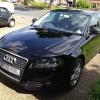
(My own car, yes i know its itching to get lowered!)

Looking at the photo's i imagine the black trim is pulled off and its bonded straight onto the bumper from there. Does anyone have any experience with these kits, what sort of adhesive would i use and does anyone have any idea what sort of cost would be involved in getting them sprayed (in the Sheffield/Yorkshire area).

Oh, and whilst i have that horrible photo of my car up - any ideas on how to get the foglight back to being silver instead of yellow, without buying new ones? :)

Thanks guys!

Techie's MPi Has this kit and I believe he fitted it himself.. So drop him a PM? :)

  • Author

Aaah will do, thanks!

  • 2 years later...

I was considering the same set of those bumpers. Can anyone (Simonbt) share any research result, please?

Regards

Just a heads up... that rear bumper is a vrs rear bumper ;)

It was sold as the sport kit with the front bumper being different.. but the rear bumper is a vrs rear bumper (same part num)

Just an observation bud.. not important lol..

Create an account or sign in to comment

Recently Browsing 0

  • No registered users viewing this page.

Important Information

Welcome to BRISKODA. Please note the following important links Terms of Use. We have a comprehensive Privacy Policy. We have placed cookies on your device to help make this website better. You can adjust your cookie settings, otherwise we'll assume you're okay to continue.

Account

Navigation

Configure browser push notifications

Chrome (Android)
  1. Tap the lock icon next to the address bar.
  2. Tap Permissions → Notifications.
  3. Adjust your preference.
Chrome (Desktop)
  1. Click the padlock icon in the address bar.
  2. Select Site settings.
  3. Find Notifications and adjust your preference.
