



Skip to content

OEM Bluetooth module location
Featured Replies

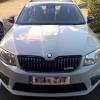
Firstly, hello everyone - picked up my first Skoda today, a 59 plate facelift Octavia VRS TSI, hatch, petrol with DSG. Only driven in back from the dealers so far and love it. Previous car was a 2008 Seat Cupra K1 which was a bit shouty, a bit faster but with 2 kids, the octy has the boot space.

Been reading about all the rSAP issues, confirmed today the bluetooth *is* rSAP and already have an alternative module located on eBay but looked under the passenger seat and couldn't find the module.

The guides I have seen have been for the Superb, is the module somewhere else on an octavia?

Thanks in advance.

Paul

It's under the driver's seat :thumbup:

I added an OEM kit which had pre-wired multiplug and all I did was wrap the unit in foam and hide it behind the climate control panel! It >just< fitted but worked a treat for 20K+ until the car was totalled!

  • Author

It's under the driver's seat :thumbup:

*facepalm* - Doh - I looked under the other seat after posting the message. Many thanks.

P

  • 10 years later...
Enter the PIN to establish a connection on your mobile phone. Or: If the PIN is already being displayed on your mobile phone, confirm it on the phone and in the MMI. You have about 30 seconds to enter the PIN.
The Audi A3 must be stationary, and the ignition must be switched on. The Bluetooth function and the discoverability option of the MMI system ►Link and the mobile phone must be activated. The MMI and the mobile phone you would like to bond must not be connected actively to any other Bluetooth device.
 

Create an account or sign in to comment

Recently Browsing 0

  • No registered users viewing this page.

Important Information

Welcome to BRISKODA. Please note the following important links Terms of Use. We have a comprehensive Privacy Policy. We have placed cookies on your device to help make this website better. You can adjust your cookie settings, otherwise we'll assume you're okay to continue.

Account

Navigation

Configure browser push notifications

Chrome (Android)
  1. Tap the lock icon next to the address bar.
  2. Tap Permissions → Notifications.
  3. Adjust your preference.
Chrome (Desktop)
  1. Click the padlock icon in the address bar.
  2. Select Site settings.
  3. Find Notifications and adjust your preference.
