



Skip to content

It's been 6 years since I had a vrs ... I Might be coming back!
Featured Replies

It's been a while since I posted on here. I've been lurking since my wife has a Fabia Vrs SE but its ran so well I've not needed to bug you all .... Until now!

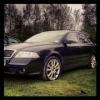
I need a bigger car, we've outgrown the current one so need something for 2 dogs and camping gear. After having owned a mk1 vrs hatch for 5 years, I've seen a mk2 vrs diesel estate that I really like that's within budget.

I was hoping for a bit of general advice and if you could answer a few questions.

Car is a 56 plate mk2 vrs diesel estate in black ( will that be black magic?)

It's done 82k. I've not seen the service book yet but I'm told its stamped up from DM Keith's in Leeds.

Obviously with this age and mileage is there anything I should be REALLY concerned about ?

Again, need to verify if Campbelt / water pump has been changed -if not then this would be done before I got the car. Plus a full years MOT.

Car has 18" zenith alloys, centre armrest, rear electric windows and what looks like dual climate control - am i right in saying these were all extra's?

Here is an interior pic if it helps confirm the climate...

DC3D5BE6-D0D8-45D6-B63D-B3A484C56BED-17020-00000D1D84EC1460.jpg

The gear knob metal is worn so needs replacing - I've done a search on eBay and it looks like you just buy the aluminium top part rather than whole new gear knob ? Assume it just clips on?

Also n the centre console next to handbrake there is what I think is a central locking button - also looks a bit tatty so assume this is an easy replacement?

Thanks for any advice.

Edited by triple7

Yep it has climate control and I think for that age of vrs the 18s, jumbo box and cc were optional extras

Create an account or sign in to comment

Recently Browsing 0

  • No registered users viewing this page.

Important Information

Welcome to BRISKODA. Please note the following important links Terms of Use. We have a comprehensive Privacy Policy. We have placed cookies on your device to help make this website better. You can adjust your cookie settings, otherwise we'll assume you're okay to continue.

Account

Navigation

Configure browser push notifications

Chrome (Android)
  1. Tap the lock icon next to the address bar.
  2. Tap Permissions → Notifications.
  3. Adjust your preference.
Chrome (Desktop)
  1. Click the padlock icon in the address bar.
  2. Select Site settings.
  3. Find Notifications and adjust your preference.
