



Skip to content

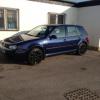
Hi everyone guna pick up my new octavia vrs next week but its a non runner :(
Featured Replies

Hi everyone

Finally guna get a octavia vrs next week as I've always wanted one since the first time I drove one but its a non runner apparently it has 1 possibly 2 split breather pipes under the inlet manifold and it kept bringing up the ECU light so it got left on a drive way for a year started regularly apparently and the only thing apart from the pipes/hoses is that since its been stood the gear stick has gone stiff will go in first and second but neutral or 3rd 4th 5th but with that said I still want to get it back to its former glory as I'm a huge fan of the vrs's if any one has any advice it would be much appreciated thanks ;)

Hi and welcome. If you have any specific questions bave a seach in the octy sections, if you can't find the answers ask away as I'm sufe someone will know .

Cheers

  • Author

Cheers mate Iv had a flick through some and found a Lot of useful info and that they seem to suffer with breather pipes splitting as found quite a few threads on that and Iv seen a couple on the gear linkage cables but non sound as bad as the one I'm getting I'm hopping that it just needs abit of grease on the springs that are on the gear selector wire ends as Iv seen them on here but not sure till Iv got it and had a proper look at it but Iv been told that the boxes rarely fail on them

Create an account or sign in to comment

Recently Browsing 0

  • No registered users viewing this page.

Important Information

Welcome to BRISKODA. Please note the following important links Terms of Use. We have a comprehensive Privacy Policy. We have placed cookies on your device to help make this website better. You can adjust your cookie settings, otherwise we'll assume you're okay to continue.

Account

Navigation

Configure browser push notifications

Chrome (Android)
  1. Tap the lock icon next to the address bar.
  2. Tap Permissions → Notifications.
  3. Adjust your preference.
Chrome (Desktop)
  1. Click the padlock icon in the address bar.
  2. Select Site settings.
  3. Find Notifications and adjust your preference.
