



Skip to content

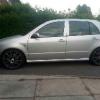
Fabia vRS 2005

Featured Replies

Hi had my vrs a few month now but have had a fair bit of stuff done to it.

Got a THS seat sport fmic fitted and had a custom remap at darkside developments.

Running a pd150 turbo which was bought brand new by previous owner so currently its 188bhp and 325lbft

Alloys do need a refurb but no point doing it now winters on the way!

Also just fitted some uprated xenon style bulbs and have to say they are miles better than the Phillips bluevision I had beforehand!

And they cost £7 from ebay with sidelights, the Phillips were £25!!

Will put a photo up of them later this evening

May possibly get the windows tinted next and a mufflerectomy as ive heard a golf tdi with one and it sounds pretty good.

Heres a couple of photos

Posted Image

Posted Image

Sent from my GT-I9300 using Tapatalk

  • Author

Photo of the new sidelight and dipped beam bulbs.

Posted Image

Sent from my GT-I9300 using Tapatalk

  • Author

Whats people's opinions on a decat on a standard exhaust system? And if I got the backbox cut out also is it 'too loud'

Would I be able to fit a decat downpipe with a regular exhaust system still in place..?

I did have a cat back exhaust on my previous car civic type r ep3 and it was a nice sound but never had one on a diesel so need opinions please :) on whether people regret having one fitted and gone back to standard etc

I've got a decat and then mufflerectomy on mine. Now I've had a remap it's got louder. It really whistles like a jet engine on idle but sounds awesome on boost,it growls like a petrol. I'd try and listen to this set up before as the turbo whistle at idle is a marmite thing!!

Bulbs look decent mate, got a link for them?

  • Author

Yeah mate here you go.

http://pages.ebay.com/link/?nav=item.view&id=130560630444

They are good and maybe ever so slightly less light output than my Phillips ones but a much cleaner look.. sidelights could do with being ever so slightly brighter but you get them for free anyway!

Create an account or sign in to comment

Recently Browsing 0

  • No registered users viewing this page.

Important Information

Welcome to BRISKODA. Please note the following important links Terms of Use. We have a comprehensive Privacy Policy. We have placed cookies on your device to help make this website better. You can adjust your cookie settings, otherwise we'll assume you're okay to continue.

Account

Navigation

Configure browser push notifications

Chrome (Android)
  1. Tap the lock icon next to the address bar.
  2. Tap Permissions → Notifications.
  3. Adjust your preference.
Chrome (Desktop)
  1. Click the padlock icon in the address bar.
  2. Select Site settings.
  3. Find Notifications and adjust your preference.
