



Skip to content

Help me find my old car :(
Featured Replies

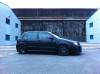
I sold my old fabia to a friend because i needed the money and now i miss it. He sold it to a guy in the lakes but i wanted to know if there is anyway of tracking this car again as my mate does not know the address or the guys name, any help would be great, Fabia vrs magic black **54 ozu, octavia vrs alloys in graphite grey, fmic, custom badges which are red and black, also it has audi tt front brake set up in red post-86987-0-95315200-1383583435_thumb.jpg

do you want to buy it back mate or are you just curious about it. Sorry to say but its a great looking mk1. :heartbreak:

Edited by O.C.D.

Looks really nice!! I know spiders have been done to death but they do look soooo good  :love:

They've been done to death because they *work* what is wrong with that :rofl:


I want to be different, hang on let me find some alloys that look crap :devil: Ok not quite that ambiguous is it to be fair to those that have some amazing alloys.


I like the spiders as they look better, but they look OEM like they SHOULD have been on the car in the first place (if it wasn't accountants running the show lol)

I'm seriously thinking about sourcing a set ready for summer, I agree they do look oem.

That looks lovely :)

  • Author

So does that mean someone has it or has seen it, the car was totally standard when I bought it so it holds sentimental value :)

So does that mean someone has it or has seen it, the car was totally standard when I bought it so it holds sentimental value :)

I've not seen it myself sorry. I'd of remembered seeing that but if it's on here I'm sure someone will know it

Create an account or sign in to comment

Recently Browsing 0

  • No registered users viewing this page.

Important Information

Welcome to BRISKODA. Please note the following important links Terms of Use. We have a comprehensive Privacy Policy. We have placed cookies on your device to help make this website better. You can adjust your cookie settings, otherwise we'll assume you're okay to continue.

Account

Navigation

Configure browser push notifications

Chrome (Android)
  1. Tap the lock icon next to the address bar.
  2. Tap Permissions → Notifications.
  3. Adjust your preference.
Chrome (Desktop)
  1. Click the padlock icon in the address bar.
  2. Select Site settings.
  3. Find Notifications and adjust your preference.
