



Skip to content

Had My Spoiler Done.
Featured Replies

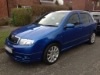
Had my spoiler sorted today and had the bootlid done at the same time. It had a few scratches and was cheap enough to have done.

I can't decide wether to put the Fabia vRS badge back on or not. Maybe leave it "de badged"?

What do you guys think?

68396299-4FE6-43D4-8D33-0756086CEDC6.png

Leave it off looks smart without

Leave it off looks smart without


+1


Looks much better de-badged :)

Definitely leave it off. :)

Looks a darker shade of blue in the pic, I wish they made it that colour!

I don't mean the boot lid I mean the shadow on the car. Looks goodd.

Looks a darker shade of blue in the pic, I wish they made it that colour!

I don't mean the boot lid I mean the shadow on the car. Looks goodd.

Looks like fords imperial blue

Looks like fords imperial blue

That's the colour I was thinking, couldn't think of it's name though. Shocking since I used to own a car that colour and my Dad still does lol.

did you use the same place as I did Matt ?

Newer vrs badge on the right hand side looks nice with matching one on the front grill.


I was thinking of leaving mine debadged after removing them all and then fitting the newer style skoda badge to the boot, decided in the end to fit the newer vrs badge to finish it off.


Dave.

  • Author

did you use the same place as I did Matt ?

Yea Ross.

I had the spoiler, bootlid and fog surround done at the same time.

Create an account or sign in to comment

Recently Browsing 0

  • No registered users viewing this page.

Important Information

Welcome to BRISKODA. Please note the following important links Terms of Use. We have a comprehensive Privacy Policy. We have placed cookies on your device to help make this website better. You can adjust your cookie settings, otherwise we'll assume you're okay to continue.

Account

Navigation

Configure browser push notifications

Chrome (Android)
  1. Tap the lock icon next to the address bar.
  2. Tap Permissions → Notifications.
  3. Adjust your preference.
Chrome (Desktop)
  1. Click the padlock icon in the address bar.
  2. Select Site settings.
  3. Find Notifications and adjust your preference.
