



Skip to content

Chrome grille surround....
Featured Replies

Just bought a new grille for my FL vRS but still debating what to with my chrome surround, whether to colour code or wrap it in black, ordered a new style badge for it to,


Anyone colour coded their chrome surround for a Race Blue vRS??

Doing mine at the moment, its drying in the garage before I start to laquer it. Def colour code abd update all badges.

Colour code. Looks much better.

Colour code for sure. Chrome looks OK, colour coded looks superb, black / matte / grey etc look unfinished and cheap to me. All personal opinion of course, so go with your favourite.

In the same boat. My car is white, and seen plenty black dipped etcetera but cannot find a picture of a white on white. No doubt there is, I just haven't spotted it yet. Anyone....!

  • Author

Well I'm having all the front lights tinted next month so wondering if a black surround is too much or whether to colour code, still in 2 minds, trying to find a pic of a colour coded race blue grille on a facelift to make up my mind.

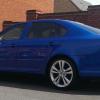
Mine is colour coded and is the best £10 i have spent on the car :)

Pic

a26689a7a45dee24a7c287c778510239.jpg

  • Author

I've seen a few pics and I've now decided on colour coded, will have to sweet talk one of my bodyshop customers on Monday to do me a favor lol.

Colour coded does look good tbh

Create an account or sign in to comment

Recently Browsing 0

  • No registered users viewing this page.

Important Information

Welcome to BRISKODA. Please note the following important links Terms of Use. We have a comprehensive Privacy Policy. We have placed cookies on your device to help make this website better. You can adjust your cookie settings, otherwise we'll assume you're okay to continue.

Account

Navigation

Configure browser push notifications

Chrome (Android)
  1. Tap the lock icon next to the address bar.
  2. Tap Permissions → Notifications.
  3. Adjust your preference.
Chrome (Desktop)
  1. Click the padlock icon in the address bar.
  2. Select Site settings.
  3. Find Notifications and adjust your preference.
