



Skip to content

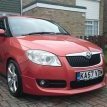
Photoshop Request - Skoda Fabia
Featured Replies

post-80790-0-66266100-1397515828_thumb.jpgpost-80790-0-15529000-1397515888_thumb.jpgHi,


Can anyone photoshop me some wheels, Roof, Front Grill and Door Mirrors on a pictures of my Fabia please 


Please can you make my current wheel to look like these:

post-80790-0-58849100-1397515094_thumb.jpg


And make my Roof, Front Grill and mirrors Gloss Black (to match my A pillars):


post-80790-0-00804100-1397515169_thumb.jpgpost-80790-0-50852600-1397515368_thumb.jpgpost-80790-0-22056200-1397515397_thumb.jpgpost-80790-0-28481300-1397515427_thumb.jpgpost-80790-0-24612200-1397515801_thumb.jpg


Thanks a lot in advance, Matty

  • Author

Anyone...? Pretty Please...;)

Can't do the wheels but here's a start

post-61834-0-73656500-1397671118_thumb.jpg

  • Author

Thanks a lot Charlie...! Can you please instead of the lights change the front grille to be gloss black...? This is looking very interesting...:)

No problems matty, how's this?

post-61834-0-43179300-1397681836_thumb.jpg

  • Author

Thank you Charlie. Now I just the wheels added and that will give me an idea and help make decision...;)

i i was going to do a quick pretty crap job it'd look like this


slottya5wheels_zps1cd34a4b.jpg


personally i don;t think those Audi-esque wheels are different enough from your current wheels.

you could plastidip them dark grey and they'd look exactly the same

  • Author

Thanks Pasty. I want to refurb mine and thinking about the style...;) this looks pretty nice IMO.

Guest
This topic is now closed to further replies.

Recently Browsing 0

  • No registered users viewing this page.

Important Information

Welcome to BRISKODA. Please note the following important links Terms of Use. We have a comprehensive Privacy Policy. We have placed cookies on your device to help make this website better. You can adjust your cookie settings, otherwise we'll assume you're okay to continue.

Account

Navigation

Configure browser push notifications

Chrome (Android)
  1. Tap the lock icon next to the address bar.
  2. Tap Permissions → Notifications.
  3. Adjust your preference.
Chrome (Desktop)
  1. Click the padlock icon in the address bar.
  2. Select Site settings.
  3. Find Notifications and adjust your preference.
