



Skip to content

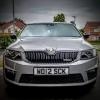
New Octy vRS - more pics and a video
Featured Replies

I followed a link from Danmann's post and found this

Apols if its already been done, or if this should be in the Octy 2 section...

Edit - Gotta say the accelerator pedal looks bigger than a Shifty's haddock!

yeah im liking it more and more, pedal looks silly imho

not liking it yet, pedel looks like it comes from a bus

  • Author

Front end still not agressive enuf for me - happy with my Octy 1

Not sure I'm liking the seat trim too much the light grey bits look 'wrong' for want of a better word.

Well I think it looks great. Need to persuade my Dad to swap his 9-5 for one :thumbup:

I love the dials and the seats looks great apart from the odd white bits.

I really dont want to sound negative but the front of it looks like a big dumb fish.

Absolutly stunning i want one!...i will dream and wish lol :rolleyes: but yeah really loveing the blue

I followed a link from Danmann's post and found this

Apols if its already been done' date=' or if this should be in the Octy 2 section...

Edit - Gotta say the accelerator pedal looks bigger than a Shifty's haddock![/quote']

knew the road test was coming up soon on that website and wanted to post the link on briskoda, but you still beat me to it! Posted the link in another thread about an hour ago before i found out you did the same yesterday! Will have to start spending 24 hours/day online instead of the current 10-20.....

The accelerator is like that on all Octy 2's isn't it?

Certainly has been in the two I've had as courtesy cars recently.

much prefer the new vRS badge too :)

Is one of the seats torn in those photos or has someone left a crisp on it?

I think it's a leaf mate...

Cat turd?

I still think it's a bland interior and the seats look like a beginner patchwork quilt maker came up with them.

i like...the colour :confused:

Create an account or sign in to comment

Recently Browsing 0

  • No registered users viewing this page.

Important Information

Welcome to BRISKODA. Please note the following important links Terms of Use. We have a comprehensive Privacy Policy. We have placed cookies on your device to help make this website better. You can adjust your cookie settings, otherwise we'll assume you're okay to continue.

Account

Navigation

Configure browser push notifications

Chrome (Android)
  1. Tap the lock icon next to the address bar.
  2. Tap Permissions → Notifications.
  3. Adjust your preference.
Chrome (Desktop)
  1. Click the padlock icon in the address bar.
  2. Select Site settings.
  3. Find Notifications and adjust your preference.
