



Skip to content

Daytime Running Lights.

Featured Replies

Hi guys,


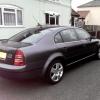
I want to add daytime running lights to my 2005 Superb...


I just wanted to ask if anybody has done this and some advice suggestions.


Firstly how to wire them up? Secondly where to mount?


Thanks,

Dan

There is a very pricey Milotec kit you could get - it puts them into the little covers at the bottom of the bumper:

http://milotec.de/index.php?cat=c358_LED-Day-Driving-Lights.html&XTCsid=41dfd5ff3db267bd6970974082d44463


Or you could hack some aftermarket LEDs into the same location.  The fitting guide for the milotec kit might give you the idea of how to fit it.


I've not done it myself, and personally think they don't look great in that location anyhow, but each to their own...! :)

You can take power from headlight switch, pin is marked "TFL", you need a repair wire to use it, and there is a spare hole in a large rubber grommet running wires from cabin to plenum chamber, near ECU.


Either wire in separate DRLs, or you may consider wiring in an adjustable voltage regulator+schottky diode feeding into high beam bulbs at the fuse box.

Around 3V at the bulb (3.7V-4.0V unloaded) makes perfect DRLs out of high beams, not blinding anyone, and not darkening the bulbs over time.


So long as you can get hold of easy to wire and adjust high current voltage regulator (also known as a step-down dc-dc converter), using high beams as DRLs is far easier than installing extra ones, as all electrical connections are in the fusebox and on the headlight switch (plus ground), and no extra work is needed in the engine bay.

Create an account or sign in to comment

Recently Browsing 0

  • No registered users viewing this page.

Important Information

Welcome to BRISKODA. Please note the following important links Terms of Use. We have a comprehensive Privacy Policy. We have placed cookies on your device to help make this website better. You can adjust your cookie settings, otherwise we'll assume you're okay to continue.

Account

Navigation

Configure browser push notifications

Chrome (Android)
  1. Tap the lock icon next to the address bar.
  2. Tap Permissions → Notifications.
  3. Adjust your preference.
Chrome (Desktop)
  1. Click the padlock icon in the address bar.
  2. Select Site settings.
  3. Find Notifications and adjust your preference.
