



Skip to content

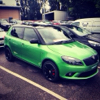
*Kermit' 1.4 DSG vRS
Featured Replies

Hey guys, been on here a while now and never got round to doing a project thread.

First of all I used to have a MK1 Fabia vRS you all probably would of seen it on here on my old account, that had quite a lot of work done to it. Here's a picture of it.

dc9883acd2c15b242b9b3eb84a81e92d.jpg

Purchased a Fabia vRS 1.4 DSG (Kermit) about 6 months ago now on a 14 plate, I've covered 2800 miles in it since I have owned it as I have a works van that I normally commute in.

Picture of when I test drove it.

2791aafbed8991bbca7ebd41dee99898.jpg

Current spec:

* Black pack

* Arm rest

* Team Heko wind deflectors

* Bluetooth telephone prep

* Black gigaro's

* Black headlights

* Black grille

Future spec:

* Parking sensors

... To be continued

Don't plan on doing to much to it, well as of yet I don't [emoji13]

More pictures to be taken soon.

132a5a249f93ae4b09a995a6ce2eb0f7.jpg

bdfb2adf0fb9addfbba7d2646123d3fa.jpg

Sent from my iPhone using Tapatalk

really like the green and black. think it needs some lowering springs

  • Author

I know, I've always lowered my cars that I've had, it drives absolutely mint at the minute, didn't really want to be messing that up

Sent from my iPhone using Tapatalk

I know, I've always lowered my cars that I've had, it drives absolutely mint at the minute, didn't really want to be messing that up

Sent from my iPhone using Tapatalk

springs and RARB, and you will wish you had done it earlier ;) (and bilstiens if you can afford it!)

That's the same as mine :-)

Very nice the MK2 fabia vRS good so good in rallye green

  • Author

Very nice the MK2 fabia vRS good so good in rallye green

Thank you [emoji4][emoji4]

Sent from my iPhone using Tapatalk

Create an account or sign in to comment

Recently Browsing 0

  • No registered users viewing this page.

Important Information

Welcome to BRISKODA. Please note the following important links Terms of Use. We have a comprehensive Privacy Policy. We have placed cookies on your device to help make this website better. You can adjust your cookie settings, otherwise we'll assume you're okay to continue.

Account

Navigation

Configure browser push notifications

Chrome (Android)
  1. Tap the lock icon next to the address bar.
  2. Tap Permissions → Notifications.
  3. Adjust your preference.
Chrome (Desktop)
  1. Click the padlock icon in the address bar.
  2. Select Site settings.
  3. Find Notifications and adjust your preference.
