



Skip to content

Pick up my new Spaceback friday!
Featured Replies

Some of you may remember my last post about rejecting my rapid due to a list of stuff going wrong.


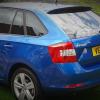
Well the time has finally come to pick its replacement up. A Spaceback se tech 1.2tsi 105 in race blue with sports seats, sports flats bottom steering wheel, sunset glass and 16 rock alloys.


It wasn't rejected in the end but both skoda uk and vwfs made contributions which has made the deal work.


Will put some proper picks up when I have it.


post-126491-0-93453400-1438112642_thumb.jpg


Wow you're lucky I'm still lumbered with mine after rejecting. How did you manage to get out of it and get this one?

If you don't mind my asking.

Sent from my iPhone using Tapatalk

  • Author

I kept on at vwfs to start with and managed to get them to knock some off the settlement figure. I had a list of stuff as long as my arm to complain about and basically said that it wasn't fit for purpose and wanted replacement.


Next I found a very helpful manager at my dealership and asked him to help fight my corner with Skoda UK.


Its took a long time but I think Skoda realised I had a lemon and agreed to help, albeit on a older spec car that had to be registered before September that was reduced by them in price.


Very lucky boy I think.


I can give you the guys name at vwfs if you fancy trying again?

Thanks for the info. I'm going for a 2nd attempt of rejection in September on its first service. If you wouldn't mind PM me the vwfs name. Thank you.

Enjoy your new one. Looks great :)

Sent from my iPhone using Tapatalk

Create an account or sign in to comment

Recently Browsing 0

  • No registered users viewing this page.

Important Information

Welcome to BRISKODA. Please note the following important links Terms of Use. We have a comprehensive Privacy Policy. We have placed cookies on your device to help make this website better. You can adjust your cookie settings, otherwise we'll assume you're okay to continue.

Account

Navigation

Configure browser push notifications

Chrome (Android)
  1. Tap the lock icon next to the address bar.
  2. Tap Permissions → Notifications.
  3. Adjust your preference.
Chrome (Desktop)
  1. Click the padlock icon in the address bar.
  2. Select Site settings.
  3. Find Notifications and adjust your preference.
