



Skip to content

Trip Computer keeps resetting?
Featured Replies

Hi. 


Basically I went abroad and only got back, my car was parked up for around 3 to 4 weeks. I had disconnected the positive terminal. 


Came back and it started first time. Only to notice that the a lot of the lights were flashing on the speedo. Went off after abit and never came back. 


Now what ive noticed is that if I leave my car parked up and come back to it, the trip computer will have reset itself. 


The trip computer ( Average Mpg, Average Speed Ect )


Every thing goes back to 0. 


But if I drive the car and park up and turn it off and back on straight away it dosent reset. Only resets after a certain amount of time which im not 100% sure yet. 


Ive used a multimeter to check voltage of battery which shows 12v and when started shows 14v. 


So not sure what it is. Anyone have an idea??


Thank You 


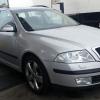
Skoda Octavia Elegance 2.0 TDI 55 Reg 

Sounds like you're looking at trip1, which resets after 2 hours.


You need to press the OK button under the stalk which is trip 2. This resets after 99 hours of driving.

  • Author

Sounds like you're looking at trip1, which resets after 2 hours.


You need to press the OK button under the stalk which is trip 2. This resets after 99 hours of driving.


Oh didnt realize it had 2 trips LOL. School boy error. Thanks for that 

Create an account or sign in to comment

Recently Browsing 0

  • No registered users viewing this page.

Important Information

Welcome to BRISKODA. Please note the following important links Terms of Use. We have a comprehensive Privacy Policy. We have placed cookies on your device to help make this website better. You can adjust your cookie settings, otherwise we'll assume you're okay to continue.

Account

Navigation

Configure browser push notifications

Chrome (Android)
  1. Tap the lock icon next to the address bar.
  2. Tap Permissions → Notifications.
  3. Adjust your preference.
Chrome (Desktop)
  1. Click the padlock icon in the address bar.
  2. Select Site settings.
  3. Find Notifications and adjust your preference.
