



Skip to content

Colour Coding

Featured Replies

Hi,

I am thinking about having the door handles and bump strips colour coded silver when I get my vRS.

Has anyone had this done and how much does it cost?

Also are there any other products that can be fitted to the handles to change from black?

Thanks,

Rik

yeah me too.. also noticed the last vrs's have the colourcoded handles.

So do the lower speced models, I think the Ambiente has them.

You could possible borrow some of a scrapped Golf or Polo, but you'll have to check if they're compatble. The colouring would be better than painting them yourself.

I did just this on my old (metallic silver) Scooby. Halfords will make up the paint (and it was a perfect match), and you basically just need to key the surface, primer and then 4 or 5 top coats. Done in a day and lasted much better than the professionally sprayed lip spoiler the bodyshop did for us!

Chris

This is a nice mod, I thought about it for my Elegamce but then decided agaisnt it as I quite like the black, my car is petrol green so it works quite well.. would be a different story though if car was a lighter colour or even silver.. then they'd stick out.

If Ya doing a VRS, may I sugest you check out painting hte chrome grill surround black? Give the Furby a all togther more aggresive look, again.. I wanted to do this but on a green elegance? seemed little point..

Hehe, read between the lines.. I want a silver VRS ;-)

Rob.

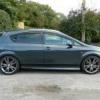
You could try Milotec Chrome Handle Covers fro Butts of Bawtry. I have them on my Black Fabia. They look better on a Silver car IMO

IMGP0070.jpg

  • Author

How much are these?

I have just downloaded the brochure, just waiting on them to send the price list, there are some nice internal and external styling buts from them

  • Author

I have asked Skoda if they will colour code the handles for me before I pick it up, they have some work to do anyway. Will see what they say and how much it will cost. If not the chrome handles seem like a good idea.

Create an account or sign in to comment

Recently Browsing 0

  • No registered users viewing this page.

Important Information

Welcome to BRISKODA. Please note the following important links Terms of Use. We have a comprehensive Privacy Policy. We have placed cookies on your device to help make this website better. You can adjust your cookie settings, otherwise we'll assume you're okay to continue.

Account

Navigation

Configure browser push notifications

Chrome (Android)
  1. Tap the lock icon next to the address bar.
  2. Tap Permissions → Notifications.
  3. Adjust your preference.
Chrome (Desktop)
  1. Click the padlock icon in the address bar.
  2. Select Site settings.
  3. Find Notifications and adjust your preference.
