





beneix
Members
-
Joined
-
Last visited
Everything posted by beneix
-
I used to have a RHD mk2 Octy when I lived in the UK. When I took it to the continent, I would do a manual adjustment just before getting on the ferry and I recall it was fairly straight-forward and specifically intended for LHD/RHD adjustment. Fast forward to today and I am in the opposite situation – I have a LHD mk4 that I am going to travel to the UK with. I have no option in the menu system for adjusting the headlights LHD/RHD("Travel mode"). I do have an option to dip the lights. Having searched on the forums, I have seen the following suggestions: Buy Eurolights stickers Dip the lights from the infotainment menu Adjust the lights using the two adjustment screws on each headlight Trust that the car will change things itself based on the GPS Do nothing Nowhere have I seen any suggestion that a similar method exists for the km4 as what I had on my mk2. I don't think (4) is valid for my vehicle, I really don't want to do (3) as it will be difficult to revert and (5) feels wrong. What have other people done?
-
@SteveTheElder Yes, what you write sort of rhymes with my perception. It would be great to find some actual confirmation of what we both feel is going on. @Edela Unfortunately, there is no read-out of energy flow, the state of the 48V battery or when regeneration is happening on the MHEV range. I suppose Skoda felt it unnecessary and also wanted the overall experience to be "seamless".
-
OK, so essentially the regenerative braking on MHEV models only applies to autonomous braking, i.e. not braking using the pedal?
-
-
Does anyone have a link to more detailed information about when the regenerative braking engages on a mild hybrid Octavia? I have been trying to sense this; sometimes it is clear, for example when the car automatically decelerates due to upcoming speed limit changes or vehicles in front of the car, but I haven't been able to tell with certainty if it is ever activated by pressing the brake pedal. I'd like to understand if pressing the brake pedal always only uses the brake discs, if it sometimes uses both discs and regenerative braking or if in some situations pressing the brake pedal (gently) would activate only regenerative braking but not the discs. On the Skoda site they say the following, but it is not clear whether this applies to the MHEV range: "To make the most of it [regenerative braking, my comment], gently press the brake pedal to engage recuperation first; regular brakes only kick in once regenerative braking is maxed out." However, I can sometimes clearly hear the discs engage (for example when it's been raining and they have a thin layer of oxidation) even when using the brake extremely softly, for example when rolling in a queue 1-2km/h and just tapping the brake.
-
My O3A8 update installed seamlessly and there was no need to enter anything, all settings carried over without any intervention from me.
-
@crisdevis Did you ever figure this out? I have tried putting some jpg files on a USB stick but when going to the "Backgrounds" selector, none of the files show up as an option. It could be that the file needs to be a certain aspect ratio or certain number of pixels, but in any case I would love to hear from someone who succeeded in loading backgrounds from a USB stick.
-
What sort of temperature does it keep the glove box at? I am wondering if it is always the same temperature regardless of what you set the cabin temperature to.
-
I have the same menu option to choose between three different backgrounds...except all three are blank, just a frame around an area the same colour as the others (dark grey/black). How are you supposed to get different backgrounds loaded?
-
I have an issue I am unable to fix: I keep getting voice prompts in German, that I think are saying things like "police reported ahead" and "warning: stationary vehicle on the road". I have looked everywhere for a menu setting to change this to English, without success. I don't even know if the voice is coming from the built-in navigation, Traffication or from one of the Android Auto apps. It happens regardless of whether I am actually using Waze or Google Maps, but I have a feeling that these apps could still be active "in the background" even when the Skoda navigation displayed on the screen. The warnings only come occasionally, sometimes days or weeks can go between hearing them. Where should I look for the setting to turn this off or get it in English?
-
Update: I had the car looked at by a dealership yesterday. They did diagnostics but said they couldn't find anything wrong. They gave me a sticker with the chassis number on that they asked me to put on the dashboard so that next time I get the issue I can take a photo of the dashboard with the VIN number in the photo...this is because I had already given them a photo that my wife took when it happened last time, but they said this was not enough to validate work being done under warranty (?!).
-
The other half was driving while I was at home. She had set a destination and was driving in unfamiliar surrondings at night. She claims that she suddenly discovered that the navigation system had changed the destination and as a result she had to re-enter the original destination, turn around and retrace her steps. We have had some other issues with MIB3, for example a several hour-long loss of functionality due to error with the SOS module, but that only happened once. I am left wondering if the problem with the navigation is real or imagined. Since I wasn't in the car, I can't tell what actually happened. Has anyone experienced either a spontaneous change of destination, or observed some mistakes that one can make that would have this effect? For example, I am thinking that perhaps if you by mistake point somewhere on the map touch screen and don't pay attention, perhaps this could set a new destination.
-
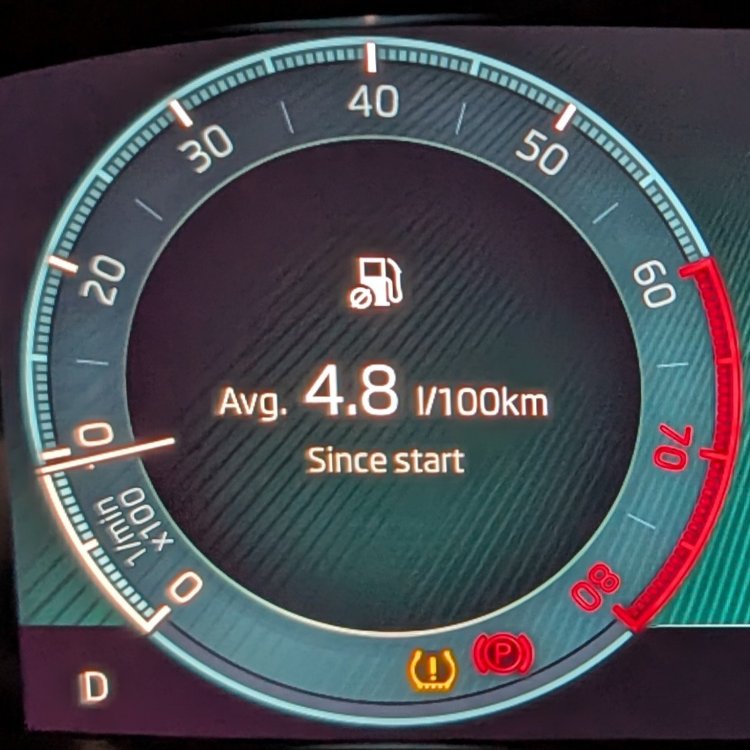
I continue to be impressed with the fuel economy of my pre-FL 2024 mild hybrid 150hp Octavia. Yesterday, a 320 km trip with average speed of 61km/h, constituting a mix of slow city driving and about 250km of 140km/h or 120km/h speeds over a 6h period yielded a 4.8l/100km consumption (that's 58.9 mpg in the UK). The drive included driving across the Graian Alps, through the Frejus tunnel. I really can't complain!
-
Well, what do you know? I bought yet another USB stick, this time a 64GB SanDisk Ultra Dual Drive Go, and transferred all the files to that. Touch wood 🤞, it seems to have fixed the issues. It's been a week now and I'll give it some more testing over the weekend, but so far so good. The weird thing is, I had already tried the exact same files on a 64GB SanDisk Ultra Dual Drive Luxe, a 128GB SanDisk Ultra Dual Drive Luxe, a Transcend 32 GB USB-C/USB-A and a 64 GB Transcend USB-C/USB-A stick, all formatted FAT32 like this one. All of them had the problems I described above. I fail to understand why those would have been problems and this one would work. I'll post back in a week or two to confirm. Wish me luck! 😊
-
Since I have continued to experiment with this over the summer and still have not managed to get music to play properly, I will recap: Music plays from the USB stick, but not in a usable way: Every time I select Media, playback starts from a specific ABBA album rather than the last played one. Playback does not follow album order, instead it jumps randomly and only plays between 2 and 5 tracks from each album, then jumps to another album. Sometimes it stops mid-track. Sometimes after stopping mid-track, it will start a completely different track 5-10 minutes later if you leave it alone. Pressing "next track" sometimes works as it should, sometimes it works but only after a 1-2 minute pause with silence, sometimes it doesn't work at all and sometimes it jumps to a random track. Selecting a new album or track from the screen during play sometimes works, most of the time it does nothing, sometimes it works if you wait a couple of minutes (during which time the currently playing track continues). What I have tried: Three different USB sticks of 32, 64 and 128 GB size (all Sandisk USB-C, no adapter) FAT32, exFAT and NTFS file systems MP3, AAC and FLAC Tried both center console USB slots. Start playing either by selecting Artist or Album, or by selecting the partition in the menu. Music placed in a root folder called "Music" All tracks have had metadata cleaned with MP3Tag, ensuring that both Album, Artist, Album Artist, Track, Track number etc. are all complete and correct. All files have been given file names starting with two-digit track numbers, e.g. "03. Dear Doctor.flac". I have reset the infotainment system. Since nothing has worked, I have booked the car in with the garage late September and will update here (I can't say I have much hope). 😢 If anyone has any other suggestions to try, please let me know.
-
The wife has our mk4 on an overseas trip. Suddenly today, without having crossed any country borders for over a week, the system will not boot up but gets stuck on "Loading settings". Obviously this means there is no satnav, etc. The light by the SOS button is not lit (neither green nor red). I talked her through doing a reboot of the system, but this didn't help. The car is from 2024 and has 1985 software. Having read up here about various things people have used to resolve this issue, some are things that I think my wife would be prepared to try but some are not... Start and cancel SOS call Pull fuses for instrument cluster and infotainment system Disconnect the battery I'd like to hear from any drivers of mk4 with 1985 software who have experienced these symptoms what worked for them. The reason I mention not crossing country borders is that I believe sometimes the issue has been related to the SIM or eSIM not achieving coverage in a new country. Since the car entered the current country 10 days ago and the problem only started today, I am sceptical that mobile coverage would explain the problem – but if others have experience that it can take that long before the system goes haywire, I'd be interested.Is it possible to activate the menu choices using OBD?Thanks @Novascape . I have always been quite thorough with my metadata; I download album art using Album Art Downloader and embed it using MP3Tag. I use the latter to make sure my file names are consistent, etc. My collection of digital music is fairly well maintained as far as metadata is concerned, and it has always worked well on my Slimserver, various DLNA players and on my mobile phones. However, I decided to give it an extra check and realised that many of my files lacked the "Album Artist" tag (as opposed to the "Artist" tag, which was present in all files). It appears this is not a problem for mainstream players but might be the reason Columbus doesn't work well. Consequently, I used MP3Tag to rectify the issue and (touch wood) it seems to have fixed the issue. I have yet to spend proper time in the car to verify it's all working well, but early signs are good. I will report back here with confirmation after some time. (As a curiosity, I can report that if the "Album Artist" tag is blank, then Columbus will report the "Artist" and "Album" as "Unknown" as well, even with these tags present in the file.)Unfortunately, I have to take my words back. The issues have come back. I am now trying to figure out what might be factors in this: File system (FAT32, exFAT, NTFS) Music format (MP3, AAC, FLAC) Folder structure on the stick Size of the stick (some claim too large can be a problem) Brand and model of the stick Will update here if I find something that works 😢I am on 1985. I am using a Sandisk Ultra Dual USB-C stick, 128 MB. I suppose I could purchase a smaller one and see if that makes a difference. As regards exFAT, I have read many posts on the forum and some swear by FAT32, some recommend exFAT and some claim only NTFS will work well... 🤷♂️I'll try that tomorrow, thanks. I also have that structure: Audio / <Artist> / <Album> / filesI have tried and failed to get music to work well from a USB stick in my Octavia mk4 pre-FL since I bought it in February. I can play music, but without fail the system will just play the first song selected and then misbehave. Sometimes it is just quiet forever. Sometimes it waits for three to five minutes and then plays a random other song from the collection (I do not have shuffle on). Sometimes I can move to the next song using the "next" button on the steering wheel or on the screen, but most of the time it doesn't work. I have tried formatting the stick as FAT, exFAT and NTFS. I have followed the advice elsewhere in the forum to put all music in a folder called "Audio" in the root of the stick. I have tried mp3, FLAC and AAC. I have tried starting the navigation to the songs from the "Partition 2" or from "Music". I have tried rebooting the Infotainment system (Columbus). Does anyone have anything else to suggest?I have noticed the same with my early 2024 mk4. I was quite surprised, since all my previous vehicles have had at least 5-6% difference even with factory spec wheels/tyres. It made me wonder if somehow the speedometer actually works off GPS rather than wheel rotation.Thanks for this @Tom_Kodiaq . Does anyone know if there is a way to determine what equipment your car has? My car was manufactured in April or May 2024, and per Skoda's own table that means that it could be either "MOD3 pre-UNECE" or "MOD3 UNECE", which makes quite a difference (the Octavia has a period April to June 2024 when it seems both versions were manufactured). (The check by VIN only tells you, by country, whether certain services are available today. It does not tell you which exact version of the radio setup your vehicle has so that you can use the table they provided to be prepared for the future with the 2G/3G switch-off.)


Important Information
Welcome to BRISKODA. Please note the following important links Terms of Use. We have a comprehensive Privacy Policy. We have placed cookies on your device to help make this website better. You can adjust your cookie settings, otherwise we'll assume you're okay to continue.