




andreiro221
Members
-
Joined
-
Last visited
Everything posted by andreiro221
-
new firmaware is needed when something does not work right. why do you want update ?
-
the SW is there, but it is locked by a FEC/swap code that only Skoda can generate for a specific VIN
-
i think the BCM needs to be 089 or 090 you need to check it your BCM has a pin for the MFWS comunication - big plug with 73 pins, pin nr 13
-
first 469, then 741, then 742
-
just read this page
-
nobody reads the funcking manual anymore 😆
-
the same i posted ealier. 469 + 741 + 742
-
as you have 0270, you need to update first to 0308 and then to 0324 update is done by using USB memory stick. what SW is installed in your unit? reset MIB unit by pressing 15 seconds on the POWER button. do a factory reset and register again as the main user ( you need both keys) check after that
-
yes, 1.0 tsi has oil level sensor. All TSI and TDI engines that run on 0W20 engine oil, wil burn more or less engine oil. 1 liter / 5000 km is normal also, the message in the dash will clearly say if the oil level is LOW or HIGH
-
it is not recommended .
-
https://we.tl/t-RS6zfImWj5 unpack every zip in the root of usb stick. Use usb C native Usb stick and a charger connected to the car battery. Engine off, ignition on
-
i will try to post them here the next days...
-
for some special updates, some procedures must be taken with ODIS. But not for those udpates, they are normal updates once you finish updating, you need to confirm the installation change to erase an error. BUt it.s not mandatory. It doesn not affect in any way https://mib-helper.com/im-so-xory/
-
if you are not sure, just take a trip to the dealer and pay for update 😇 for older scala/kamiq, 741+ 742 is the latest version curently available, you can ask the dealer. you cannot restore older SW 469 chagelog : Problems with rear camera view: The camera will either not start or - on the contrary - will not switch off while driving forward or even at higher speed. The digitizer of the display of the control and display unit does not work. The infotainment system is sporadically spontaneously switched on after parking and locking the vehicle. Failure of ABT display (black screen). MIB without sound or sound cannot be controlled; faulty voice control. MIB is sporadically switched off 741+ 742 changelog • Problems with the reverse parking camera display: it either does not start at all or does not switch off when driving forward or at higher speeds. • The digitizer of the display and control unit does not work. • After parking and locking the car, the infotainment system switches on spontaneously/sporadically. • ABT display blackouts (black screen). • MIB is without sound or sound cannot be controlled; faulty voice control. • Fault B104914 is stored in the OCU control unit
-
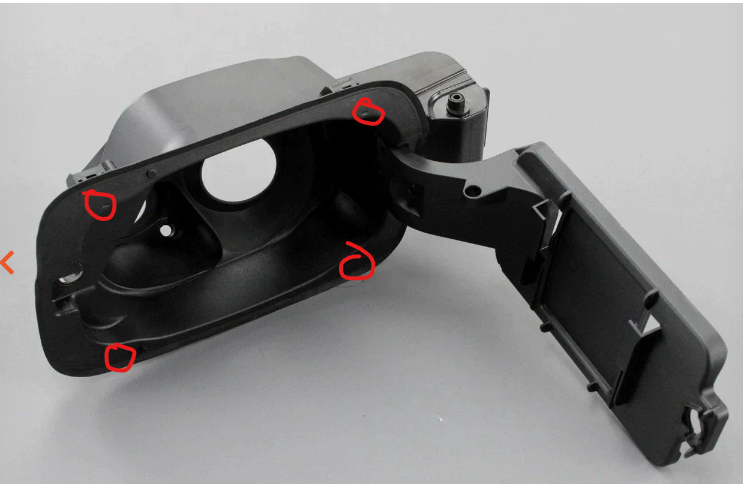
you need to remove the entire flap , it only hold in with plastic clips. You need to puncture the plastic in the marked areas and insert a screwdriver to press the clips. it similar to this https://youtu.be/cmuF21KrB8w
-
you need to try other phones, but nobody complaint about conectivity. only newer MIB, with SW 17xx, had problems with Samsung S23 Android Auto. But these are other hw units there is someone here on forum that tried 1800 on his older unit with 469 and it didn.t finished the update corect.
-
742 is the latest for your MIB 1800 is for other versions , not yours
-
latest is 741 + 742
-
if it.s dead, yu can.t update it. try disconecting the battery for 30 minutes.
-
thenyou need tu update to SW0469 and then to SW0741+sw0742
-
i need your VIN to be able to send you the SW
-
if you have SW469 , you need to update tu SW741 AND SW742 , because 741 is an incomplete SW
-
what message do you get on the screen, when you press the button APP? "please contact a dealer to activate "? only at dealer, with an activation key. some 250 euro
-
yes, only the airbag needs to be removed
-
first step - do a scan and post here the errors


