wagster
Members
-
Joined
-
Last visited
Everything posted by wagster
-
Depends on where you want to buy the adaptor from, how much you are willing to pay and how long you are wanting to wait to get it delivered, cheapest is AliExpress but also the longest delivery time, most expensive is Halfords but probably the the quickest to get it if they have it in stock in store, just google Dual Fakra to FM and take your pick from Amazon, eBay, Connects2 AliExpress etc. Just make sure you get the one with the power feed and yes no matter whether you are using the single or double version make sure you connect the blue power feed.
-
Yes if you are planning on using that one for the GPS then yes it is a bit too short. I use that one which is 15cm long to connect the USB dab dongle to the factory dab aerial. For the GPS I went and bought this one https://www.amazon.co.uk/gp/aw/d/B07YXP1JP1?psc=1&ref=ppx_pop_mob_b_asin_title which is 30cm and plenty of length.
-
The seller is meant to be getting his friend to email me the factory files so I can restore the head unit using USB as I am hoping that will have all the apps on it so I can set it back to how I 1st got it with everything activated. If/when I get it I will let you know if it works. Not holding out for much hope though.
-
In short the answer is no. As you might have picked up on in previous threads about this, the only way to get the factory USB to work correctly if you have the factory USB type that has the +5volts and ground connected on the external part of the USB socket, is to splice in the required 5volt power into the quadlock connector. The onlt other option you really have is to replace the existing factory USB with a version that has the +5volts and ground wired to the internal pins of the USB socket. The way they have designed the double USB cable is that one USB will work as normal and the other only supplies 5volts that can only be used for charging something. What i did was use the USB that only allows charging and cut the end of the USB and spliced that into the quadlock connector to get the factory USB to work. Speaking to the vendor with most of our problems has always resulted in them not having a clue so get used to it
-
-
-
Well as i never re-setup TLink after i initially had it working wired and wirelessly with version 1.7.7 then i did a full factory reset, i thought today i would reinstall it. Well, the only version i can get work is 1.4.30 but that only works wired, any other version all the way up to version 1.8.8 just asks for activation!!!!!!
-
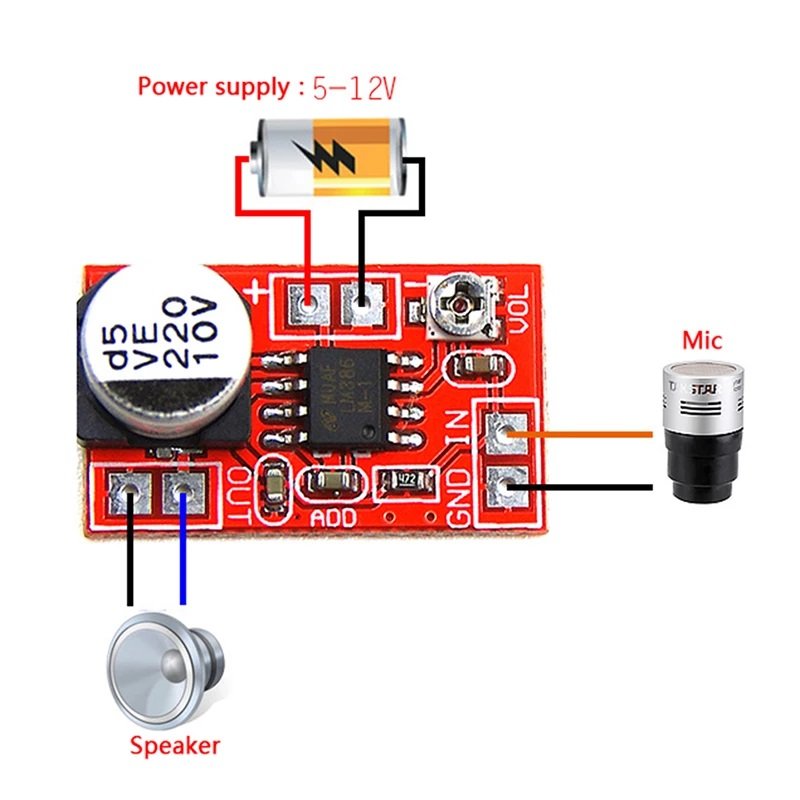
If i was going to do it i would ultilise the 2 connections for the factory mic that are connected in the quadlock connector , i have already added in the 2 extra connectors to the chinese connector to connect to the factory mic and it worked but was poor quality so would only need to connect the amp board inline inbetween the chinese connector and quadlock
-
-
Junsun head units are slightly different compared to what we have fitted. That is the reason why you cannot find the themes app as i do not think it runs a theme launcher as such and most people with your type of head unit install 3rd party launchers. As i have no real knowledge of using your type of setup it is hard to provide help. You might be best taking a look at the the forums on xda https://forum.xda-developers.com/t/junsun-v1-pro-megathread.4385315/ where you might get better help. Anyway yes you will need to cut those 2 wires as you are using a canbus box. With a canbus box connected the power ACC power supply to the head unit is controlled from the canbus and only powers on when the ignition is switched on, by having those 2 cables still connected you are basically providing permanent power supply to the head unit that will cause the battery drain. On our head units we do not have those 2 cables so nothing for us to cut. By what i have read on the Junsun units they do not have the option to update OTA and can only be done by USB and the files are provided by Junsun directly when you ask them, on the XDA forum they do have all the firmware files available to download when new ones are released.
-
-
In my maxidot I do not get the same options or information as I did with the factory head unit. For the phone information all it shows is the battery level and signal level. For the audio I only get the FM frequency. For the navigation I only get the compass. As I never use the maxidot for driving info I am not bothered. As for the mph/kph if you are on about what is shown on the main home screen then you need to go into the themes app then click on the settings cog then click on plugin and you set the mph or kph there.
-
I will try and answer a couple on the usb connectors side but will respond better when I get on a computer. To start with how many white connectors to usb female connectors did it come with? Were they 6 pin white with all 6 pins wired to how many female usb's? Did they give you a 4 pin white to female USB? The 4 pin white that goes to the big black connector as you put it, can you take a photo of what color connector and what pins it goes to in the big connector. The 8 pin white connector that only has 2 green cables is what comes from the canbus box and you have that in the correct place. Regarding the airbag problem, did you turn the ignition on with the airbag switch disconnected? If you did then you will probably need to get the fault cleared from the ECU and you will need to get hold of diagnostic equipment to do that. What seller did you buy the unit from and did they give you any wiring instructions for it?
-
-
I know my brake lights come on when using ACC but never took much notice whether it was under gentle or rapid deceleration. At night time I can see the brake light coming on when looking in the rear mirror.
-
-
-
I don't have that problem, have you tried to see if it still happens when using the stock launcher, I haven't switched over to Agama yet. Also in the car settings if you scroll down to the bottom there is an option to switch on or off parking assist or words to that effect, try changing that as I find that it controls whether the car sensor screen stays on after going from reverse to drive and it doesn't go off until I get above a certain speed driving forward.
-
I bought this one a while back and fitted to my 2015 estate with MIB2. US $22.67 19%OFF | HD 170 Degree Fisheye Lens Car Trunk Hand Switch Rear View Camera For Audi A4 VW Touran Tiguan Tournamen Skoda Speed Octavia https://a.aliexpress.com/_mO0C3P2 If you go this route you will also need these connector pins to connect the two camera wires to the quadlock connector https://www.ebay.co.uk/itm/AMP-TE-CONNECTIVITY-963715-1-CONTACT-SOCKET-20-AWG-CRIMP-Price-for-10-/153922461340?mkcid=16&mkevt=1&_trksid=p2349624.m46890.l49286&mkrid=710-127635-2958-0 Then just need to code the unit with either vcds or obdeleven to activate the camera.
-
-
To be honest I would not have any idea which one to pick but you could try them all I guess. I know that I have a UIS8581A UNISOC chip fitted but that is not much help. You could also add on the official FCC Launcher forum for help https://forum.xda-developers.com/t/fcc-car-launcher-official-thread.3639659/page-412#post-85987889
-
As I have mentioned in previous posts when I tested the internal mic, an external mic and also the factory mic, the factory mic seemed to be the worst out of the three, I always tested with the car stationary and engine not running. Anyway, today my wife phoned me whilst I was driving and she complained that the call was bad and to her it sounded like a wasp or bee was humming down the phone to her, on my side everything seemed clear. When I got home, I decided to run some more tests using the microphone sound test app that I had installed but this time with the engine off then engine running. I tried with the internal, external and factory mic and the results were that with the engine turned off the sound quality on all three mics was ok but with the engine running I can clearly hear a humming/droning noise on all three mics as if the head unit it picking the sound of the engine running, if I increased the revs on the engine the humming also got louder. I might have to dismantle the head unit to investigate a bit further but I need to do some research first. Your reboots might be to do with overheating and I have seem on other forums of some people having overheating issues during hotter weather, there is a workaround for that in that you can fit a small cooling fan to the back of the head unit which apparently solves the overheating problem. I would seriously think about doing a proper factory reset just to eliminate any corrupt files etc. from where you have been playing around trying to make any changes.. When I have been resetting mine, I always doing a factory reset through the settings menu using password 7890, then when it has rebooted I then go into the full android settings and do a full factory reset as well.
-
What I did when I ordered the boot handle camera was sort out the coding required whilst waiting for the camera to arrive. I hard wired a short RCA female connector to the iso connector for the MIB so I could just plug in the camera when it arrived which also gave me easy disconnect options if I needed to remove it and not have to mess around with the pins on the iso. To test it I took an old video player out to the car which had an rca video output on it and plugged it in, turned on a video to see if it was playing on the screen when I put the car in reverse. That is something you could try as you already have the yellow rca connector fitted to the head unit, you just need to find a piece of video equipment that has rca video output.
-
I also have the boot handle camera and yes it is a bit of a pain to fit, mainly running the cables through the the rubber grommets where the the boot opens if you have the estate car. I don't know how it will work installing the camera with the new head unit installed as I did it when I had the Amundsen fitted and I had to make some coding changes with Obdeleven to get the camera to work but without the Amundsen fitted you have no access to the 5F module to make the required changes. I guess you will need to test it before you run the cables and fit the camera to see if it works properly when you select reverse. If I remember without looking you need to go into settings then factory settings then use the password 123456 and you should find a backup apk option. Once it has finished you go into file manager app and find the backed up folder and then transfer to memory stick. Also make sure you have show hidden files and if you have a folder called blink back that up as well as apparently that holds any licences for the unit.
-
I couldnt get the sim dongle to recognise a Vodafone PAYG sim but worked fine with my EE contact sim, I had to open up the head unit to access the built in sim slot which works fine for the Vodafone sim, if you get a chance can you test a Vodafone sim if you have one spare just to see. I don't seem to have any problem using the built-in mic but until you try it you won't know. Didn't they send a free reversing camera with the head unit as I got one free but didn't use it as I already had a camera fitted. Just remember to do a backup of the unit so you recover the apps if you have to reset for any reason.