Xsr
Members
-
Joined
-
Last visited
Everything posted by Xsr
-
I was under the assumption that it included all mpi's between 1999 and 2007.
-
10w40 is what is recommended by Haynes and by the manufacturer. However that was a long time ago. Now days 5w30 is recommended. However i've tried 5w30, 10w30, 5w40 10w40. It runs overall better with a 5w than a 10w. 30 or 40 is up to you. Some people say it idles better with a 40 than a 30. But honestly there is no cure for the lumpy idle of a Fabia. What we can agree upon is the fact that regardless if you put in a 5w30, 10w30, 5w40 or 10w40. None of these wear your engine out any faster than NOT changing your oil and oil filter at least once a year.
-
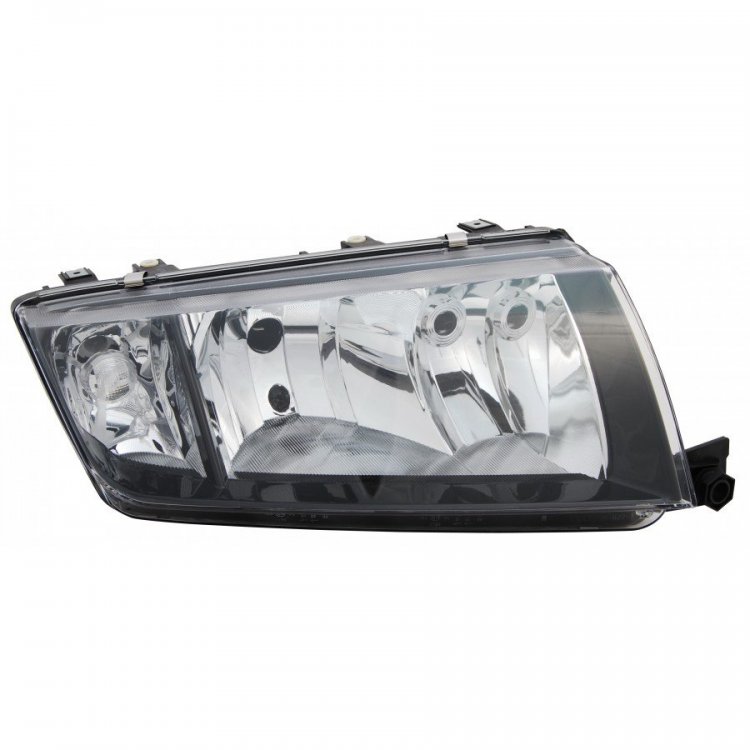
I bought a set of TYC headlights. The black outline underneath is a nice aesthetic touch that makes the whole front end look a little less sad. If your stock headlights are hazy its absolutely worth the money given the improvement of light output at night. I Paid a 100 euro / 92 GBP for the entire set. Personally i have had no complains with this set. They still look as great as the day i put them in there. Which was 2 years ago.
-
An alternative for this is to get a rear wiper of a vw polo or seat arosa/leon. (Of similar age) They have a metal end cap that is attached to the arm. You can easily find these at the scrap yard. Just bring a pulley puller tool as these ****ers are stuck tighter than spandex on a 350 pound woman. (Pulley makes it a breeze) With this modification you'll never lose that cap again. Totally worth the money.
-
if its the third (middle) brake light. They rarely fail but have been known to stop working when the ground terminal (E5 at base of LH 'C' pillar) in the boot has a poor connection The light itself is LED and rarely fails so, if the fuses are OK. (Left Hand fusebox F5, 5A) Check/clean the ground connection for corrosion. (This also goes for your boot light not coming on, especially in wet conditions.)
-
I've changed the battery quite recently. It started happening after that. I've just put the windows fully down, and fully up manually. And cycled the key. After which they seem to work automatically again. Now they do go up and down by themselves when i press them onces. I'm starting to suspect this might be some sort of calibration thing. I'll keep an eye on it, see if remains this way or its just a fluke. I don't think its a wiring issue, as everything checks out. Continuity, resistance. switch resistance etc. I've worked extensively on the wiring loom in the past 3 years. The majority of the wiring in the doors, enginebay and boot have been replaced with heavy duty wiring (extra thick shielding) and weather resistant sleeves. Just because i had the time, the wires were exposed due to other work. but mostly for peace of mind. (They are prone to have electrical gremlins under wet conditions) The wiring inside the car was acceptable as it is not exposed to the elements. I re-sleeved the majority of it with more durable material. (Rubber)
-
Hi there people. I am having the following issue with my power windows. It has a mind of its own... Sometimes when i press the button the windows roll up or down automatically. Sometimes no matter what i do, i have to press and hold the button to get them to go up and down. This goes for both left and right window regardless of which controller is used (driver side or passenger side) Is there some sort of toggle i am not aware of that changes its operation mode ? Or a known issue that i am not aware of ? The windows always work, flawlessly. No weird sounds or inconsistent behavior (except for the issue at hand) Its just that i for the life of me cant figure out why it works sometimes and other times it wont. Thanks in advance !