deepshegde
Members
-
Joined
-
Last visited
Everything posted by deepshegde
-
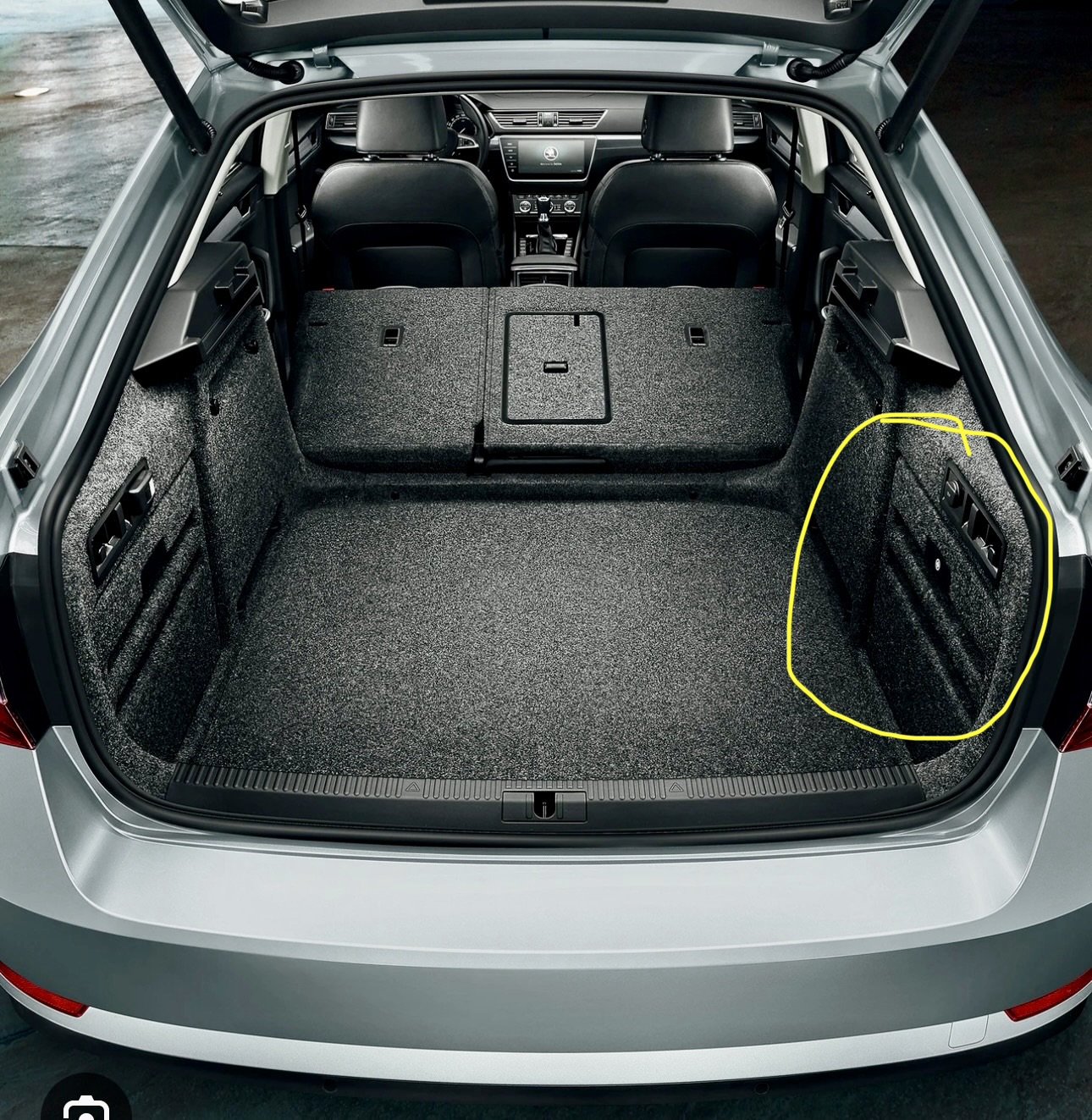
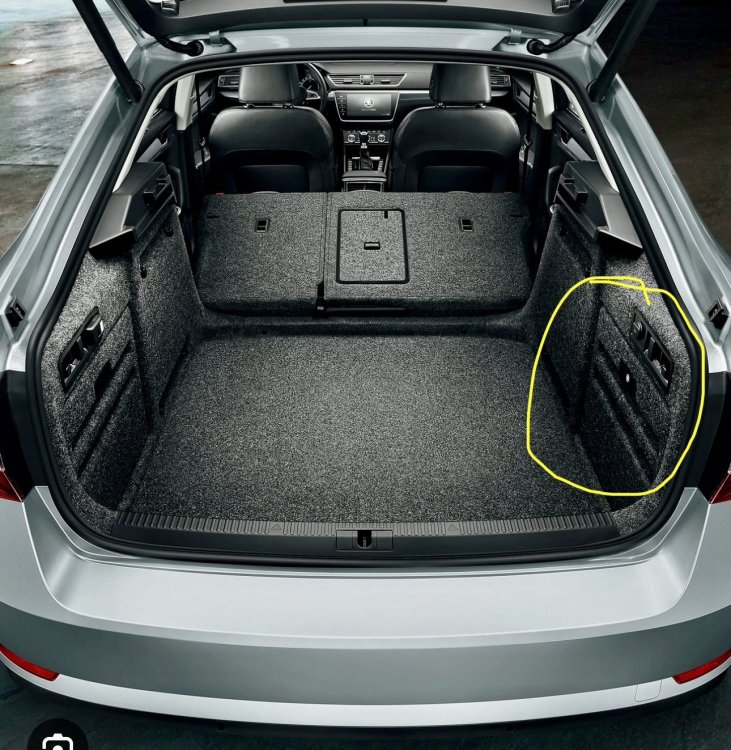
Hello, I opened the trunk liner where you place first aid box and placed it horizontally using double sized tape. I did not have tools to remove bumber instead i simply stuck it above rear wheel well by opening trunk lining. Its been few months and it simply works fine.Including picture of the exact location.
-
Recently Indian govt launched E20 fuel which is a petrol blended with ethanol by 20%. I want to understand its effect on engine and other components of my car. Here in india skoda is not very clear whether the car if compatible with e20. I have been running with 95 octane fuel which has blend of 15% ethanol for last 6 months havent noticed difference in fuel efficiency nor performance. Any guidance or thoughts would be appreciated.
-
Okay looks like LED lights i installed in the boot two weeks back is causing issue. Strangely It was all okay for 2 weeks. I reverted to OEM lights now. Thanks everyone for helping me narrow down the issue.
-
Today I faced battery drain issue with my car. Initially i thought i forgot to switch the car of completely. I jump started the car. Everything was fine and then once i got home. I stopped the car noticed that after switching the car off. I locked the car. MID display started continuosly flashing boot open error. This is only happening when car is locked and not when car is running for some strange reason. Has anyone seen this with their car? Attaching video for reference. This is coming after car is completely locked. VID-20250401-WA0046.mp4
-
It is not straight forward and there is a risk of bricking the device. I did it last year there is a procedure you need to follow and yes using GEM toolbox.
-
Did anyone retrofit tpms to superb mk3? I was looking for help in retrofitting but couldn't find end to end instructions especially around wiring connections clearly documented.
-
Looks like hardware issue than software. Dealer shud be able scan and tell you whats wrong.
-
Hey mate, reviving this thread...my gateway is 5Q0907530AM...with this my both drive modes and some adaptation to show VC settings on headunit are missing. I am not sure if this is due to incompatible canbus (suggested by another member who scanned my car)... Can you pls confirm?
-
I need some help to remove my existing gateway to high gateway compatible with virtual cockpit. I was able to locate the part which is just behind steering column. However its placed at very awkward location that I wonder how do i remove it 😞! Any advice would be deeply appreciated.
-
Just out of curiosity, were you able to start the car with component protection for canbus activated? I am planning to do the same as my local skoda dealer wouldn't fit canbus i bought from outside. So question is, can i fit the new canbus and drive to dealer to have CP removed and coded?
-
Yes i am talking abt skins.
-
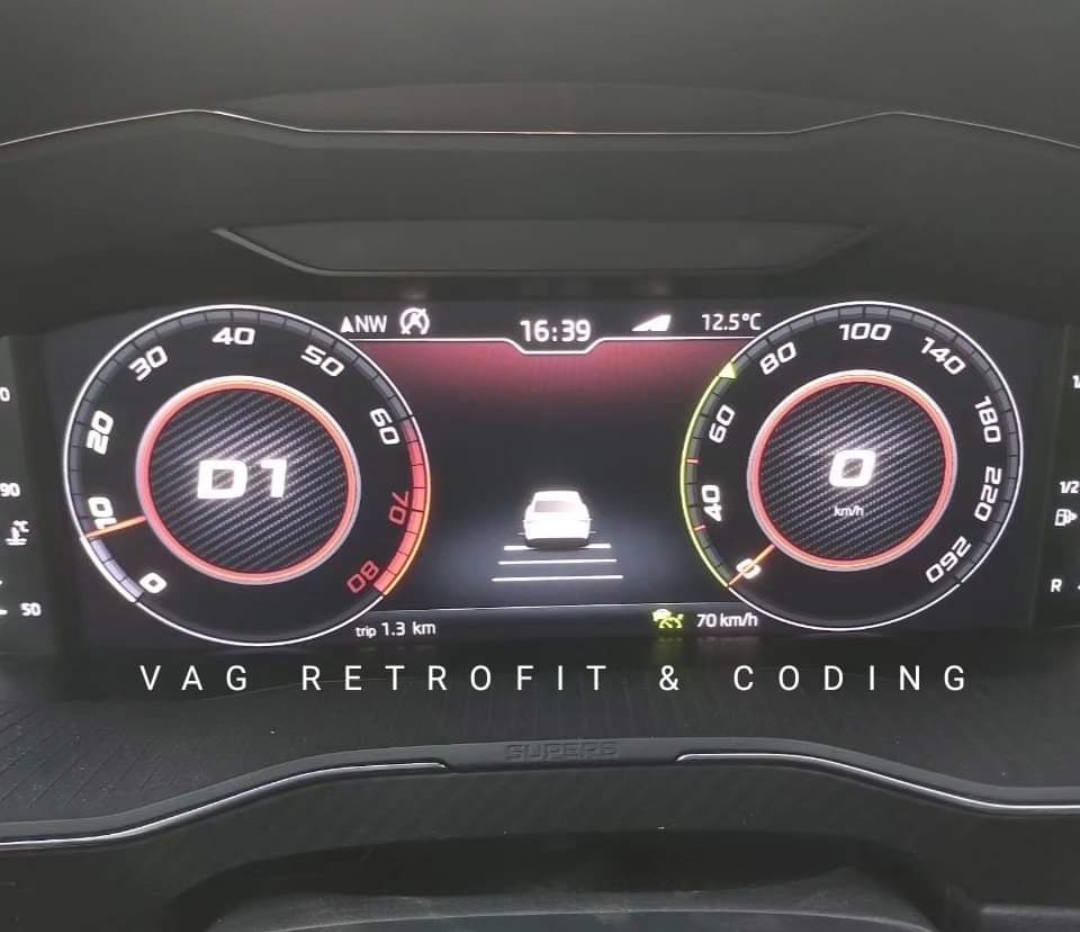
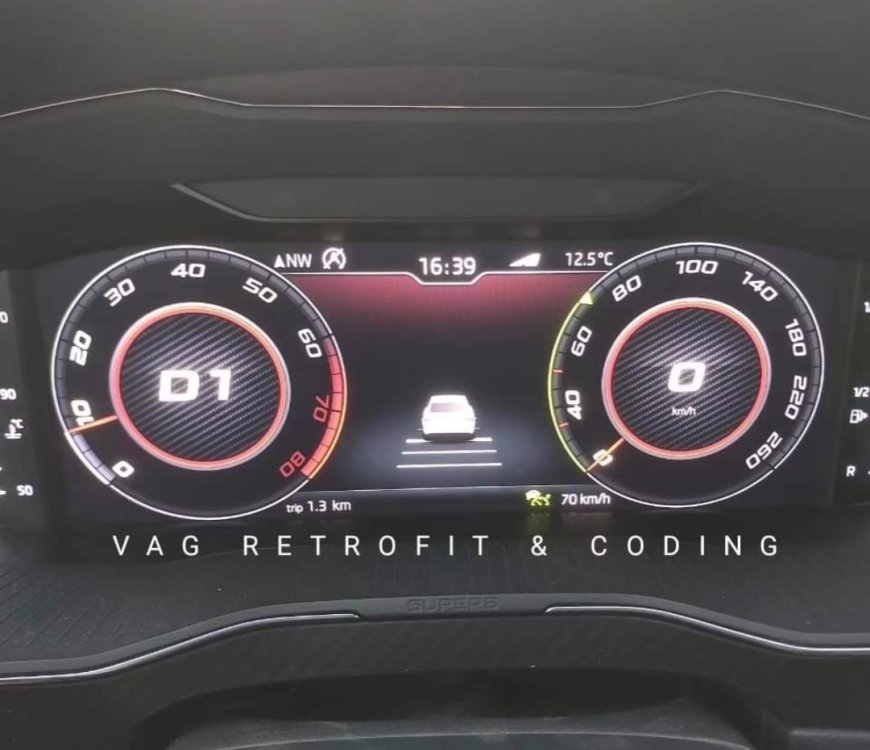
I recently retrofitted virtual cockpit on my skoda superb 2017. How do i get sports dial something like in the picture?
-
I am having strange issue with memory seat is that i mapped all car setting to driver1 with seat position saved to 1. However when i unlock the car...seat automatically changes position to something really awkward(seat bends half forward) which i have to change manually. The problem is same when i press "1" number which i had saved my position still car chooses position on its own. I am not sure what wrong i am doing here. Its becoming very frustrating now. Any advice would be appreciated! Car is Skoda Superb Mk3 2017
-
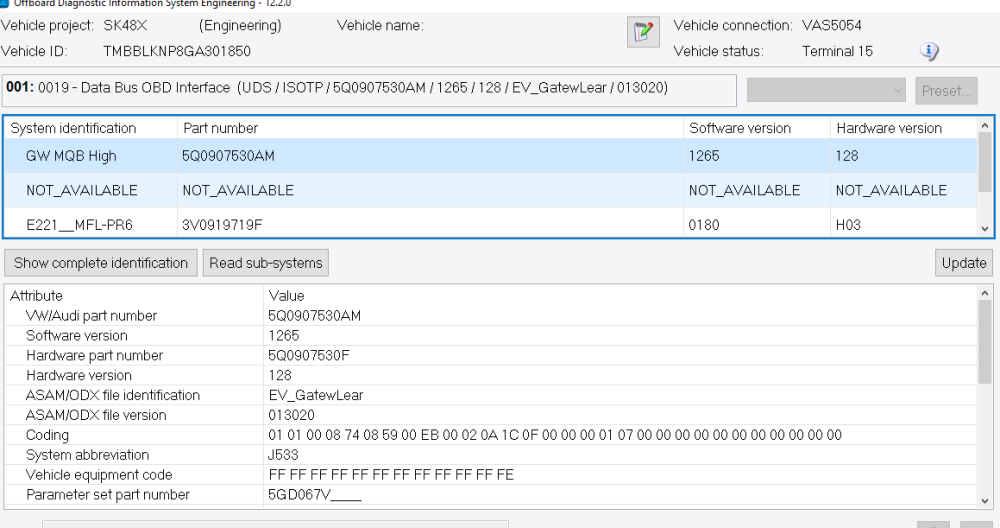
Current one is : 5Q0907530AM. I have two problems with my car right now: 1.Drive Modes not working. Carisma adaptations are active. 2.Unable to find "expansion-display configuration" adaptions missing because of which i am unable to view VC settings on mu MIB display. Rest everything is working flawlessly including my new virtual cockpit. I am still not sure if above problems due to incompatibe canbus gateway. I couldnt find anything wrong with coding/adaptations.
-
@ApertureSDo you have any idea abt canbus gateway? I ordered 3q0907530AC for my car. Will attempt to replace it.
-
Ok, Have an update. One of the members in a group scanned by car and told me i will need to change gateway to part no. 3q0907530AC or AA... suspecting comparability issue with my stock gateway and cluster. Nowhere in briskoda i never heard people changing gateway for a 2017 model..yes 2016 model requires changing gateway+bcm . I am not sure if its gateway which needs changing in my case.
-
No, gateway was not changed...i installed a new VC and MOST cable. I am suspecting some coding issue but unable pin point.
-
Experts, I need some help to diagnose and fix my drive modes which after virtual cockpit upgrade on my superb mk3 2017 stopped working. "Mode" button near DSG lever has is glowing white but nothing happens when i press it. It used to work before and i verified carisma/charisma adaptations on 5F they are active. Not sure what is wrong here.
-
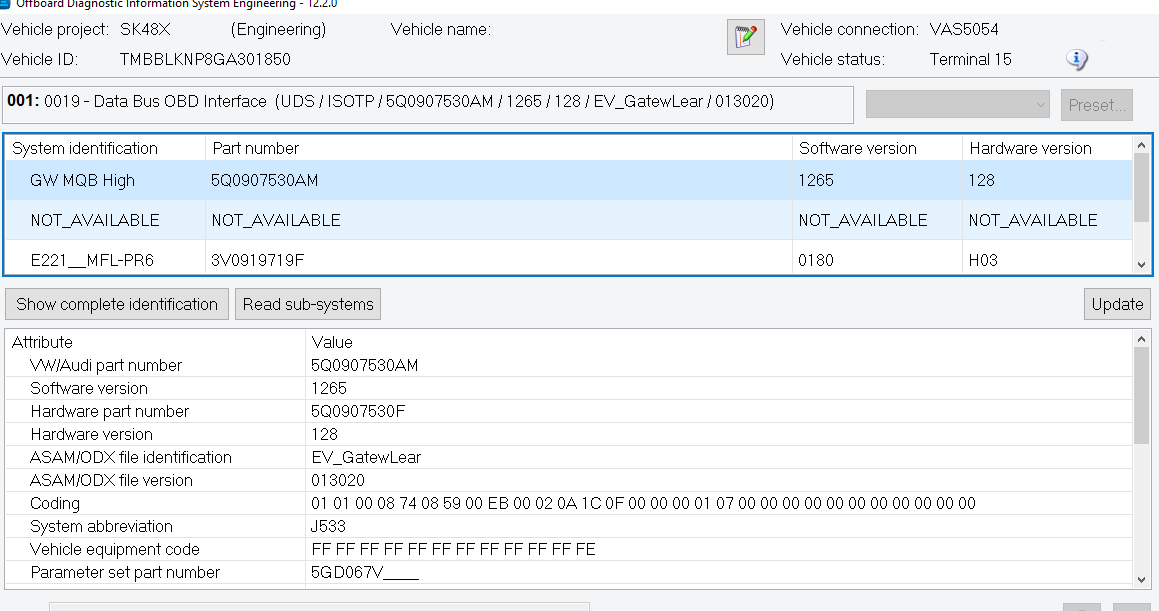
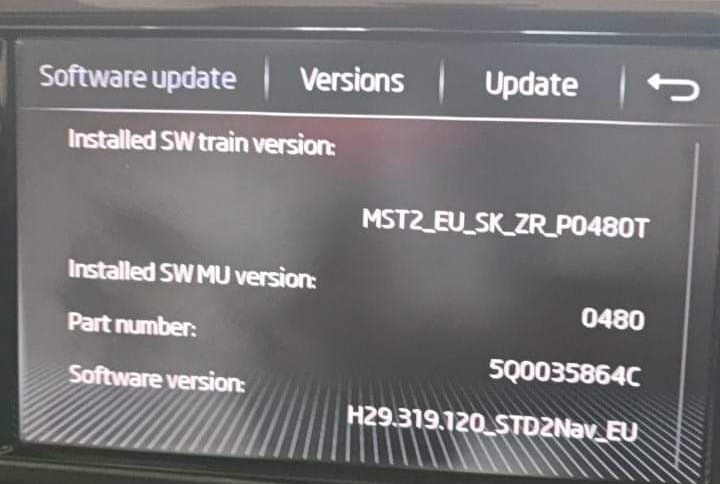
I completed by VC retrofit. Everything works pretty much except for virtual cockpit menu in selection - car so I am unable to configure VC from my MIB display. I tried updating adaptations below and 2 of these do not show up in ODIS-E or S. I was able to activate other adaptations without any issues but these two are missing. Any one has any idea abt this issue? Attaching picture of train version and part no. channel IDE11524-ENG137043-Vehicle function list BAP 2nd generation: expansion-display_configuration_0x45 channel IDE11524-ENG137044-Vehicle function list BAP 2nd generation: expansion-display_configuration_0x45_msg_bus
-
Good news...I was able to fix this DTC by enabling some adaptations like electric steering wheel etc for some reason some adaptations were not activated by default. Now only thing remaining is to get my fuel gauge recalibrated. I got a test plan under instrument cluster for doing just that. I am going to refuel to 100% and then calibrate it using ODIS to 100%. Will let you know how it goes. Thanks for your help !
-
Ok figured out that following adaptations are not available in my MIB unit and that may be the only reason why i am unable to see option to setup VC under vehicle-selection. It could be because i upgraded from 3x to 4x but not entirely sure: channel IDE11524-ENG137043-Vehicle function list BAP 2nd generation: expansion-display_configuration_0x45 adapted from not activated to activated channel IDE11524-ENG137044-Vehicle function list BAP 2nd generation: expansion-display_configuration_0x45_msg_bus adapted from not activated to Databus Infotainment
-
On a different topic, I recently did a virtual cockpit retrofit on my skoda superb 1.8 TSI 2017. However my coder forgot to take backup of adaptations/coding and now i am getting DTC related incorrect coding of cluster. My old instrument cluster part no was 3V0 920 710A. Can anyone help with code in binary if you have same part number and the car? I can use the same to code my car correctly.
-
Ok, finally i was able to get required coding/adaptation to display maps on VC. Its working but i am unable to get setting for VC on MIB- Car selection still...Am i missing anything?
-
@langers2k thank you. Unfortunately coder messed up and did not take the backup...
-
I need some help with fuel gauge calibration on my retrofitted VC. Car is Skoda Superb 1.8 TSI 2017. I am using ODIS to code. The moment VC was installed. I started getting empty fuel tank indicator. In the coding, i tried to change variant of car from variant 1 to 2 in the tank parameters. Now tank is showing full...i tried changing variants from 1-8 all except 2 and 3 are showing tank full. Now i am not sure if this is showing correctly. Any inputs from experts would on correct variant selection for my car would be deeply appreciated