Octy-PHEV
Finding my way
-
Joined
-
Last visited
-
Most people seem to have unlinked the ACC from their traffic sign recognition and map display. Doing that means you have to set the ACC speed manually, but avoids it changing to an inaccurate one all by itself.
-
Yes, I've had to turn mine off a couple of times. I'll have to check on the car, but I think it was on the navigation settings, accessed from the 3-dots button. I'll look tomorrow if that doesn't work.
-
Yes, it works fine. The manual isn't totally clear. What I've found is that you need to activate it once by pushing the stalk away from you (as if you were selecting high beam on a car without the assist feature). The 'A' symbol then comes up: white when it's on dipped and blue when it's switched to full beam. It you want to override it when it's selected dipped, you can push the stalk away from you a second time, and it will then stay on full indefinitely. You can also pull it towards you for a quick flash of full, as usual. I haven't tried this, but I presume you can override auto full beam by pulling the stalk, as that's what the manual implies.
-
High beam assist seems to be on special offer at the moment. I've just purchased it for £125 instead of the usual £180. I have the option appearing correctly on the menu, but I haven't driven in the dark yet to try it out.
-
On my Octavia I couldn't see any difference between a speed limit that had been picked up by the camera and one that came from the map data. On my Honda Jazz I get different displays for the two sources and it's illuminating comparing the two. The one from the camera goes blank about a mile after the last sign it spotted.
-
On my 2023 Octavia, you can disconnect the link between the ACC and the traffic sign recognition, so I presume you can too. The setting is called "speed limit preview" or something similar. It drove me nuts too until I found how to avoid the ACC target speed changing automatically.
-
I'm curious to know how big a gap there was between the cars when yours came to its sudden stop, @croquemonsieur Was it a very near thing, or was there sufficient gap to give you confidence it would always be safe?
-
Yes, the setting for showing the speed limit has gone for me too (on v 1989). It must be always on now. It also shows a warning triangle if I've just passed such a sign, but with the speed limit roundel directly on top, so that only the corners are visible. Having a PHEV, the thing I do have to change after every update is to switch off the electric range indication (under the ... menu on the map). Otherwise it looks like I'm driving in a spot of wonderful sunshine, with murky grey clouds everywhere else!
-
I think the setting is off the three dots (...) on the map itself. I had trouble finding it last time. If that doesn't work, I'll have a look tomorrow.
-
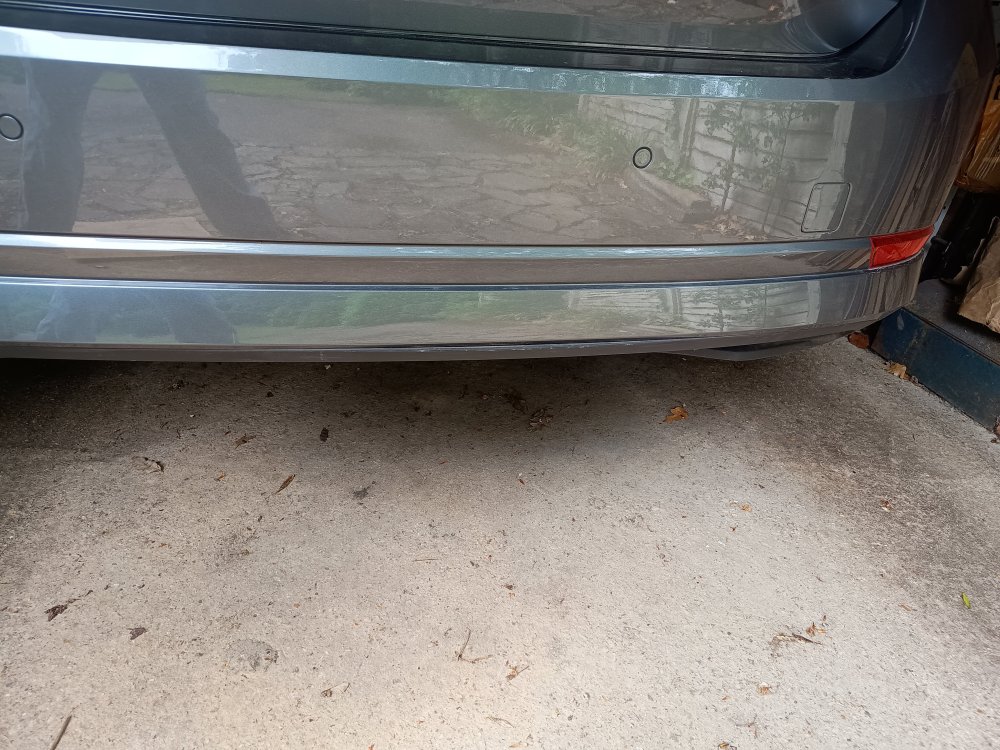
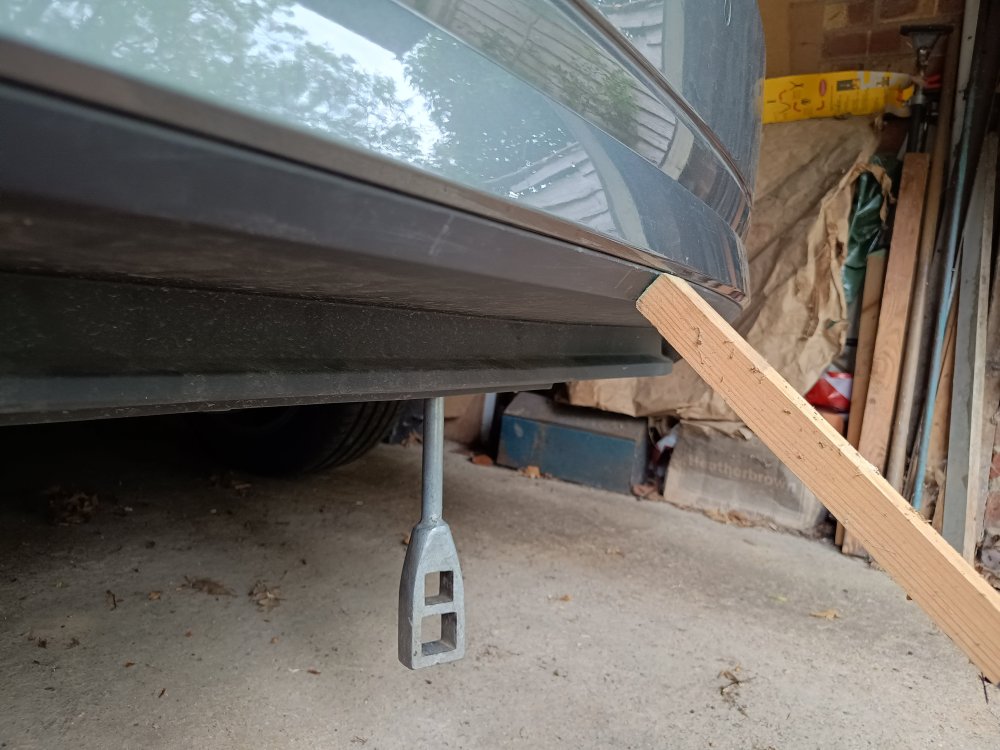
Would you believe I've done this again! Am I really the only person who has ever done this? Assuming I'm not, here are some photos this time, as suggested by @CKO The first shows the problem (not as bad as last time, when a longer portion became detached with a larger gap). The second photo shows the wood strut firmly supporting the black part, and the L-shaped tool used to push against the inside of the body-coloured part of the bumper above (a canal windlass!), and the lower part snapped back in.
-
There are a number of threads where people are complaining that it picks up long removed temporary speed limits. There are no signs at all to see now, but on the M1 and M4 it comes up with 50 mph at places where there were roadworks many moons ago.
-
I've had it when reversing slowly if there's just a single blade of grass in the way. It's particularly annoying when reversing into a passing place on a single track road, as the driver waiting to pass must think I'm a total idiot.
-
I've found this to be a particular problem on single track rural roads. If I meet someone and need to reverse smartly into a passing place, there's nearly always a blade of grass there that causes the brakes to slam on (if I haven't remembered to disable that 'feature'). The other driver waiting to pass must think I'm a total wally!
-
The link between the ACC speed target and what TSR thinks the limit is, is controlled by a setting called "speed limit preview". See https://www.briskoda.net/forums/topic/538558-hows-this-for-good-range-but/?do=findComment&comment=6009108
-
You can disengage ACC from changing the target speed based on what TSR is reporting (at least you can on my 2023 PHEV). The setting is not well described. It's something like "speed limit prediction". I wasn't so bothered about it reducing to 50 when passing the site of long completed motorway roadworks ( with no signs now present). It was the automatic speeding up to 70 when it had passed the site that I found alarming. I set my ACC to 60 or 65. I think it is dangerous for this to ever get automatically raised to higher than you've chosen manually.