Steve153
Members
-
Joined
-
Last visited
-
-
Winter pack gives you front and rear heated seats, tri-climate control and heated windscreen. The are currently four main trim levels (SE L, Edition, Sportline and vRS) which give you different levels of main specifications. Then you get three main packages (Plus, Advanced and Maxx) which add various enhancements. The there are smaller add on packs that give you various other options such as a towbar etc. Loft, Lodge and Suite are interior finish options. The best thing to do is go on the Škoda website and build your own new car in the car configurator. This will take you through all of the different options and walk you through the contents of each package. You can find it here: https://cc.skoda-auto.com/gbr/en-GB/trimline-scenic?_gl=1%2A1qqnnta%2A_gcl_aw%2AR0NMLjE3NzY3NzI3NDkuRUFJYUlRb2JDaE1JMzY3SG9QTC1rd01WU1p4UUJoMGQ4Zy04RUFBWUFTQUFFZ0wtSHZEX0J3RQ..%2A_gcl_dc%2AR0NMLjE3NzY3NzI3NDkuRUFJYUlRb2JDaE1JMzY3SG9QTC1rd01WU1p4UUJoMGQ4Zy04RUFBWUFTQUFFZ0wtSHZEX0J3RQ..%2A_gcl_au%2AMTAyNjU5Nzk2NC4xNzc2NzcyNzQ1&activePage=trimlines&color=K4K4&configurationId=&extraEquipments=&id=GBR%3Bskoda%3B2026%3BPYLGJ2%3B1%3BGYONYON%3Bmda20260413145914%3Ben-GB%3B%3B62002%3B62062&interior=TP&mbvcode=PYLGJ2&modelcode=PY&modifiedPages=&pagegroup=Website&replace=true&salesprogram=GBR&snapshotVersion=3e470311-211c-405c-bd71-f964a9234798&trimline=PYG%7CSE%20L%20606206262002&visitedPages= You can also search for Škoda approved nearly new and new vehicles on the Škoda UK website. Have a good read through everything on the configurator and if you still have questions then come back to the forum and ask away. Hope that helps?
-
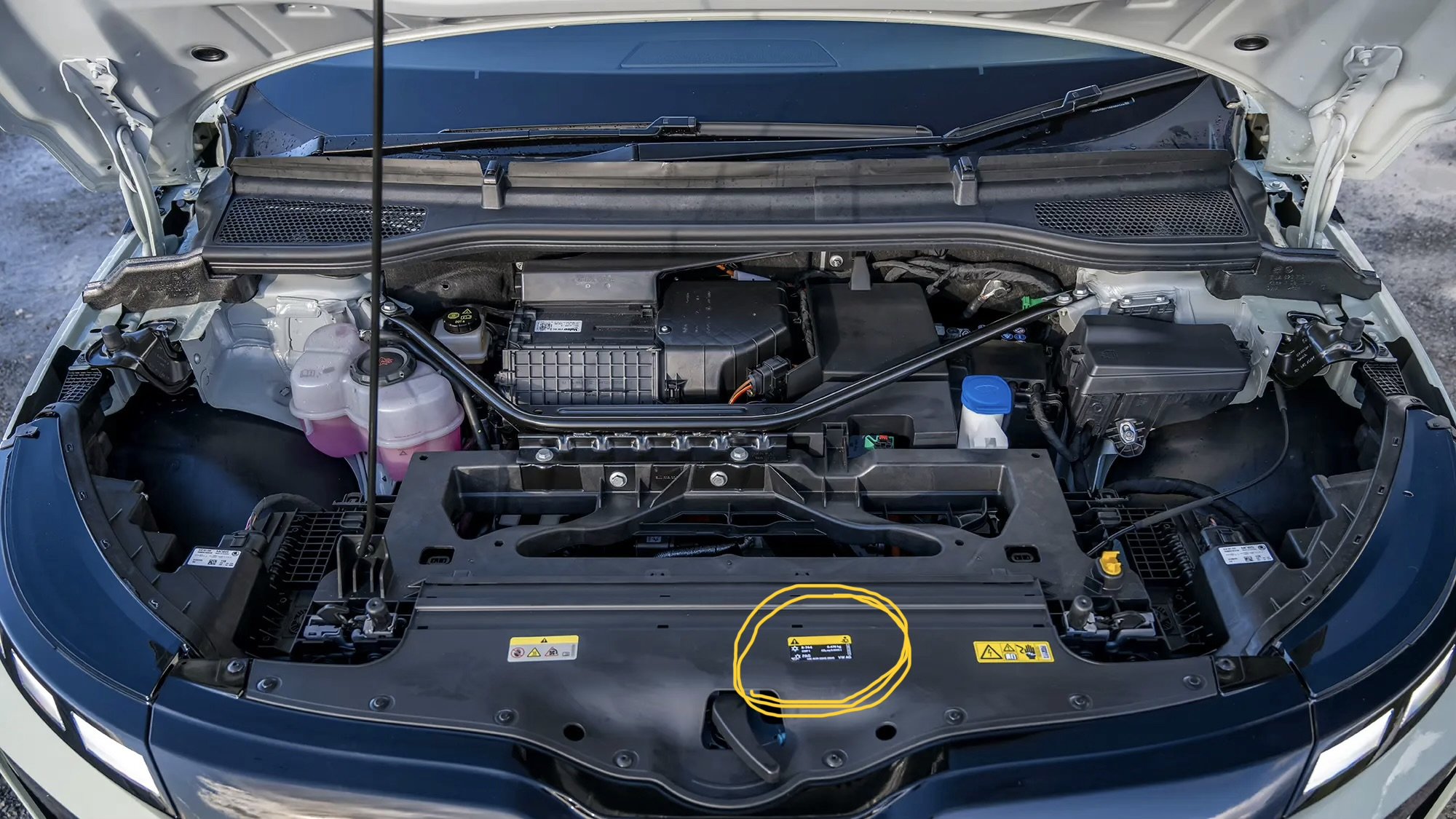
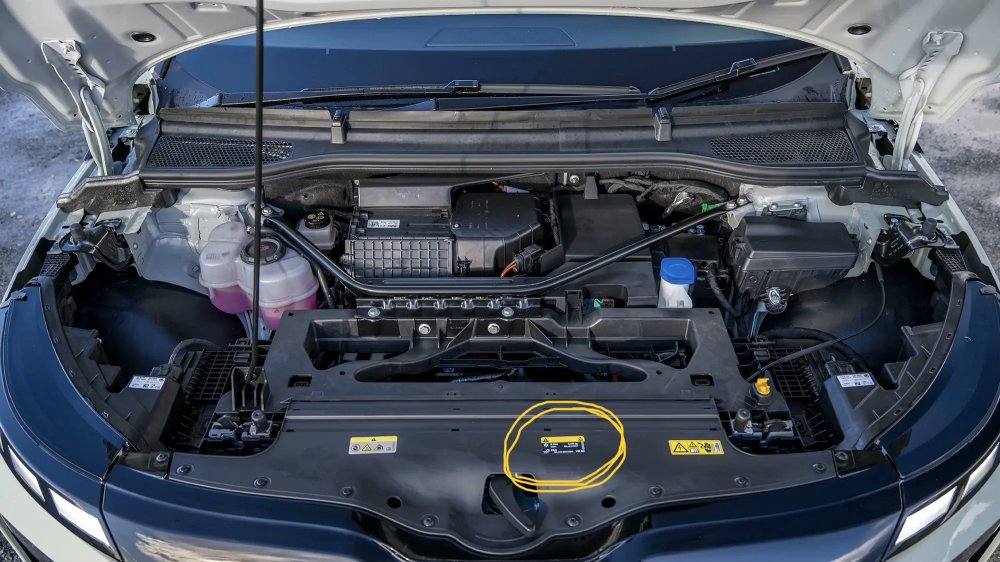
You’ll need an 85 model for maximum range. There’s not really much to be gained in having a heat pump with our climate in the UK. Most people report a gain of around 0.2 miles/kwh at most. They are not standard on any UK build Elroq or Enyaq and an optional extra at £1000+ at new. If fitted the heat pump would be listed on the digital certificate for the car in the MyŠkoda app (which can be downloaded) there’s nothing on the infotainment screen. Heat pump refrigerant will be R744 and you can see it on one of the yellow stickers under the bonnet (circled on the photo attached). This is the easiest way to check. Also be aware that not all dealers have the equipment to check and repair or regas R744 and they are alleged to be more prone to leak due to the higher pressures used. Personally I would avoid and go for a vehicle with the winter pack. Model/trim versions are a personal preference thing and you should think about what you find indispensable for your motoring. If you like a heads up display then go for something with the advanced pack and also the winter pack is useful (for me anyway). The maxx packs have self parking but just about everyone has problems linking and using and is probably more of a gimmick in reality… Edition trim is probably the sweet spot? With regard to end of line returns I’ve not had any issues with this but you could try pressing shift+return?
-
Glad you got a result in the end 👍 Most dealers are pretty much useless when it comes to EVs and software in particular. Reporting potential software issues directly to Škoda via the app usually gets a quicker response. Have you signed up to the Škoda EV Lounge on facebook? A great resource run by Škoda. https://www.facebook.com/SkodaEVLounge/
-
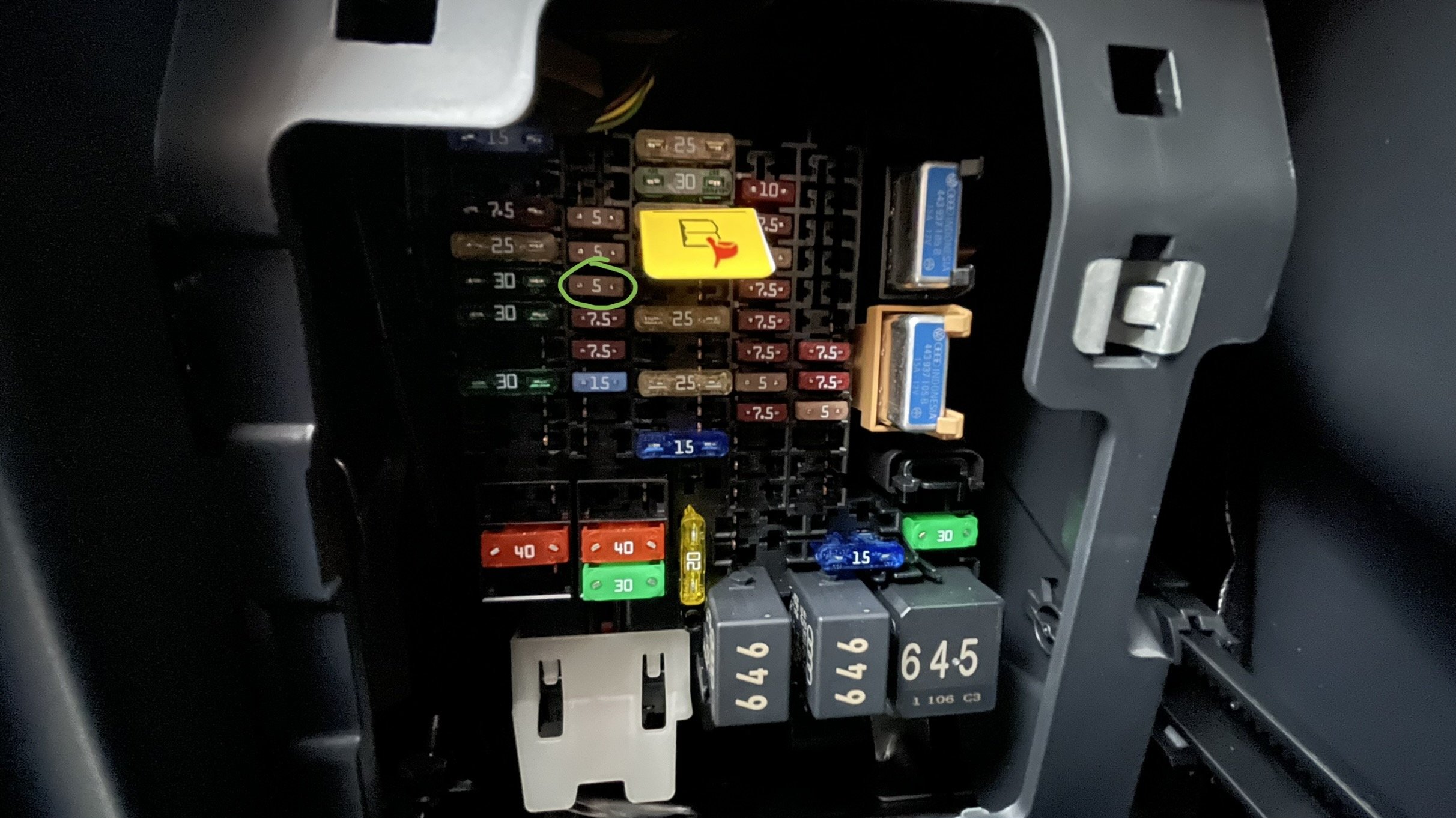
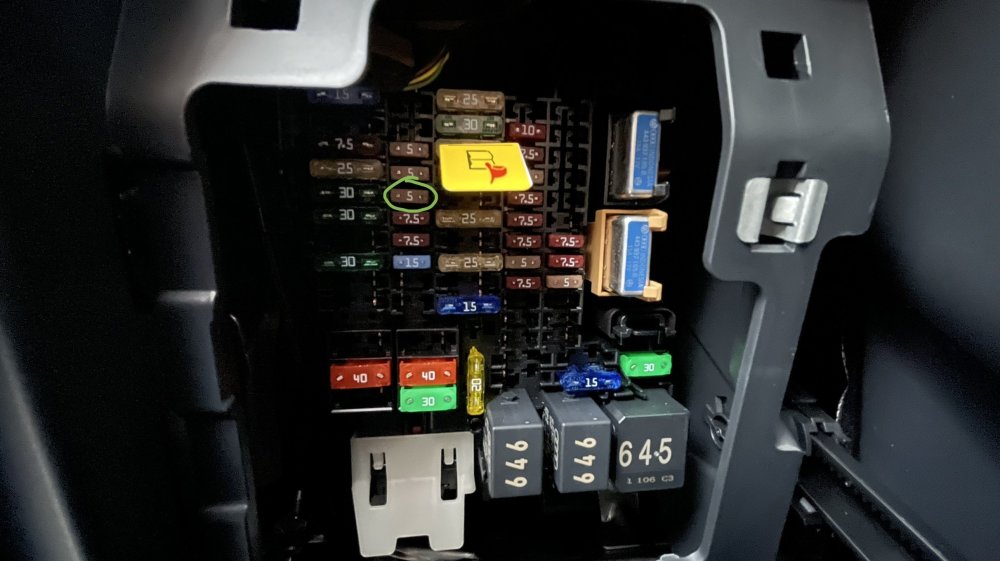
This is fuse 19
-
Have you tried turning off the privacy/data settings then back on again? Also is there a good cellular service where the car is located? Otherwise reset the comms module: Turn the car off, pull fuse 19 (in glovebox), wait 2 minutes, put fuse 19 back in, turn car on and wait 10-15 minutes. This resets the communications module in the car and forces it to search for a signal again. It can take 10-15 minutes so be patient. There have been some cases of failed comms modules in some Elroq and Enyaq models but if you’re getting some data this seems unlikely. If you are still having issues try reporting through the MyŠkoda app (by shaking your phone), they will be able to reset things on their servers for you. Otherwise it’s back to your dealer…
-
@skier1066 Ah I forgot about the HV random start, mine was already disabled from new but had read elsewhere that it confused IOG. I gather it’s there by UK legislation and may be a requirement to be enabled in the future, though IOG does this itself currently and also throttles charge power to balance the grid. Glad you are now charging successfully, now enjoy your lovely vRS
-
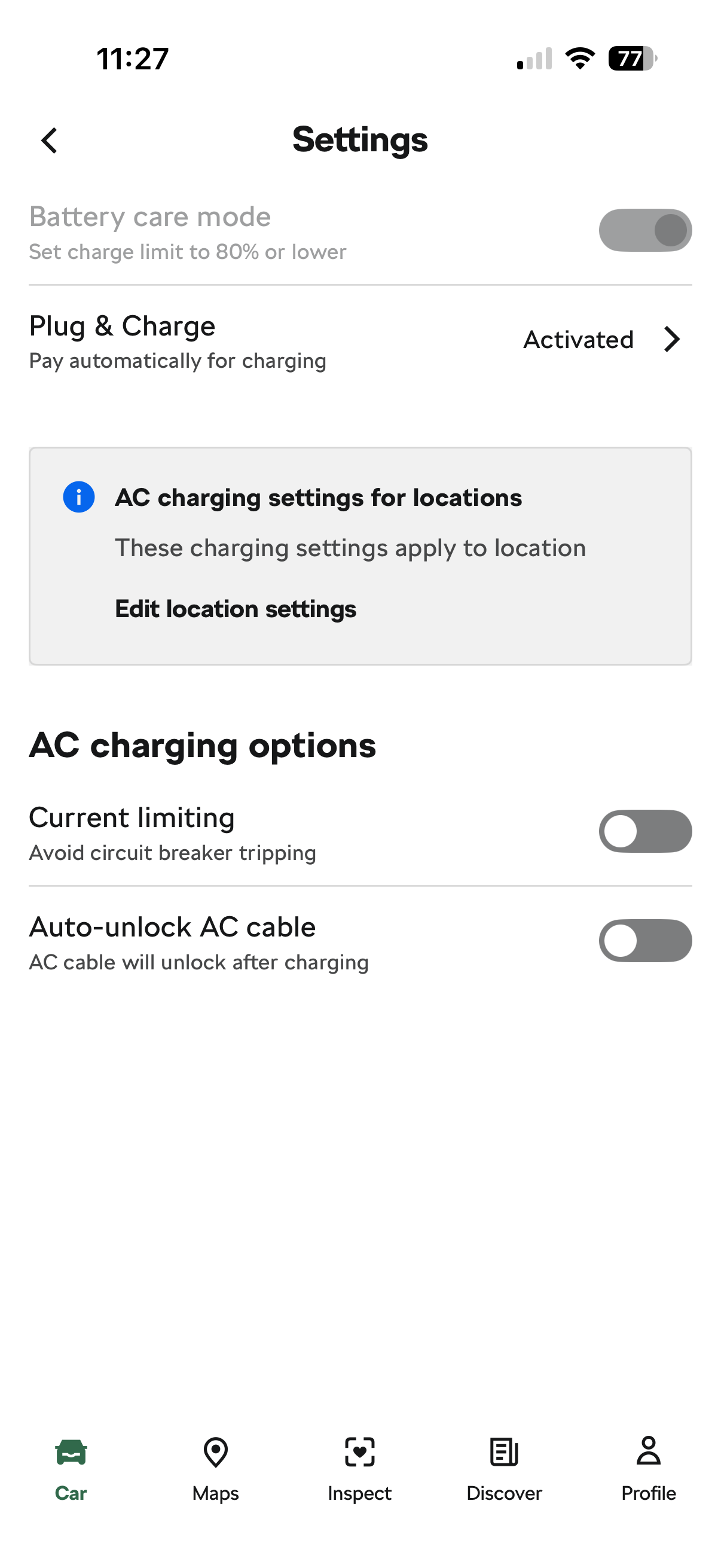
Hi Scott, Apologies for the late response, how are you getting on with your charging? I have suffered with all of your issues but once IOG was linked to the car have not had any problems. This is my process: Ensure all schedules are deleted in the car and the Hypervolt. Set up a home charging location in the car and make sure you have not enabled privacy mode and are sharing the location data. Set car to not unlock cable after charging. Also check you have a cellular connection in the car at your charging location. Unlock HV3 and ensure it’s set to plug and charge Set car to charge immediately Plug the Elroq in and wait for the green light Reach in to the car and pause the charge on the infotainment screen (note don’t sit in or put weight on the seat Open the Octopus app and devices tab, car should now show as plugged in (but can take a few minutes to display and create a schedule). Refreshing the page by pulling down the phone screen can help. Lock car and walk away. Don’t open the MyŚkoda or HV app during the charging. I find the above works well for me and hopefully this will help if you are having trouble?
-
I have seen similar replies on other forums but as far as I am aware they have not yet taken any action. I believe it’s the traffic to the Škoda servers is the issue. I would assume that once they realise what’s happening they will ban Octopus from doing it? Glad to hear you managed to get a charge with no issues 😀 Also hear Enyaq users who have a facelift version or have older models updated to software 5.4 are also having the same charging issues (which were charging perfectly with IOG previously). I wonder if 5.6 which is coming soon will have any fixes for this problem? I have heard that the update is only for bug fixes and no new features. For information Octopus are now trying to force users into car integration if they have a compatible car (not offering charger integration) when you onboard for the first time. Some existing customers on IOG have had emails informing them they need to re register their vehicles (because they are compatible) to maintain their service and when they do the option to integrate the wall box is lost… I believe this is a reaction to people gaming the tariff to get extra cheaper slots by overstating the amount of charge required thereby opening up the whole house for cheaper prices during the daytime slots. I wonder how/what Octopus have found that makes the Elroq integration work as it wasn’t supported initially. If or when Škoda retaliate and start preventing Octopus users from using the API it would leave owners and Octopus in a bit of a pickle. I know that BMW had the same issue with server traffic (and blocked Octopus) and that was solved (by BMW I believe)🤷♂️
-
I know others have used the same unplug and plug back in method but it’s far from ideal especially if it’s in the early hours or piddling down 🤦♂️ I’m sure the vRS will be supported by Octopus 🐙 at some point, maybe worth asking them when this would be? It should be simple for them to use the Elroq 85 configuration and amend the battery capacity… All I can add is that the Elroq integration is working for me. Hope you manage to solve your issues 🤞
-
Will be interesting to hear what they come back to you with… I would think the Elroq 85 integration would work? It would try it out and see if it works for you, if it doesn’t then you can just delete the integration. Worst case it will just give you slightly less charge than required? You should still be able to use a scheduled charge while you wait for vRS support from Octopus (or swap to the standard Go tariff in the short term).
-
It’s a known issue. The Elroq goes to sleep and then won’t wake to charge (or resume a charge between slots). Octopus have recently added the Elroq as a supported device and since I integrated the car rather than the charger I have had no issues. For information I have the same setup as you. Also it has been reported by many IOG users that Octopus are now not allowing a charger to be the controlling device when you have a car that is compatible (across all manufacturers and not just Škoda). Apparently this is a response to users inflating the charge level requirement as a way of gaming the system… I agree it’s less than ideal from Škoda and the reply you have posted is very similar to the responses others have received. It requires more investment in their servers and backend systems to cope with the data traffic. If you are a member of the Škoda EV Lounge on facebook then I would post your question to Škoda there. The more UK customers who complain the more chance of us getting a fix.
-
I assume your location services are set correctly on the car? Have you tried deleting the Elroq from devices in IOG then adding again? I’ve had no end of issues with IOG and really want it to work, recently the Elroq has become supported by Octopus again and fingers crossed, with the car integration set rather than the charger, things seem to be working better for me 🤞. If you report to Octopus then at least they are aware of the problem even if they cannot help you in the short term. Hopefully IOG will get better for everyone in the future…
-
You can toggle it off in the sounds menu on the infotainment system
-