gareth71
Members
-
Joined
-
Last visited
Everything posted by gareth71
-
Disappointingly, despite Skoda Assist pushing it to them as a fault related to the car's safety systems which should therefore be allocated a priority workshop slot, the absolute earliest date my local Skoda dealer can offer for a diagnostic appointment is 13th November. They initially tried to fob me off with 13th December until I dug my heels in about getting something sooner. So I'm stuck with doing several long motorway drives between now and then without front assist, brake assist, and (most inconveniently) cruise control. Not very impressive.
-
When I was on the phone to Skoda Assist today, the guy I was talking to - after I'd listed the first couple of faults - very much gave the impression that he kind of knew what I was going to say next. I mentioned this - "sounds like you're not unfamiliar with what I'm describing to you" sort of thing! - and he basically said, yeah, sounds like either the front-facing camera or one of the front radar sensors. Given that sign recognition and lane assist still seem to be working fine, I guess that rules out the camera.
-
I've had issues on damp/dewy nights on a couple of occasions before. Car parked up in a damp grassy place (farmyard), lots of dew and moisture around, back to the car very late at night, get in and start it, and get some errors with radar sensors and assist systems. Not the same combination of errors that I've got today, though, and on those occasions they always cleared within a couple of minutes of driving away. Today's errors are still present after 20+ miles of driving, and several restarts. The nearest the car has been to a wet/damp environment was getting washed two days ago.
-
Hmm, this isn't going brilliantly. Started the car this morning - Bong!!! "Travel Assist unavailable"... "Front Assist unavailable"... "Proactive occupant protection system restricted"... "Emergency Assist unavailable"... "Error: ACC". Skoda Assist seem to think it's a front radar sensor gone u/s - waiting for my local dealership to get back to me with a priority appointment at their service centre for diagnostics. I really, really want to like this car - and in many ways I do - but it's not making it easy for me!
-
Yup. Superb mk4 - 24-plate L&K - very quiet creaking noise from passenger side when driving over rougher roads (and i live in Flintshire, so thanks to our local council we've got quite a lot of those locally!). So quiet that it's almost impossible to identify an actual source - but it's there. Can't hear a thing when on a nice smooth surface. Never thought about the door rubbers - will look into the 'Gummi Pfledge' mentioned. Having come to the Skoda from a couple of BMWs, what's become obvious is that, while the Skoda is a great car in many respects and represents much better value for money than the BMW, it's simply not quite as well put-together. The BMWs were more 'solid' cars in terms of the build quality. Never got any sort of noise of this nature on either of the Beemers.
-
But they shouldn't. If I set a specific function to 'on' or 'off' in the car, I don't want the car then deciding every few weeks to autonomously alter that setting for some reason - I want it to stay as I put it. If it doesn't, that suggests a software issue.
-
I get that - but on more than one occasion Auto Hold has autonomously switched itself off, and I've had to go into the vehicle settings to reactivate it. Sorry, thought I'd made that clear.
-
Auto Hold is what you're looking for. I wasn't sure how well I was going to get on with it when I first got the car, but have come to really like the feature after a few months. If only I could find a way to prevent it from intermittently turning itself off every couple of weeks. (And if someone can tell me how to prevent "drowsiness monitor" from autonomously turning itself back on all the time, too, I'd be really grateful!)
-
On a brand-new car, we shouldn't have to be disconnecting the battery just to sort out an issue like that - it shouldn't be happening in the first place, and now that there are several recorded instances of it occurring Skoda should be engineering a fix for it.
-
Any mention of it fixing the issue of driver assist systems taking a while to come online in damp, dewy conditions? Or front interior lights sticking on and the touch-sensitive switching becoming non-responsive? Or massage seats stopping functioning with random 'cushions' still inflated?
-
Can you tell us any more about what they are?
-
Update. By this morning, the two 'stuck' cushions had deflated, and the massage function works again. Looks like the system managed to reset itself at some point after powering the car down last night. Don't think I'll be using the function again until I've had a chance to speak to my local dealer workshop about it, though - don't want a repeat of yesterday, having to drive for a couple of hours with two lumps poking into my spine! Sadly, I think it's time to start keeping a log of issues I've experienced with this car, so that I can get it thoroughly checked out when it next goes in for some work (this is the third thing, following two separate instances of transient errors with the driver assist systems). When we're paying this sort of money for a car which is pitched as a more top-end offering, I can't help feeling that the quality should be better.
-
Another seat massage function failure here. Driver's seat, with two of the 'pods' fully inflated and refusing to deflate, all controls non-responsive. Shut-down and re-start of the car doesn't help. Will be getting onto the local dealer for a warranty repair and a courtesy car if they haven't reset themselves by the morning.
-
I thought I remembered seeing a topic about this... Just had my driver's seat massage function stop working part-way along the M62. Had to drive the last hour home with the two massage 'balloons' just behind my kidneys fully inflated. 🤨 Tried switching off and locking, then reopening and restarting the car in the hope it might trigger a reset - nope. Hoping that leaving it overnight might see them 'deflated' in the morning. Otherwise, it's a call to my local Skoda dealer in the morning for a warranty repair - and a loan car, I guess, as I've got many hours of driving to do over the next couple of weeks and I'm not going to do them with two lumps sticking into my back.
-
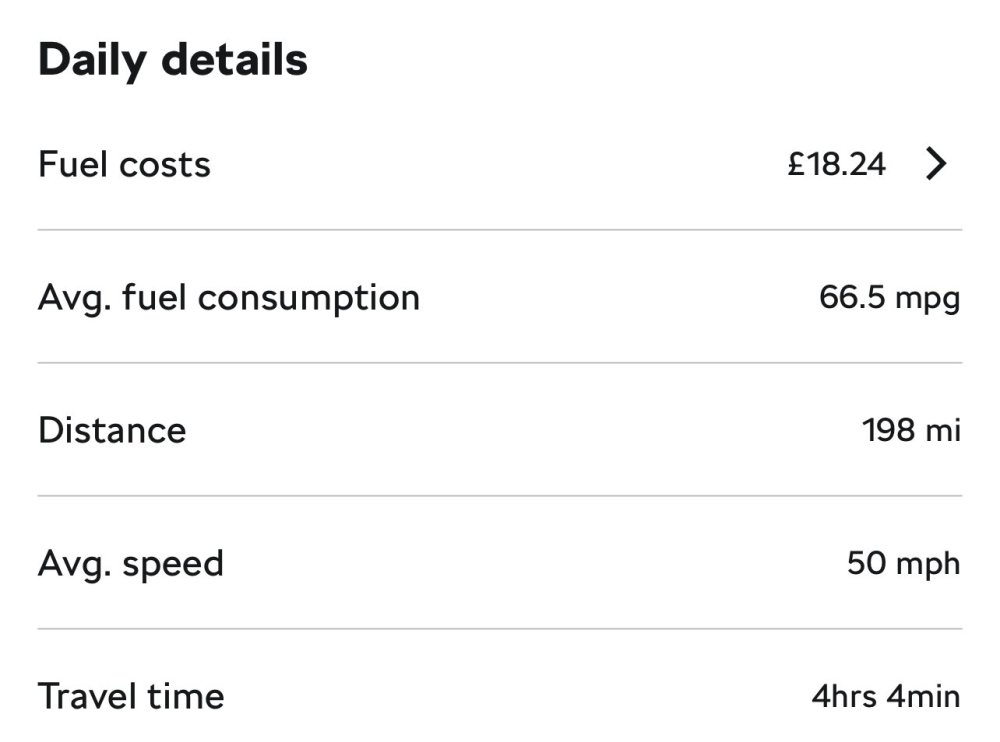
Have to say, I'm pretty impressed with the consumption on mine - 2.0TDi 193PS 4x4 - so far (a little over a month in). Even just pootling around locally I'm getting an MPG of low to mid 40s ; and I managed this last Sunday...
-
I've noticed in mine that the effect of the seat ventilation is quite subtle! I assume that's expected behaviour...
-
Well, here's the Skoda Approved Used PDI checklist (note item 117). Not unreasonable to guess that the PDI for new vehicles would cover a similar breadth of detail. https://www.skoda.co.uk/_doc/f34b1953-0f64-43be-8914-258ecdb48f44 As for driving 100km - well, now you're just being deliberately flippant. Some things can be checked without the car leaving a workshop - some basic function tests of things like climate control is one of those. Maybe expectations in Poland are different - but I'd expect a supplying dealer to have given any new car a thorough once-over before signing off on delivery to the customer.
-
I'd beg to differ. The dealer should've done a full PDI on the car prior to handover - to my mind, that should've included a function check on, among other things, the AC system. Yes, things break - but according to the OP's post, the AC never actually worked in the first place. Anyway, it'll be resolved under warranty, so all's well.
-
I'm not about to start drilling holes in a car which is still under warranty! I'm perfectly happy with the arrangement as it is.
-
Sounds like an unlucky one-off. Unlikely to have been something which was missed before the car left the factory, so maybe happened during shipping? Definitely shouldn't have been missed in the PDI, though, so the supplying dealer probably has some questions to answer!
-
In case it helps anyone else, here's what I ended up with. One of these - https://www.amazon.co.uk/dp/B0BNYGSDPX - and one of these - https://www.amazon.co.uk/dp/B0DJN62TX9 - results in this : The 50cm cable is almost the perfect length, with a very small loop (which helps to avoid any off-axis strain on the USB-C) hiding behind the mirror.

-
No-one can recommend anything suitable?! 😲
-
That's the odd thing - at this one location where I'm consistently seeing the error, there's no signage which could possibly be confusing the system. https://maps.app.goo.gl/ZRmM79xPLgndkvY26 The only difference between the date of that StreetView image and now is that the 30 signs and road marking now reflect the 20 limit. The car correctly reads those signs. Within a few yards, though - before the speed camera that you can see just after the crossroads sign a little further down the road - the system determines that the limit is actually 30 (and does so consistently). Here Maps have the 20mph limit correctly mapped. So where's the incorrect data being picked up from?
-
Have checked that out, and it's odd. There's one particular section of road where something is obviously wrong - the A5119 trunk road through the village of Sychdyn, Flintshire. Coming southbound into the 20 limit, the car 'sees' the 20 sign and indicates the correct limit - but just a few yards later the displayed limit changes to 30 (incorrect since Sept 2023). However, that road in Here Maps looks to have a 20 limit correctly set - so where's the 30 information coming from?
-
Thanks for all that info. Deffo MIB3, then! Car reports "navigation database: 25.5" and no updates currently available, so looks like it's as up-to-date as it can be. Connectivity services working fine as far as I can tell. I guess the problem is with the Here Maps data set, then. On the whole it seems to be correct - but there are definitely a small number of locations in my home area where the speed limit derived from the mapping data overrides that detected by the front-facing camera, and is clearly incorrect (pre-Sept '23 limit). Surely there must be a way of offering up user-submitted corrections to Here Maps for obvious mistakes like this (especially when it affects a fundamental feature of the car such as speed limit warnings and Travel Assist)? Waze is my nav app of choice (in fact I'm also a map editor for them), and for the very, very few instances of incorrect speed limits on the Waze map it's very easy to submit a correction which is acted upon very quickly. If Waze can manage that, surely Here Maps must be able to?