




whitedot
Members
-
Joined
-
Last visited
Everything posted by whitedot
-
Install the new battery, making note of its technology and capacity in Ah. Start the car to ensure it actually works, maybe do a 10min drive. Install the Car Scanner app on your phone and upgrade it to the pro version. Plug the ELM327 dongle you've bought into the car's OBD2 port, turn the ignition on (no need for engine to be running) and connect to the dongle with the app. Code the new battery's technology and Ah (if different to currently stored) in the app. I don't think manufacturer matters. Roll the battery serial number on by one - this is important, as it ensures the car knows to reset the battery management system. Close the app connection, turn car off, job done. Optionally, reconnect to the dongle and double check the current battery details are showing as you just set them. This may be useful: https://www.youtube.com/watch?v=_qAHF5nMDis
-
I used a generic wifi ELM327 dongle that cost me £6.50 in 2016, worked perfectly fine. If buying new now, I'd probably go with one of the Bluetooth ones recommended by the app: Choosing OBDII adapter – Car Scanner ELM OBD2 The Vgate ones are about £20 on eBay.
-
Ideally as soon as you can, use something like Car Scanner ELM OBD2 to register the new battery, and change the type back to EFB if needed. Be surprised if it's actually been registered as AGM in the first place, they probably just slapped it in - which may well be why it's died.
-
Ask/pay for the refrigerant recharging again. If it passes an initial leak test but only works for a day or two, there are two probable causes: If you're fortunate: leaking from condenser due to stone damage. ££ If you're not fortunate: leaking from evaporator, which requires full dashboard dismantle and reassembly. £££££ PS: it could also be leaking from somewhere else of course. However you should note that the compressor on these is belt driven and runs all the time, so be suspicious if a garage immediately tells you that needs replacing (get a second opinion).
-
-
The high level brake light comes out with some trim removal tools, just need a wide and thin one to work in and lever it out. It doesn't seem like it'll come out at first but be patient and it will. Be gentle so you don't snap the clips. It's worth ensuring the area is pretty clean first, so you don't scratch the surrounding paint by pressing on any grit. The hose comes in from the left and goes across the light to the nozzle on the right hand side.
-
Kick off and threaten to invoice them for your wasted time whilst they went about trying to find moneymaking problems to solve that you didn't ask about in the first place. About £600 per hour should cover it I reckon. So annoying.
-
Our 2016 Mk3 estate did not have a grille, hence why I bought one. 👍 When I read up on it, I found a load of posts on the Drive2.ru site whose car was the same. Perhaps ours was just lost, apologies if this is not the case across the board. Can't edit my previous post now.
-
Ah maybe the facelift has the grille as standard, ours is a 2016. 👍 The scuttle cover is fixed into a channel at the bottom of the windscreen, just lift/bend it up rather than trying to remove it from that channel. As far as I'm aware the drains just go straight down into each wheel arch, easy enough to test by using the front washer and watching it dump all over the floor. 🤣 PS: the aircon serves as a dehumidifier, not using it at all times may be adding to the problem. I get your concern though, I would suggest taking it somewhere to be looked at because it sounds like a pretty serious drainage issue for the carpets to be getting wet.
-
You don't need to fully remove it to get your hand under, just pull off the rubber trim at the bottom edge and lift up the cover from the corner. The rubber trim holds the cover and metalwork to each other. Another thing you definitely should do is clear out any crap behind the front wheel arch liners (the side behind the wheel, nearest the doors). Only a couple of torx screws to remove. I bet there's a ton of rotting material in there, holding moisture. There was on ours. Just to add to your other post, there's no grille/filter on the intake opening as standard. If you saw a cover, you may have had the AC set to recirculate which physically closes the hole off. I think it's a bit ridiculous for the intake to be completely open so I bought a VW grille, same part fits various models and it just clips into the opening. Part number is 5Z0819044.
-
£97, flipping 'eck. Glad you're sorted but I think the OEM part is Mahle/Behr, they're £30-£40 on eBay etc.
-
Looks like a Mk2, 2015 registration but matches this diagram from the 2014 model year. https://www.startmycar.com/gb/skoda/fabia/info/fusebox/2014#anchorfusebox1 You need to rotate the image 180deg for RHD.
-
Could you not just buy a single 16in alloy wheel? Loads on eBay.
-
USER ERROR! 🤣 Just remembered that I'd previously disabled wireless Android Auto in the settings, on the assumption we'd never need it. Turned that back on and of course it works. What a clown. 😂
-
FWIW my cheap dongle appears to work (and I was able to update the firmware etc), but literally nothing happens when I connect to it via Bluetooth. I then have to factory reset it for the car to even recognise it again, which is a convoluted process of connecting wifi, wifi direct, forgetting networks etc. Hot garbage, straight in the bin. At least it was only £4.
-
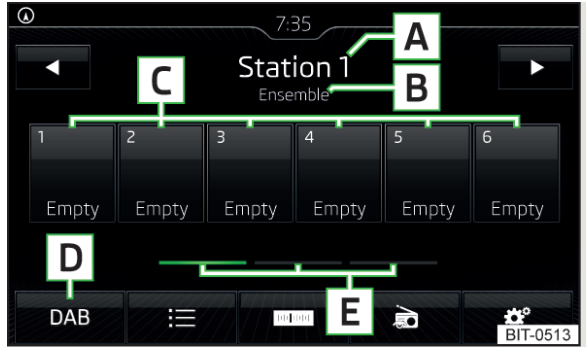
We have a Mk3 Fabia with MIB2 5Q0035842B control unit, which has Android Auto/Carplay (without navigation). The firmware is MST2_EU_SK_ZR_P0369T (latest official) and radio database installed is v1.10.60 (latest). I installed these updates myself via SD card. No 5F fault codes are showing, and everything works as expected. Signal is fine and all expected stations are being received. The DAB now playing/song/station information is being received by the MIB unit, and can always be seen if we change the view to any of the other styles. However on the main preset view (as the below extract from the manual), almost all of the time it just shows the ensemble name (e.g. D1 National, SDL National, BBC National). Every now and then after starting the car, the ensemble is replaced with the now playing/song/station information, which updates and changes dynamically. There seems to be no pattern to this. In addition, I've noticed that when the song information is showing correctly, the bottom row of buttons collapses neatly down to icons after a couple of seconds of inactivity, as per the example from the manual below. Whereas when the ensemble is showing, the text below each icon is present and stays on. So it does seems like the icons are meant to collapse in normal use, and therefore song information is meant to be showing all the time. Is anyone else seeing this behaviour, and is there anything we can do about it? It's a minor thing but we would prefer it to always show the song information. The only other reference I've found to it was on a Seat forum.
-
One thing I've noticed is a lot of the generic dongles seem to have the same chipsets inside, so there are firmware updates available. Takes a bit of messing to perform, but worth a look @JimmyFlan.
-
I've just bought a dirt cheap one from eBay to play around with, not expecting much.
-
Just to confirm for anyone who may come across this in future, I sorted my issue and it was due to a prior dodgy wiring job, presumably done to pass an MOT. More details in a thread I made in the Mk3 forum, but needless to say, what they'd done with the wiring is why I couldn't find anyone else with the exact same problem. 🤣
-
PS: The fault code on the A/C low pressure hasn't come back yet either, only done one drive in the car but it would normally have shown up by now. We'll see if that was related.
-
So to update the thread and close this out (because it's really annoying when people don't do that 😉), I had an auto electrician out today to work on the car. After testing the original wiring and signals from the stalk were working as they should, he took out the extra wire and wired it back in to how it should be. And sure enough, the pump works absolutely fine in both directions. Rear washer instantly fully operational and rear wiper behaviour back to intermittent as expected. As suspected, the botch job on the pump wire was responsible for everything. My theory is the previous owner of the car blew fuse 22 at some point - probably trying to overcome frozen screenwash - and struggled on with it, then when it came to MOT time, some garage has done that 'fix' to get the front washer working. Amazing really that rather than spending ten pence and thirty seconds replacing the fuse, they instead decided to go to all the effort of taking the wheel and arch liner off to butcher the original wiring. Crazy. Thanks again to @Breezy_Pete, it was great to be able to talk through this with the electrician with confidence. As an aside, I've also had the aerial base replaced which has totally resolved the poor DAB reception and stopped the digital aerial short to ground fault. So if anyone else comes across this post and wants to know; On the combi/estate, you need to remove the D and C pillar trims (which involves dismantling a lot of the boot surround) and take out the rear passenger overhead grab handles. Otherwise there's simply not enough room to get tools in to access the aerial without seriously risking creasing the headliner; you need the handles out before it can drop down enough. Online guides and videos for other VAG cars don't account for the steep upwards slope in the headliner on the Fabia estate, above the top of the boot hatch. I used VAG part number 6C0035501Q which has a much larger footprint than the original (6C0035501A/N) and therefore better protection from water ingress. I believe the internal seals are better too. Fitment to the car is exactly the same, and I swapped over the existing screw-in M6 antenna.
-
Just posting this for the info of others who don't already own a VCDS and/or OBDeleven device, and don't want to spend a lot of money on either of those (or a subscription). This may be common knowledge to many but I've only seen reference to it in passing, in various places around the forum. Use at your own risk. For reference, this is what I own and have used: MY2017 (registered 2016) Skoda Fabia Mk3 (PQ26 platform) SE Combi with EA211 1.2 TSI 66kW engine (CJZC). MIB2 with 5Q0035842B control unit, supporting Android Auto/Carplay and without navigation. Redmi 9 running MIUI 13, on Android 12. Generic wifi ELM327 dongle*, purchased in 2016 from eBay for £6.50. Car Scanner ELM OBD app, which is free to use with adverts and some limits to parameter monitoring and coding. Costs £4.99 (Android) or £7.99 (iOS) for the lifetime 'pro' version with no ads or limits. *My unbranded wifi dongle is not recommended by the developer of the app, as apparently many dodgy clones and spoof devices have popped up over the years which may not work properly at best, and may cause costly software corruption issues at worst. I've clearly got lucky here. The branded Bluetooth models they suggest start from about £25 on eBay or £30 on Amazon. https://www.carscanner.info/choosing-obdii-adapter/ So apart from the basics - reading and clearing fault OBD codes for diagnostic purposes, for which I've also used it on my 2011 BMW E92 3 Series - it turns out this app can be used to do some coding on the Fabia. The capability list for PQ26 platforms is here: https://www.carscanner.info/coding-pq26/ I have no particular intention of customising the car, however the reason for the post and what I have successfully used it for, is properly registering a new battery to the car, and removing the unclearable 1555 software version management fault code left behind after updating the MIB2. The latter doesn't even require messing about with reading and calculating HEX codes, like other methods. It just does the calculation for you and applies it automatically. Fault code gone, no bother. It's obviously nowhere near as polished as OBDeleven, or as fully-featured and well supported as VCDS, but as a novice I'm chuffed with what I've been able to do with it for a fiver. Highly recommended for the cheapskates among us. 🤣
-
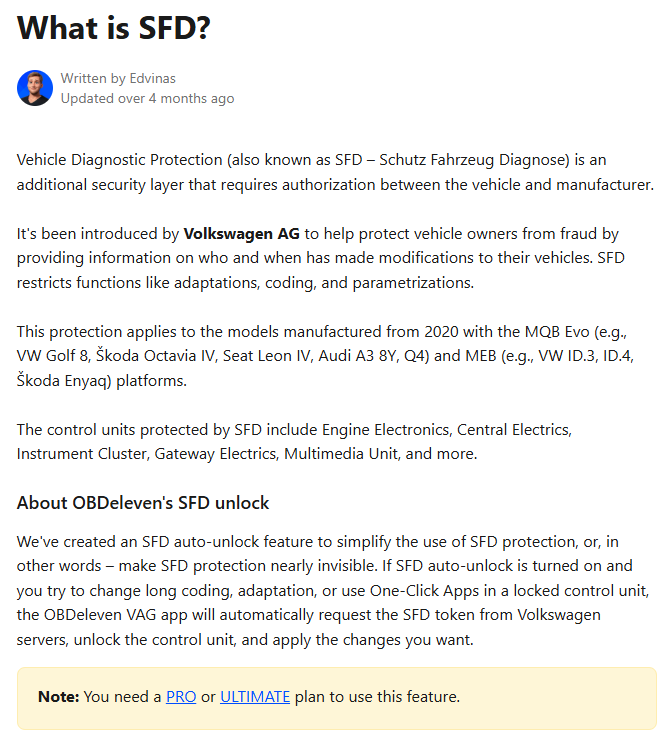
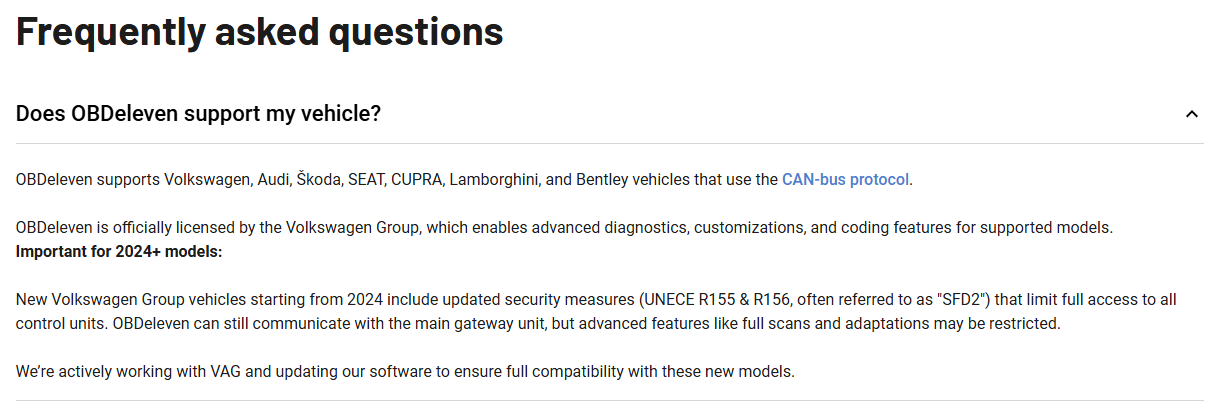
Some more info here: https://wiki.ross-tech.com/wiki/index.php/SFD So it looks like your 2023 car will have SFD but not SFD2.
-



Important Information
Welcome to BRISKODA. Please note the following important links Terms of Use. We have a comprehensive Privacy Policy. We have placed cookies on your device to help make this website better. You can adjust your cookie settings, otherwise we'll assume you're okay to continue.