Paikesejanku
Members
-
Joined
-
Last visited
Everything posted by Paikesejanku
-
I have MIB3 Kodiaq, but I know how to get Album Art working with Android. You need to change your phones bluetooth default AVRCP version to 1.6. To do this, You need to activate Developers settings under phones system. There you can change this settings. After I did it in my Google Pixel phones, it started to show album art via bluetooth on cars headunit.
-
Back doors do not play bass, only midrange. Bass supposed to come from sub to backseat.
-
-
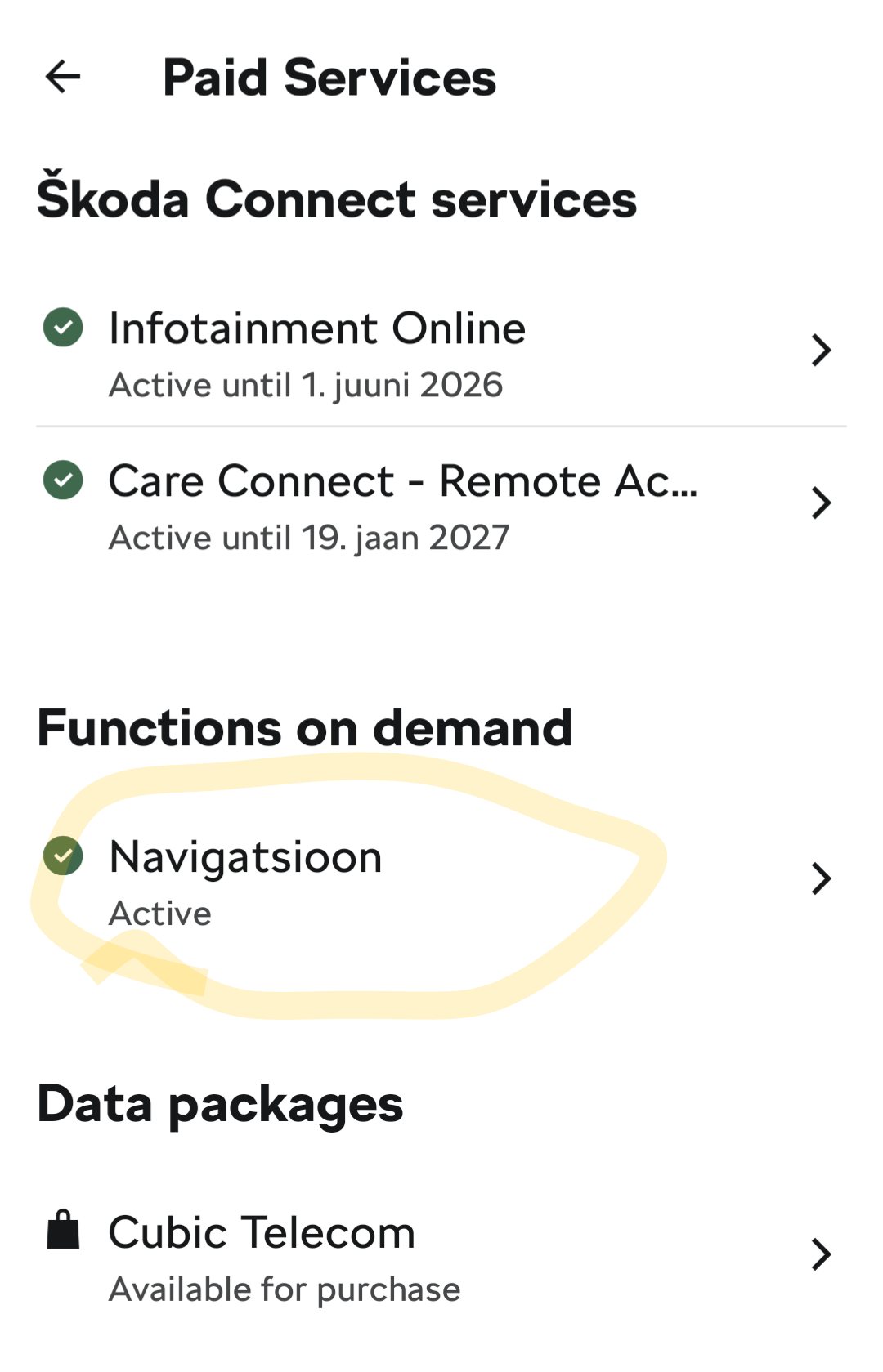
I purchased navigation rights from Škoda Connect Online web shop. I have heard that in dealership, after the software is updated, they synconize all the software FAC/SWAP codes with škoda server. I am afraid that in self upgrade process, this additional purchase will be lost. And if I then want to purchase/update the subscription, online shop will say that you allready have purchased it....
-
-
-
-
In the estate, it is actually in the boot: (87) Skoda Superb iV - Canton Sound System Issue & Fix - YouTube
-
Boot is longer in Superb. Backseat folded, Superb fits longer equipment, ~10cm longer. I have transported 2,10 meter doors and they fitted easily in Superb, but it was hard to fit them into Kodiaq, so that I can drive the car.
-
Neither of them is comfortable for the 90kg adult in the middle. Middle seat is half seat. I reccomend to look car what has 3 separate seats in the back.
-
-
-
I have Kodiaq with 330 sw version and I have similar black line... Would like to know how to utilize full screen.
-
If you have active Infotainment Online service, then it updates the maps over internet automatically. Regarding station logos, I have observed that for some station that initially is missing logo, it is capable to get that info over DAB/RDS signal.
-
But it is possible to communicate that it is know issue. Instead customers had to sit in the dark...
-
Tested this morning and it worked again... strange.
-
For me, still not working. Stopped few weeks ago no response from škoda support.
-
I have had this behavior 2-3 times in first year owning my car. Simple MIB3 reset did not help, but switching off engine and waiting for 1-2 minutes and then start the engine fixed it. I would say that this is a "feature". I suspect it might be related to using Andoroid Auto, cause after I stopped using it in everyday driving I have not had this issue.
-
It is possible only with high end radio - Columbus.
-
This is VAG group issue, all the brands have poor cameras for year 2025 according to car reviewers.
-
1.4 and 1.5 has belt. I have ovned 1.4 Superb and it is poweful enough if you don't need to pull a trailer.
-
It needs everithing, amp, wiring, new speakers etc. It is easyer to go with aftermarket rebuild in some caraudio shop. Probably the result is also better.
-
Has anyone found brighter boot LED-s what don't give this error? I changed boot LED-s to Aliexpress ones and now when motor is running and opening glovebox I get drunk open message to dashboard. The standard LEDs are so dim that it is too dark in the boot.
-
Yes, you have to change two values: 09 – Central Electrics - Adaptions Search 'scheinwerferreinigung' (headlight cleaning) Select 'SRA Verzoegerungszeit' and set value to '2000' (don't worry that the range is '0-250' on the input field) - it is the time in ms how long you have to hold down the washer stick to initiate headlight wash request. Commit the change Number of activation front wash per SRA activation - Anzahl Betaetigungen Frontwaschanlage pro SRA Aktivierung: This is by default set to 10 and means if you pull the washer lever 10 times it will activate the lights cleaning. You need to change it to 1 so that every time when you hold washer stick for 2 seconds, it cleans lights. If you leave it to default then headlight wash occurs only after 10 time of holding 2 seconds. Now when you hold washer stick ~2 seconds, it will spray water on to lights.
-
I have done this with OBD11 (FL Kodiaq): Lane Assist FL Adaption Long Coding 03 - Brakes Byte 29 enable bit 5 09 - Central Electrics Aussenlicht_Blinker => Warnblinken_durch_Fahrerassistenz -> Active 13 - Adaptive Cruise Control Emergency_Assist => Installed (Byte 04, bit 3 (Emergncy assist)) 17 - Dashboard Lane Assistant => Yes (Byte 04, bit 6) Volume to be replenished => Yes (Byte 10, Bit 4) Lane retention assistant, BAP distance => Yes 44 - Steering Assistance Lane assistant => active (Byte 04, bit 0) 5F - Multimedia Vehicle function list BAP => LDW_HCA_0x19 > activated Vehicle function list BAP => LDW_HCA_0x19_msg_bus > Terminal 15 Vehicle menu operations => menu_display_Lane_Departure_Warning > Activated Vehicle menu operations => menu_display_Lane_Departure_Warning_over_threshold_high > Activated A5 - Drive Assistance Point_of_intervention -> early_setting_over_menu HC_advanced_takeover_request -> Coded HC_variante -> Variante_1 aLDW -> coded Emergency_Assist -> EA_Variant_1 Configuration_for_lane_departure_warning_Kl15 -> last_setting Hc_messages -> coded HC_mob_line -> coded Lane_assist_off_tex -> enabled (I left it disabled, cause I don't like warning lights when Lane assist is disabled from menu) HC -> coded HC_Warn_Intensity -> Setting_over_Menu