




El Dingo
Members
-
Joined
-
Last visited
-
We have this on our Karoq. It's a 2018 model year. TSR does recognise overhead gantry signs. It also recognises temporary speed limit signs on slip roads and sometimes signs on side roads. What I'm saying here is that it's neither reliable nor foolproof. It doesn't work in conjunction with cruise control in our car but we don't have the adaptive version. We have conventional instruments and a centre screen, so I can't answer your third point.
-
This worked perfectly, thanks to @Tell and @pcbbc
-
Thanks Tell, That's really good info. I'll try this later today. You are a star.
-
Hi Tell, I have USB-A with the touch screen, no physical buttons, it looks like the attached image. I can update the Nav over an SD card but the Nav data is stored in the unit and not held on a SD card. So is that MIB2 high? Does this unit have RDS-TMC capability? As I mentioned before, the coding in the Karoq is currently 32771. In my Audi the coding was 32783 changed to 32782. So I'm a little confused 🤔. Thanks.
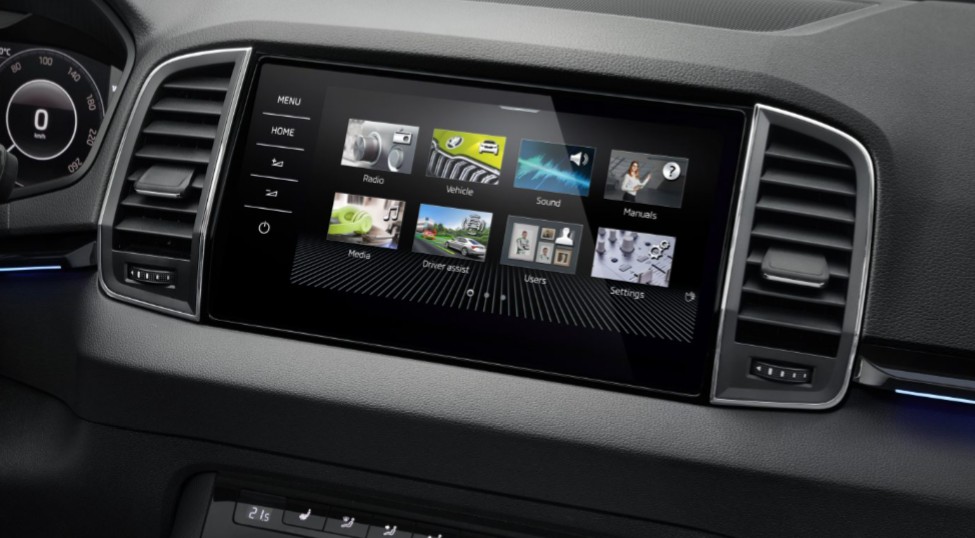
-
Did the 2018 Karoq Edition (I assume MIB3) use RDS-TMC? I have an older 66 plate Audi and updated the system from Trafficmaster to INRIX. But it's not clear in the Karoq (or in the manual) if traffic data of any kind is used, except that I can sign up to Skoda Connect to get live traffic data. And the 5F coding is 32771, different from 32783 that is recommended here. Any guidance would be much appreciated.
-
Just in case someone else suffers with this: Our car was recalled for pano roof drain issues and yet still suffered with this common problem. The spare wheel well filled with water, and I started removing trim at the bottom and working my way up... When I got to the roof lining, I found that the pano roof drain tube had a kink in it that blocked the water from draining away. I found a tight-fitting spring that I slid over the pipe that kept the pipe from bending and job done. (Apart from drying out then reassembling the boot trim and wheel well liner.) Hope this helps others with the same problem.
-
I found an easy way. Remove the storage box from next to the steering wheel. I still haven't found the buzz though.
-
Just as the title says, my Superb has started to buzz somewhere in the dashboard, quite loudly, at between 2,900 and 3,000 rpm. This has been going on for a couple of months now, and as my replacement car isn't now due to arrive until 2023, I need to fix this. There is a secondary quieter buzz from the same place that started this week, between 3,400 and 3,600 rpm. Any ideas? Is it easy to get the instrument panel out, so I can have a look behind it?
-
Yep, decades indeed. My 1990 Audi 20v engine used a huge amount of oil for the first 5,000 or so miles.
-
Anyone know where I can get one other than from VAG? (They want £137.91 plus VAT!) (For those interested, this is an engine support, as listed in Autodata for the cam belt change.)

