



Skip to content

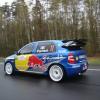
Fabia WRC (www.Lamino.cz)
Featured Replies

Skoda Fabia KIT LS 02 (01/20)-WWW.LAMINO.CZ

Edited by Vany
http://www.youtube.com/watch?v=0BJ7tlBzgd0

  • Replies 67
  • Views 15k
  • Created
  • Last Reply

Top Posters In This Topic

Most Popular Posts

Posted Images

Sorry not a fan of that

  • Author

foto

  • Author

Foto

  • Author

Origo Wings Fabia WRC

  • Author

Origo GPS WRC

thats cool! something a bit different and mad. Will you be using it for rallying or just building it as a replica?

Don't mean to be rude.... but is this an add for a body kit?

Looks pretty cool, shame it doesn't come with a 20vT and 4WD

Hmmm like that.Looks quite cool :cool:

What does Jason think ?

  • Author

Car will stay in the garage.:rofl:

  • Author

Just-in-hand

Its very tidy. Considering most bodykits look absolute tat, this one looks quite nice. Yes, shame its not 4x4!

  • Author

Apologize for the language but translate it into Translator

  • Author
  • Author

Skoda Fabia KIT LS 02 + Skoda Fabia KIT LS 01

  • Author

Have a photo application to start the car fibers.Thank you

  • Author

Administratora.Thank you

  • Author

Otherwise no problem BodyKit UPC and sent to England.:)

not to my taste

  • Author

Wings

  • Author

Gps wrc

It looks good. :thumbup: It just needs a WRC wing or a different bigger one. Rally sticker would also look good.

  • Author
It looks good. :thumbup: It just needs a WRC wing or a different bigger one. Rally sticker would also look good.

Thank you

Wing is the original Skoda Motorsport:thumbup:

Otherwise the car will be in the colors Skoda Motorsport and perhaps in the

colors RedBull:D

Id love my Fab with the WRC kit on - No stickers though! afew of my other mods - Amazing!

Looks good pal, well done! :thumbup:

Create an account or sign in to comment

Recently Browsing 0

  • No registered users viewing this page.

Important Information

Welcome to BRISKODA. Please note the following important links Terms of Use. We have a comprehensive Privacy Policy. We have placed cookies on your device to help make this website better. You can adjust your cookie settings, otherwise we'll assume you're okay to continue.

Account

Navigation

Configure browser push notifications

Chrome (Android)
  1. Tap the lock icon next to the address bar.
  2. Tap Permissions → Notifications.
  3. Adjust your preference.
Chrome (Desktop)
  1. Click the padlock icon in the address bar.
  2. Select Site settings.
  3. Find Notifications and adjust your preference.
