



Skip to content

Octavia III

Featured Replies

"]Next+Car+Sunday+1.bmp

Next+Car+Sunday+2.bmp

Thats different to the pics from a few weeks ago isn't it? Anyway, i like it!

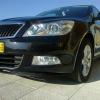
Same pics photoshopped so the car is a darker shade.

The new Octavia when released will have little in common with what is basically a concept car.

since I just got my new Octavia the other day I hope and pray that the new one is horrible I do not want to be FORCED to buy one but still CAN'T wait to see the VRS version :D

this one is sedan-looking.

the previous one was a hatch-style.

looks good. bet it won't have wheels that size or that ride height, but that's fixable..

;)

this one is sedan-looking.

the previous one was a hatch-style.

Yes, this is more like the current shape. Nice, no silly bumps or bits - clean shape. I'd get one if they put the 1.8TSi in it!!!

Nice, nicer than the previous 'concept D' photos, which I did like.

Getting dangerously close to looking like an Audi though (front & rear lights), which would be awful..... :p :D

  • Author

From diferent pictures I seen, I think the front end type will be future front end for Skoda

I like it, looks darn cool. :thumbup:

this one is sedan-looking.

the previous one was a hatch-style.

would be great if it had the smart boot the new superb has that opens as a saloon or hatch very clever idea

looks good. bet it won't have wheels that size or that ride height, but that's fixable..

;)

yeah, those wheels do look a bit "too big" for it.

and with that sort of height, u'll either need smaller wheels with serious lowering or big over hanging skirts/lips (front & rear)!!!

Create an account or sign in to comment

Recently Browsing 0

  • No registered users viewing this page.

Important Information

Welcome to BRISKODA. Please note the following important links Terms of Use. We have a comprehensive Privacy Policy. We have placed cookies on your device to help make this website better. You can adjust your cookie settings, otherwise we'll assume you're okay to continue.

Account

Navigation

Configure browser push notifications

Chrome (Android)
  1. Tap the lock icon next to the address bar.
  2. Tap Permissions → Notifications.
  3. Adjust your preference.
Chrome (Desktop)
  1. Click the padlock icon in the address bar.
  2. Select Site settings.
  3. Find Notifications and adjust your preference.
