



Skip to content

vRS Facelift

Featured Replies

What exactly changed in the Mk1 vRS Facelift and when did this happen. Many thanks

  • Author

Thanks just what I was looking for. Now to find out if the vRS I pick up tonight is a facelift or not :D

Thanks just what I was looking for. Now to find out if the vRS I pick up tonight is a facelift or not :D

The only real exterior give away will be the rear light clusters, Which can be easily emoticon-0110-tongueout.gif replaced!

  • Author

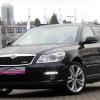
So I am guessing it is a Facelift.

SkodaFront.jpg

SkodaRear.jpg

Is there anyway to tell which engine is in it?

What year is it?

Sticker in the boot or on the cambelt cover will tell you what engine it is.

  • Author

Should have mentioned the year it would probably help :rofl: its July 2005

New rear lights

New dash

New traction control button

Old asz engine

Should have mentioned the year it would probably help :rofl: its July 2005

It would be HIGHLY unlikely a pre-facelift car would be registered that late - since the change was in Autumn 2004. It will have the earlier engine - the BLT engine came in around early 2006.

New rear lights

New dash

New traction control button

Old asz engine

As I've pointed out before I'm afraid it's not nearly so simple and straightforward as that statement implies - the process didn't happen in one go.

The "new traction control button", by which I take it you mean the warning light on the dashboard, was post-facelift in any case. And my facelift car didn't have the new fascia top (not a "new dash") or the price rise which came with the facelift.

And you've missed to mention the different front grille and the rear door lock pin deletion too.

Edited by DRJ

My bad

Should have new grille an door lock pin deletes on the rear

I know that it didnt happen all at once but an 05 'should' like my old 05 have all the revisions bar the blt engine

Edited by BigJase88

Create an account or sign in to comment

Recently Browsing 0

  • No registered users viewing this page.

Important Information

Welcome to BRISKODA. Please note the following important links Terms of Use. We have a comprehensive Privacy Policy. We have placed cookies on your device to help make this website better. You can adjust your cookie settings, otherwise we'll assume you're okay to continue.

Account

Navigation

Configure browser push notifications

Chrome (Android)
  1. Tap the lock icon next to the address bar.
  2. Tap Permissions → Notifications.
  3. Adjust your preference.
Chrome (Desktop)
  1. Click the padlock icon in the address bar.
  2. Select Site settings.
  3. Find Notifications and adjust your preference.
