



Skip to content

Newbie

Featured Replies

Hi folks, found my old profile from a good few years ago and now that I've actually got a Skoda, thought I'd put it to good use.

Recently bought a 2006(56) Fabia 1.9 PD100 Ambiente. Used to drive a Saab 9-5 Aero but due to change of circumstances, I have to drive to work a lot more often now - 80 mile round trip! So the Fabia was purchased to save money on fuel.

Had a couple of VAG cars in the past - a 6N2 Polo GTi and a Golf GTi TDi PD150 (which I still regret selling).

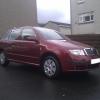
Here is a pic of the Fabia, sorry for quality, it was a quick one on my phone after the car was delivered.

Fabia021211.jpg

Won't be doing a lot to it as my aim is to save money but I've got a few small plans for it:

Remove the Ambiente badges

Remove the rear Fabia badge

Fit silver indicator bulbs and LED numberplate bulbs (have these already)

Fit headlamp protectors

+ anything else I can think of.

Edited by del-gti

Hi and welcome aboard.

Seem to remember n old biblical saying about a sinner repenting

Welcome back .You might have been better getting 1.4 TDI, but that's my opinion - it's a sedate little lady ,till the turbo kicks in - then she's bitch ,but with the lighter front end ,handles better. But I'd like to see one with 100 bhp -then boy racers beware .An if you keep the turbo out - you get decent ecomomy .

Edited by VWD

Create an account or sign in to comment

Recently Browsing 0

  • No registered users viewing this page.

Important Information

Welcome to BRISKODA. Please note the following important links Terms of Use. We have a comprehensive Privacy Policy. We have placed cookies on your device to help make this website better. You can adjust your cookie settings, otherwise we'll assume you're okay to continue.

Account

Navigation

Configure browser push notifications

Chrome (Android)
  1. Tap the lock icon next to the address bar.
  2. Tap Permissions → Notifications.
  3. Adjust your preference.
Chrome (Desktop)
  1. Click the padlock icon in the address bar.
  2. Select Site settings.
  3. Find Notifications and adjust your preference.
