



Skip to content

Badge removal RS Mk 2
Featured Replies

Hey all...

Planning on removing the RS and Fabia badging from the rear of my car when it arrives.

My guess is that they're just held on with adhesive, and there are no holes or anything behind to mess around with afterwards. Can anyone confirm this? and what method did you use to remove the badges / residue?

Took fab and tdi badge off monte easy enough

Hair dryer round badge to warm glue up,then dental floss towards middle from one side then other

Took 10 mins and a damp cloth will clear glue off underneath

Or Fishing Line.

Vinegar will do for taking of residue.

(i get told off for suggesting careful use of Nail Varnish remover, Paint Thinners, White Spirit, Glue Remover etc)

No one loves the search forum function - I think the admins should just remove it...

If the cars brand new the badges will just pull off with little resistance and won't need heating up

In Australia they might just be warm enough anyway.

george

In Australia they might just be warm enough anyway.

george

It would have been here today, 40.5 Celsius. I got the letters off my old Focus with dental floss. Use a sawing motion, making sure you pull towards yourself. That will minimise any slight possibility of marking the car.

I must admit I'm happy to leave the badges on, though. Hardly anyone knows what a Fabia is, let alone a (v)RS. I figure that everyone who gets humbled by it will go and look it up on the Internet, and may eventually consider buying one. Skoda Australia should pay me for the marketing. :giggle:

Edited by OzFabia

  • Author

Or Fishing Line.

Vinegar will do for taking of residue.

(i get told off for suggesting careful use of Nail Varnish remover, Paint Thinners, White Spirit, Glue Remover etc)

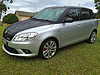
Thanks for the photo... nice clean look is what I'm after too. Plus hardly anyone knows what a Skoda is here... let alone a Fabia or what an RS is. My plan is to have them asking 'what the hell was that?' as I rapidly distance myself from them ;)

May I suggest a different take on this one :

large_241122-2851038.jpg

Create an account or sign in to comment

Recently Browsing 0

  • No registered users viewing this page.

Important Information

Welcome to BRISKODA. Please note the following important links Terms of Use. We have a comprehensive Privacy Policy. We have placed cookies on your device to help make this website better. You can adjust your cookie settings, otherwise we'll assume you're okay to continue.

Account

Navigation

Configure browser push notifications

Chrome (Android)
  1. Tap the lock icon next to the address bar.
  2. Tap Permissions → Notifications.
  3. Adjust your preference.
Chrome (Desktop)
  1. Click the padlock icon in the address bar.
  2. Select Site settings.
  3. Find Notifications and adjust your preference.
