



Skip to content

Ignition Key/Steering Lock Problems
Featured Replies

Hi All

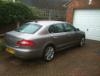
I have had my (2009) Superb II 170 PSI DSG Elegance since last August. Very very pleased with it, although the interior seems more prone to scratching than my Jaguar X-type.

Occasionally I have had difficulty getting the ignition key to go into the barrel on the steering column. Juggling or even banging the steering wheel, whilst locked, usually frees the ignition barrel to allow me to insert the key. My wife also had the same problem and called out the local garage. I solved the problem before they got there by banging the steering wheel, but afterwards the garage owner told me this is a common problem with Skoda.

Last night I got home late, switched off and removed the key, but the Columbus stayed on and it seemed as if the ignition switch was still in position 1. Also the steering lock wasn't engaged. It took about five minutes of moving the steering wheel until I could get the key back in and fully switch of the ignition.

Anyone else had or having this problem?

Many thanks

Richard

Edited by richardo

  • 5 years later...

I am having similar problems with my 2008 Octavia Elegance. Usually sorted by similar method but today my wife was stuck for 2 hours until I got here and got the key in in less than a minute. Obviously need a better solution.

not just a skoda problem its a VAG issue across the board.

Create an account or sign in to comment

Recently Browsing 0

  • No registered users viewing this page.

Important Information

Welcome to BRISKODA. Please note the following important links Terms of Use. We have a comprehensive Privacy Policy. We have placed cookies on your device to help make this website better. You can adjust your cookie settings, otherwise we'll assume you're okay to continue.

Account

Navigation

Configure browser push notifications

Chrome (Android)
  1. Tap the lock icon next to the address bar.
  2. Tap Permissions → Notifications.
  3. Adjust your preference.
Chrome (Desktop)
  1. Click the padlock icon in the address bar.
  2. Select Site settings.
  3. Find Notifications and adjust your preference.
