



Skip to content

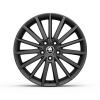
RS6 alloys on a Octavia vRS 09+
Featured Replies

Hi lads,

I've seen a set of genuine RS4 alloys for sale for an excellent price. They are 5x112, 18x8J, ET 43 with centre bore of 57.1. Is the offset ok?

I've done a search on here and on the net for pictures of them alloys on a Octavia vRS 09+ but no joy.

Can someone help me out with a few pictures to see will they suit?

Thanks.

Normal 'Neptune' OEM wheels have an offset of 51...so these should fit fine

  • Author

Thanks Chris.

RS4 alloys...


xtg6862024i.jpg


New RS6 alloys....


post-94476-0-36238900-1356562038.jpg

  • Author

Sorry the is a typo in my first post, they are RS6 alloys, very similar to these:

16122008990sml_zps334afcf6.jpg

I was chatting your man selling them there and they are not genuine! ????

Someone on here has a set on his wagon. Think he's Scandinavian based - check the projects section...

rs6hr0_zps84941f63.jpg


20130420_182202_zps3e5f946d.jpg


IMG_5140_zps9a8dab18.jpg

Sorry the is a typo in my first post, they are RS6 alloys, very similar to these:16122008990sml_zps334afcf6.jpg

I was chatting your man selling them there and they are not genuine! ????

No. On the C5 RS6 they were in the low 30s offset from memory, and the RS6plus had them in a more matte "Titan" colour. You'll find that a Faber Castell 4B graphite stick available from an art shop will come in handy for touch-ups.

They look nice though and I wish I'd kept mine. That said I've got some 8x18 and 8.5x19 (both ET42) double 7 spkes ("RS4s") that I hope will look better on an Octavia III than they do on the II.

Edited by Jeeves

That white ones a beut!

Create an account or sign in to comment

Recently Browsing 0

  • No registered users viewing this page.

Important Information

Welcome to BRISKODA. Please note the following important links Terms of Use. We have a comprehensive Privacy Policy. We have placed cookies on your device to help make this website better. You can adjust your cookie settings, otherwise we'll assume you're okay to continue.

Account

Navigation

Configure browser push notifications

Chrome (Android)
  1. Tap the lock icon next to the address bar.
  2. Tap Permissions → Notifications.
  3. Adjust your preference.
Chrome (Desktop)
  1. Click the padlock icon in the address bar.
  2. Select Site settings.
  3. Find Notifications and adjust your preference.
