



Skip to content

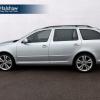
whats goin on with this estate?
Featured Replies

it seams to have an extra bit in middle?skoda_superb_combi_test_mule_2.jpg

the rear door seems smaller than usual

  • Author

but why? the B piller is wider

if you look at the rear wheel arch seems to be something going on there, perhaps a custom job with an engine in the rear, cut and shut?

It's a test mule for the current Superb.


They often wrap a new chassis in the body of a different car so they can test it in the real world without too much attention.


Superb is longer than an Octavia, so they had to add a bit of metal in the middle.


The filename of the image gives it away.

skoda_superb_combi_test_mule_2.jpg

what softscoop said, I knew all along just wanted a lengthy thread! ;)

  • Author

ah its actually got on superb wheels. only just noticed that

Maybe skoda is going to fabricate limos. Hahaha

One thing of interest, Skoda did actually produce a long wheelbase mk1 Octavia with an extra bit in the middle similar to the test mule.


Skoda Octavia Laurin & Klement Long


It had more rear legroom, and some other options like folding tables on the back of the seats :)


I guess it was the most luxurious Skoda before the Superb came along.


397_1999lklong01.jpg


aeb89eu-480.jpg


f6b89eu-480.jpg


octavia_long_01a.jpg


399_1999lklong03.jpg

pretty pointless 3-4 inches

pretty pointless 3-4 inches

I could be tempted to say "Speak for yourself!" but that might cause offence, so I won't.

Here's another Suptavia, or Octerb :)


9080403.014.Mini2L2.jpg

In the dark old days of Czechoslovakia I could just imagine some senior Party official cruising around in one of those, with blacked-out windows.

Create an account or sign in to comment

Recently Browsing 0

  • No registered users viewing this page.

Account

Navigation

Configure browser push notifications

Chrome (Android)
  1. Tap the lock icon next to the address bar.
  2. Tap Permissions → Notifications.
  3. Adjust your preference.
Chrome (Desktop)
  1. Click the padlock icon in the address bar.
  2. Select Site settings.
  3. Find Notifications and adjust your preference.
