



Skip to content

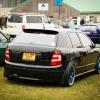
STOLEN KY06HWC... In Halifax black fabia vrs! Swapz username BANSHEEBOY999
Featured Replies

Stolen by this guy in Halifax area a few people looking out for it on edition this is the second car he's stolen n gotton away will either selling or disappearing ...

What he failed to relise forums and police are on to him...

Please keep an eye out for him and this car

image_zps270777a5.jpg

Cool


In Halifax tonite (Tues).

Will keep an eye out for .....


Wait.

Halifax in West Yorks?

Will keep my eyes open round rochdale, its only over the hill. Whats the username on swapz?

Confused.com

Second time?

....on edition?

Whats the story here?

Confused.com

Second time?

....on edition?

Whats the story here?


I'm truly confused .com also Chris?

Confused.com

Second time?

....on edition?

Whats the story here?


I'm truly confused .com also Chris?


I think we need more info here so we can try and find it and also keep our pride and joys safe too!!


How did it get stolen? When? etc...

Cool


In Halifax tonite (Tues).

Will keep an eye out for .....


Wait.

Halifax in West Yorks?


Yes Halifax West Yorks... that pic is near the Ogden Wind Farm/Warley Moor res.

What guy?

Which?

Who?

why?


Totally baffled here. :think:

Locking this until further info sought.

Deano, if you're reading this, please PM me more info about this and I can do the necessary to make it all a little clearer. :)

Guest
This topic is now closed to further replies.

Recently Browsing 0

  • No registered users viewing this page.

Important Information

Welcome to BRISKODA. Please note the following important links Terms of Use. We have a comprehensive Privacy Policy. We have placed cookies on your device to help make this website better. You can adjust your cookie settings, otherwise we'll assume you're okay to continue.

Account

Navigation

Configure browser push notifications

Chrome (Android)
  1. Tap the lock icon next to the address bar.
  2. Tap Permissions → Notifications.
  3. Adjust your preference.
Chrome (Desktop)
  1. Click the padlock icon in the address bar.
  2. Select Site settings.
  3. Find Notifications and adjust your preference.
