



Skip to content

Metallic green paint code?
Featured Replies

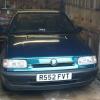
Hi I have a 1998 Felicia gli mk1 and I was wondering what the paint code was. In the handbook it says L959 but it looks to dark. Can any one help??

Your coulor looks the same as my '98 facelift LXi and the code marked inside the boot is W959 which is a pearlescent paint.

GREEN DARK METALLIC: Mixing Code = 9590

GREEN EMERALD (FOREST) METALLIC: Mixing Code = 9595, SKODA Code = 1L1L

Another skoda paint shop/data sticker failure it seems, it's really common for them to write the wrong paint number on the data sticker.

I had exactly the same problem with mine, it was not any of the paint colours that had ever been used on uk spec vehicles, mine is senaris green, which according to skoda was never used on a felicia, it's irritating beyond belief when they make mistakes like this, mine is a pearl finish which again is something that skoda claim was only available in black magic if I recall, it just goes to show what little thank odd paint shop know about painting cars, they probably just painted them in whatever colour they had in stock at the time irrespective of what the customer ordered.

edit ; should have said, line mine also says L959 in the hand book/data label which is vw emerald green as used on the mk3 golfs, but it is nowhere near the actual paint on the car, also about 4 shades lighter that W959 as well

we're talking about this colour, right? if so, in my catalog is code 9590.

800px-Skoda_Felicia_outside_Robinson.JPG

Create an account or sign in to comment

Recently Browsing 0

  • No registered users viewing this page.

Important Information

Welcome to BRISKODA. Please note the following important links Terms of Use. We have a comprehensive Privacy Policy. We have placed cookies on your device to help make this website better. You can adjust your cookie settings, otherwise we'll assume you're okay to continue.

Account

Navigation

Configure browser push notifications

Chrome (Android)
  1. Tap the lock icon next to the address bar.
  2. Tap Permissions → Notifications.
  3. Adjust your preference.
Chrome (Desktop)
  1. Click the padlock icon in the address bar.
  2. Select Site settings.
  3. Find Notifications and adjust your preference.
