



Skip to content

I have a few issues with my fabia
Featured Replies

Hi all,

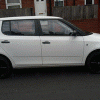
I have a 2011 skoda fabia 1.2 12v s and I'm trying to figure out whether my engine/gearbox mounts are gone or going or whether my clutch is going or both.

My skoda has only done just under 35000 miles 12k while I've had the car and gearbox doesn't feel as smooth as it did and I'm sure the biting point as moved up and I sure the engine have dropped a bit on the nearside or is that normal.

Many thanks

Any issue's engaging any gears, apart not feeling as smooth.


At 35,000 miles I would have thought the gear-box and clutch would be fine/ OK.

Although if a previous owner (if any) might be the sort to leave their foot resting on the clutch pedal whilst driving, would reduce clutch life..


The car is now 5 years old, so anything is quite possible, but the dog-bone that stabilises the engine from below is easy to replace by DIY..

DOUBLE POST FROM OP!

Is there a tech glitch? A number of double posts are appearing - not that it bothers me - just wondering.

Edited by Brian69

  • Author

I gonna check out the dogbone, as for the gears it seems to knock on something when changing from 3rd to 4th and feels slightly heavy then normal pulling it out of 3rd to N but goes in to 4th easy like it pull it self into gear and I sometimes miss 2nd coming from 1st like it's not a lined. And sorry can't the duplicate page didn't load when I clicked post

  • 5 weeks later...
  • Author

Hi all,


i was wondering if anyone got any more infomation about my gearbox.

A friend of mine said that my gearbox oil might be low and that i should check it but i'm not sure this will be a problem.


Thanks

Create an account or sign in to comment

Recently Browsing 0

  • No registered users viewing this page.

Important Information

Welcome to BRISKODA. Please note the following important links Terms of Use. We have a comprehensive Privacy Policy. We have placed cookies on your device to help make this website better. You can adjust your cookie settings, otherwise we'll assume you're okay to continue.

Account

Navigation

Configure browser push notifications

Chrome (Android)
  1. Tap the lock icon next to the address bar.
  2. Tap Permissions → Notifications.
  3. Adjust your preference.
Chrome (Desktop)
  1. Click the padlock icon in the address bar.
  2. Select Site settings.
  3. Find Notifications and adjust your preference.
