langers2k
Resident Member
-
Joined
-
Last visited
Everything posted by langers2k
-
OEM options are: - Amundsen/Amundsen+ (RNS-310/RNS-315) with a 5" screen. - Columbus (RNS-510) with a 6.5" screen. - MIB discover media (MIB PQ STD2) with a 6.5" screen. Aftermarket options are: - The Kenwoods designed for this generation of car have a 7" screen (DNX518VDABS, DNX525DAB). - Aftermarket double din headunits tend to have a 7" screen, you'd need a new facia as they are square. - There are some Chinese headunits with 8", 9" and 10.1" screens but the software can be flaky and support none existent. I'm not aware of any MIB 9" options that would be compatible, the only MIB systems with screens larger than 6.5" are for newer MQB cars and won't be compatible with a 2014 Superb.
-
The hardest part is splitting the headlights. The are permasealed so the old oven trick doesn't work too well, most people seem to cut them open which is the biggest reason I've not tried to open mine. There are plenty on drive2 that have split them to repaint etc. I'm pretty sure the EvoX-R and any other E55 projector should just drop in although you may need to trim the bracket to clear the shutter motor if using bi-xenons. Never heard about AFS motor failures, as long as you're careful I'd expect them to be fine. Finally, if you want to add the bi-xenon functionally, you'll need to run two new wires from the headlights to the BCM. The vRS uses the shutter pins to control the LED DRL so you'll need to move some pins and possibly replace the BCM. You'll also need VCP or ODIS-e to change the lighting configuration too
-
VCDS probably won't help. All you need is a multimeter :) It's not super difficult to narrow it down to a single circuit but you need to make sure to perform the test properly. Thread with a guide: https://www.briskoda.net/forums/topic/377587-technical-bulletin-about-parasitic-current-draw-measurement/ Helpful video here: https://www.youtube.com/watch?v=lRcj1fQcWwU
-
VCDS won't be able to update the software in the gateway although it will let you code a replacement module. To be honest, I'd probably try and find someone local with VCP/ODIS-e to update the existing gateway. It can be done without removing it and only takes 10 minutes. You can have fatigue detection activated at the same time. After an update it should become a 7N0 907 530 BK and fully support 5F units. If you can and assuming you don't need the car for a few days, post it to me and I'll update it then post it back
-
VCDS is probably the most common/best supported tool, a genuine 3-VIN Hex-V2 should be around £225. Otherwise, Carista and OBDeleven are gaining popularily but I've never used either so I can't add any detail.
-
Not that I'm aware of...
-
Depends what you're looking for too. Various online shops are still open as are eBay/Amazon.
-
-
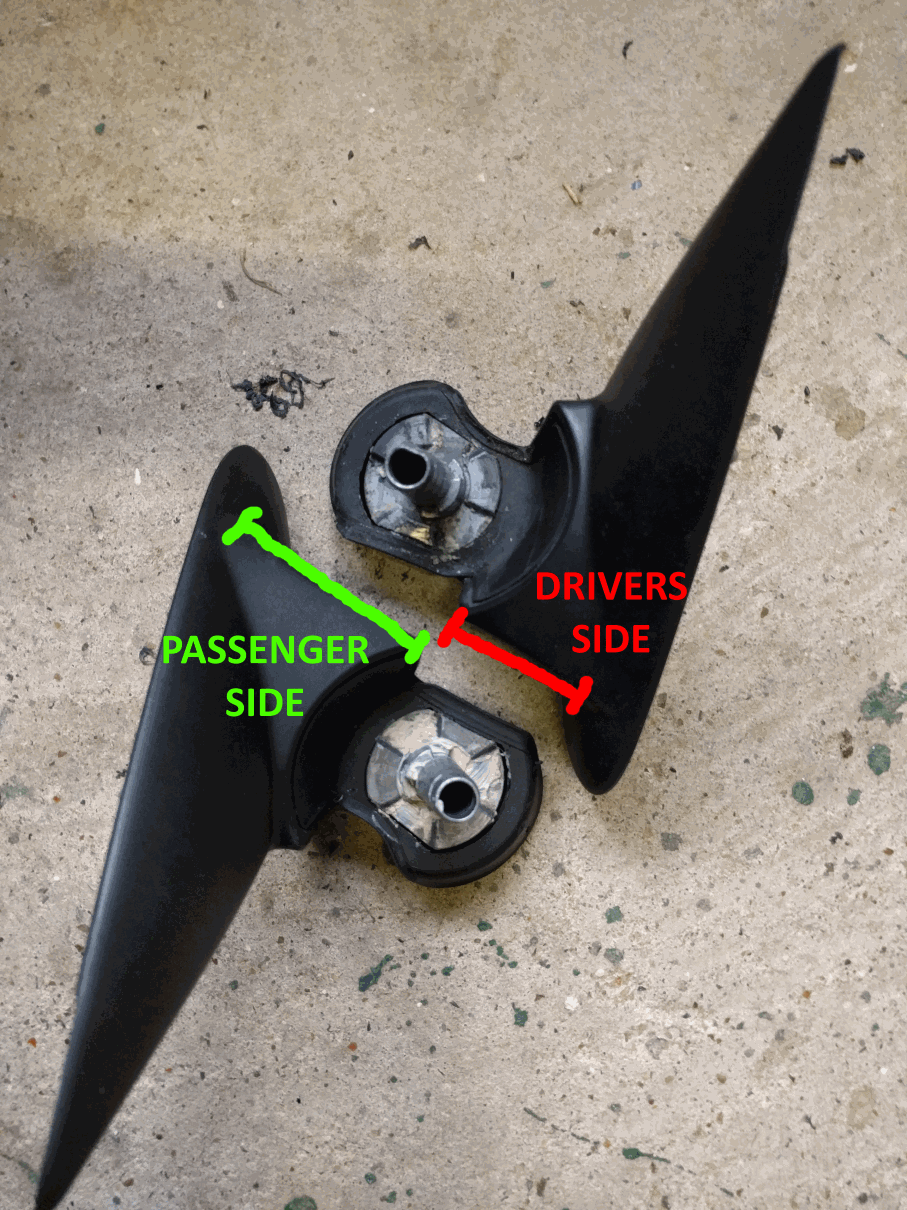
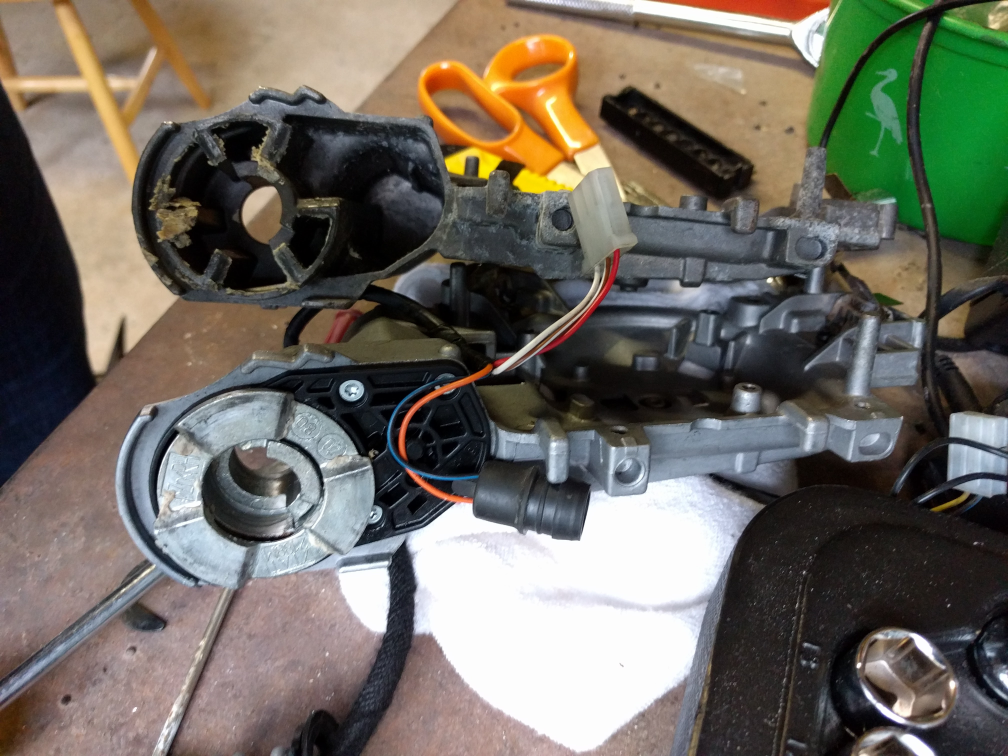
Just completed the above on my MK2 FL Elegnace and wanted to add what I'd learnt. Early FL Elegances came with electric folding as standard but this appears to have changed in around 2010. This means that my MY12 was missing them... It did however have puddle lighting and therefore the correct door modules to support folding mirrors: Address 42: Door Elect, Driver - Part No SW: 1T0 959 701 AA Address 52: Door Elect, Pass. - Part No SW: 1T0 959 702 S If your FL Octavia has the above modules all you need is wing mirrors (with electric motors) and a mirror switch with the folding position. A passenger side mirror came up on eBay with a memory module for reverse dip. Fitting was easy enough: - Remove door card (maybe four screws?) - Remove trim behind the mirror - Disconnect mirror loom and undo one screw to release the mirror from the door - Fit new mirror! - Recode the door module for folding mirrors (if reverse dip is also being fitted, the BCM also needs coding) - Check it works (VCDS output test) - Reassemble the door Sourcing a drivers side mirror was proving much harder and the dealer price is ~£240. Fortunately, Eddie-NL came to the rescue as he had a spare LHD passenger mirror (with motor) which is the same side as a RHD drivers mirror that I needed. This presented it's own problems as the angles are different to accommodate the differing drivers positions in RHD or LHD cars. Stripping both mirrors down and removing the circlips showed a simple solution. The base which attach the mirror to the car set the angle so by swapping the LHD base with the RHD base from my car all was good. I've attached a couple of pictures to show the differences between passenger/drivers bases and motorised/manual folding mechanisms. Just as a word of warning, removing the circlips can be quite a task, even more so on the manual version as the spring fitted is much stronger. With the help of a vice and patience it is possible to get them out and back in again. Fitting the drivers side was pretty much the same as the passengers side with a couple of extra screws. To get it working from the remote I needed to redo the min/max limits for all windows and fold/unfold the mirrors a couple of times with the engine running. The final issue was that the puddle lights did not illuminate when the mirrors were folded (worked normally when unfolded).Turns out this is part of the door mirror EEPROM and can be changed via ODIS-e or VCP (not VCDS). It's a ten minute job to reprogram the two door modules and now I have puddle lights regardless of mirror position. I have no idea what the stock behaviour is so if anyone with factory fitted electric folding mirrors with puddle lights can let me know the stock behaviour that would be great! Bases: Mirror castings: