langers2k
Resident Member
-
Joined
-
Last visited
Everything posted by langers2k
-
It's a CAN-bus gateway or CAN gateway. This page from rosstech gives the basics: http://wiki.ross-tech.com/wiki/index.php/Navigation_System_(RNS510)_Retrofitting It will need coding in after fitting. The advantage is you don't need to mess with your wiring and create a custom switch. The problem is that most (all?) the stock switch are probably push-to-make or push-to-break. This means they can't stay in both the off and on positions so won't work are you'd like them to and will need modifying. You'd need a used stock switch with a random symbol (ASR, ESP, park assist, etc), take it apart and replace it's internals with a on-off switch that's capable of switching the 15-20A supply to the headunit. Otherwise, you can just grab a bog standard switch and hide it somewhere out of view. As memtioned by Mac11irl, the Bolero isn't designed to have it's power cut constantly so it might not like it.
-
£100!? Probably closer to £20 for a used one from eBay or a breakers yard :)
-
The unit in the glove box is the headunit and also contains the bluetooth module. The bit in the dashboard is just a touchscreen There are occationally updates for the headunit which can contain BT updates but I'm not sure if it'll help. Add a picture showing your headunit details to the following thread as Pab seems to have updates for most headunits:
-
You might want to take a look at this:
-
There is no harm in leaving VIM enabled - I never even put a DVD in my Columbus so unless it something you're planning to play DVD's, I wouldn't worry too much. Assuming the software is original, it should always take the latest maps but may not support the POI database that comes with the maps (if I remember correctly). I think earlier versions only had two partitions but later ones had three. Most the time, even with the latest firmware the Columbus is never 'quick' ;) Might be worth dropping @Rustynuts a PM as he tends to know most things about the Columbus/RNS-510 units and often helps others with firmware updates.
-
Erm, it doesn't, otherwise the redline would be at 2500 rpm Because the ECU has decided there is still enough load on the engine to hold the lower gear. Seems unlikely, mostly as I think your car is probably working normally... You might be better posting in the Rapid section as a 2019 Rapid is very different to a MK2 Octavia in terms of engines and electronics. At least it'll let you compare to other similar cars
-
I think I used the Josi version for a while. What version are you currently on as updates don't tend to add much from around SW:4000 onwards if I remember correctly. It will continue being Skoda branded
-
It's cloned/copied hardware and hacked software based on a very old product. I wouldn't let it anywhere near my car and I'd be amazed if it worked in a useful fashion on a MK2 Octavia.
-
Sounds like you have the cars original BT module still enabled rather than just the Kenwoods BT. I'd check under the front seats for the original BT module and disconnect it Feel free to add a picture if you're unsure what you've found.
-
To save them needing to make two different headunits for cars with or without BT It also means you can retrofit BT without replacing the headunit.
-
Pretty sure you don't have a telephone baseplate so the error when you code it isn't surprising. I've never seen a flash file to upgrade a 5N0 035 730 D module either. I'd probably replace the module for a HFP or combined HFP/rSAP module as HFP tends to be less problematic
-
There's a guide here: It should at least give you an idea of whats involved
-
I think you can disable the message but not the functionality 🙄
-
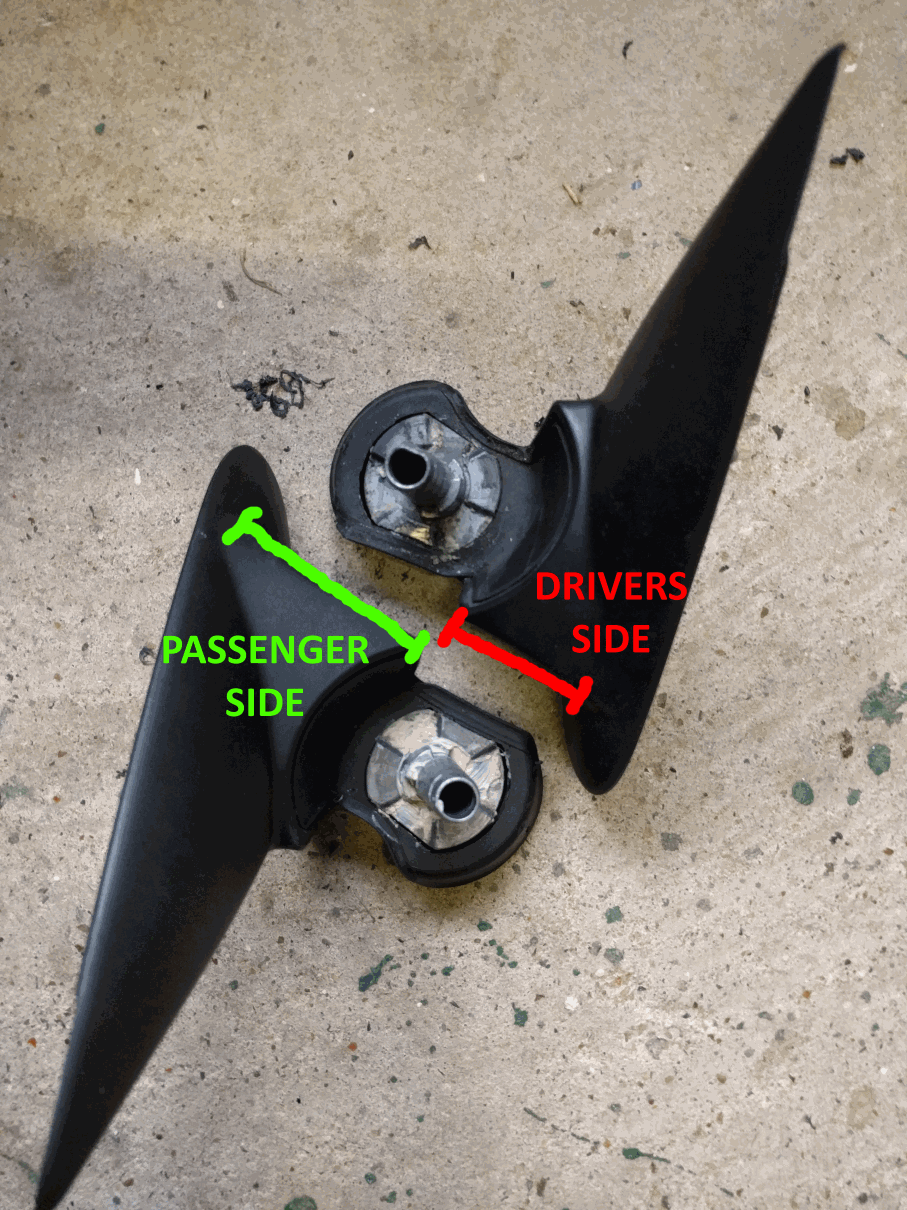
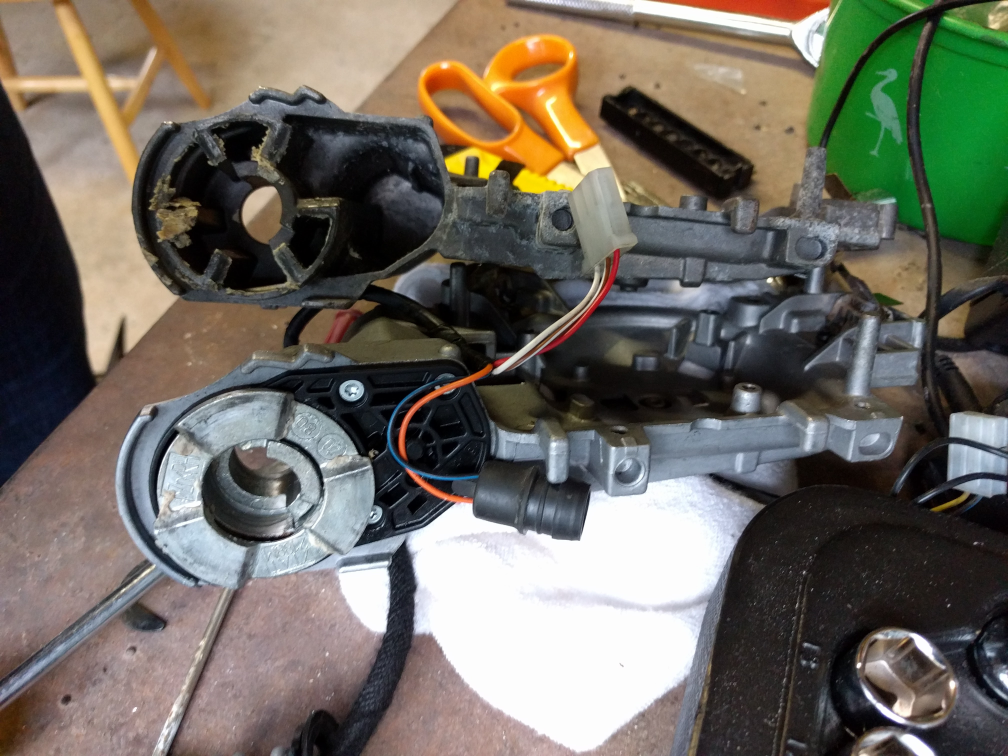
Just completed the above on my MK2 FL Elegnace and wanted to add what I'd learnt. Early FL Elegances came with electric folding as standard but this appears to have changed in around 2010. This means that my MY12 was missing them... It did however have puddle lighting and therefore the correct door modules to support folding mirrors: Address 42: Door Elect, Driver - Part No SW: 1T0 959 701 AA Address 52: Door Elect, Pass. - Part No SW: 1T0 959 702 S If your FL Octavia has the above modules all you need is wing mirrors (with electric motors) and a mirror switch with the folding position. A passenger side mirror came up on eBay with a memory module for reverse dip. Fitting was easy enough: - Remove door card (maybe four screws?) - Remove trim behind the mirror - Disconnect mirror loom and undo one screw to release the mirror from the door - Fit new mirror! - Recode the door module for folding mirrors (if reverse dip is also being fitted, the BCM also needs coding) - Check it works (VCDS output test) - Reassemble the door Sourcing a drivers side mirror was proving much harder and the dealer price is ~£240. Fortunately, Eddie-NL came to the rescue as he had a spare LHD passenger mirror (with motor) which is the same side as a RHD drivers mirror that I needed. This presented it's own problems as the angles are different to accommodate the differing drivers positions in RHD or LHD cars. Stripping both mirrors down and removing the circlips showed a simple solution. The base which attach the mirror to the car set the angle so by swapping the LHD base with the RHD base from my car all was good. I've attached a couple of pictures to show the differences between passenger/drivers bases and motorised/manual folding mechanisms. Just as a word of warning, removing the circlips can be quite a task, even more so on the manual version as the spring fitted is much stronger. With the help of a vice and patience it is possible to get them out and back in again. Fitting the drivers side was pretty much the same as the passengers side with a couple of extra screws. To get it working from the remote I needed to redo the min/max limits for all windows and fold/unfold the mirrors a couple of times with the engine running. The final issue was that the puddle lights did not illuminate when the mirrors were folded (worked normally when unfolded).Turns out this is part of the door mirror EEPROM and can be changed via ODIS-e or VCP (not VCDS). It's a ten minute job to reprogram the two door modules and now I have puddle lights regardless of mirror position. I have no idea what the stock behaviour is so if anyone with factory fitted electric folding mirrors with puddle lights can let me know the stock behaviour that would be great! Bases: Mirror castings: